

How to capture slow queries in SQL Server?
If you come from the MySQL, PostgreSQL or even Oracle world, you may have already asked yourself: how do you capture slow queries in SQL Server?
In MySQL, we have slow_query_log , in PostgreSQL, pg_stat_statements/ slowquery and Oracle AWR/ASH* can help. But what about SQL Server?
We can analyze queries running at the moment using sys.dm_exec_requests, but what if we want to look at the history?
Err.. Then we enable the Query Store!
The Query Store is a good solution. It lets you store and analyze query execution statistics over time. However, depending on the data volume and the granularity you need, it may not be the best option for detailed monitoring.
That is the context in which I researched alternatives and found an efficient solution: using Extended Events (XEvents). If you are also looking for a reliable way to capture slow queries in SQL Server, this article is for you.
References:
- Official Microsoft documentation on Query Store
- The Dirceu Resende blog
📌 Monitoring slow queries with Extended Events
Starting with SQL Server 2012, Extended Events (XEvents) became one of the best ways to capture SQL Server internal events. They work as a lightweight, customizable auditing system, letting you log slow queries, deadlocks, commits and so on..
We can compare them to triggers, but instead of running at the table level, they capture events at the SQL Server instance level.
Step 1: Create the capture event
First of all, we need to create a capture event to log long-running queries. For that, we will use Extended Events, making sure the output files are written to a directory where SQL Server has write permission, in my case.
K:\SLOW_QUERIES
CREATE EVENT SESSION [SLOW_QUERIES] ON SERVER
ADD EVENT sqlserver.sql_batch_completed (
    ACTION (
        sqlserver.session_id,
        sqlserver.client_app_name,
        sqlserver.client_hostname,
        sqlserver.database_name,
        sqlserver.username,
        sqlserver.session_nt_username,
        sqlserver.session_server_principal_name,
        sqlserver.sql_text
    )
    WHERE duration > 5000000  -- AJUSTE O TEMPO CONFORME SUA NECESSIDADE
)
ADD TARGET package0.event_file (
    SET filename = N'K:\SLOW_QUERIES\slow.xel',   -- AQUI TAMBEM, AJUSTE SEU DIRETORIO
        max_file_size = 10,
        max_rollover_files = 10
)
WITH (STARTUP_STATE = ON);
GO

-- Ativa o Extended Event
ALTER EVENT SESSION [SLOW_QUERIES] ON SERVER STATE = START
GO
in this case we will collect everything that takes more than 5 seconds, with 10 files of at most 10MB each, in D:\SLOW_QUERIES\.
Step 2: Create a table to store this data
Now we need a place to store the data collected by XEvents. We create a table that will receive the captured information.
CREATE TABLE dbo.Historico_Query_Lenta (
    [Dt_Evento] DATETIME,
    [session_id] INT,
    [database_name] VARCHAR(128),
    [username] VARCHAR(128),
    [session_server_principal_name] VARCHAR(128),
    [session_nt_username] VARCHAR(128),
    [client_hostname] VARCHAR(128),
    [client_app_name] VARCHAR(128),
    [duration] DECIMAL(18, 2),
    [cpu_time] DECIMAL(18, 2),
    [logical_reads] BIGINT,
    [physical_reads] BIGINT,
    [writes] BIGINT,
    [row_count] BIGINT,
    [sql_text] XML,
    [batch_text] XML,
    [result] VARCHAR(100)
) WITH(DATA_COMPRESSION=PAGE)
GO
Step 3: Create a procedure to capture the data
The next step is to create a Stored Procedure to extract the data from Extended Events and store it in the table created in Step 2. Create a database of your choice, I recommend always keeping an administrative database for this kind of action.
CREATE PROCEDURE dbo.stpCarga_Query_Lenta
AS
BEGIN


    DECLARE
        @TimeZone INT = DATEDIFF(HOUR, GETUTCDATE(), GETDATE()),
        @Dt_Ultimo_Registro DATETIME = ISNULL((SELECT MAX(Dt_Evento) FROM dbo.Historico_Query_Lenta), '1900-01-01')


    IF (OBJECT_ID('tempdb..#Eventos') IS NOT NULL) DROP TABLE #Eventos
    ;WITH CTE AS (
        SELECT CONVERT(XML, event_data) AS event_data
        FROM sys.fn_xe_file_target_read_file(N'K:\SLOW_QUERIES\slow*.xel', NULL, NULL, NULL)
    )
    SELECT
        DATEADD(HOUR, @TimeZone, CTE.event_data.value('(//event/@timestamp)[1]', 'datetime')) AS Dt_Evento,
        CTE.event_data
    INTO
        #Eventos
    FROM
        CTE
    WHERE
        DATEADD(HOUR, @TimeZone, CTE.event_data.value('(//event/@timestamp)[1]', 'datetime')) > @Dt_Ultimo_Registro


    INSERT INTO dbo.Historico_Query_Lenta
    SELECT
        A.Dt_Evento,
        xed.event_data.value('(action[@name="session_id"]/value)[1]', 'int') AS session_id,
        xed.event_data.value('(action[@name="database_name"]/value)[1]', 'varchar(128)') AS [database_name],
        xed.event_data.value('(action[@name="username"]/value)[1]', 'varchar(128)') AS username,
        xed.event_data.value('(action[@name="session_server_principal_name"]/value)[1]', 'varchar(128)') AS session_server_principal_name,
        xed.event_data.value('(action[@name="session_nt_username"]/value)[1]', 'varchar(128)') AS [session_nt_username],
        xed.event_data.value('(action[@name="client_hostname"]/value)[1]', 'varchar(128)') AS [client_hostname],
        xed.event_data.value('(action[@name="client_app_name"]/value)[1]', 'varchar(128)') AS [client_app_name],
        CAST(xed.event_data.value('(//data[@name="duration"]/value)[1]', 'bigint') / 1000000.0 AS NUMERIC(18, 2)) AS duration,
        CAST(xed.event_data.value('(//data[@name="cpu_time"]/value)[1]', 'bigint') / 1000000.0 AS NUMERIC(18, 2)) AS cpu_time,
        xed.event_data.value('(//data[@name="logical_reads"]/value)[1]', 'bigint') AS logical_reads,
        xed.event_data.value('(//data[@name="physical_reads"]/value)[1]', 'bigint') AS physical_reads,
        xed.event_data.value('(//data[@name="writes"]/value)[1]', 'bigint') AS writes,
        xed.event_data.value('(//data[@name="row_count"]/value)[1]', 'bigint') AS row_count,
        TRY_CAST(xed.event_data.value('(//action[@name="sql_text"]/value)[1]', 'varchar(max)') AS XML) AS sql_text,
        TRY_CAST(xed.event_data.value('(//data[@name="batch_text"]/value)[1]', 'varchar(max)') AS XML) AS batch_text,
        xed.event_data.value('(//data[@name="result"]/text)[1]', 'varchar(100)') AS result
    FROM
        #Eventos A
        CROSS APPLY A.event_data.nodes('//event') AS xed (event_data)


END
Step 4: Create a job for frequent collection.
To ensure slow queries are collected continuously, we can set up a SQL Server Agent Job to run the stored procedure periodically.
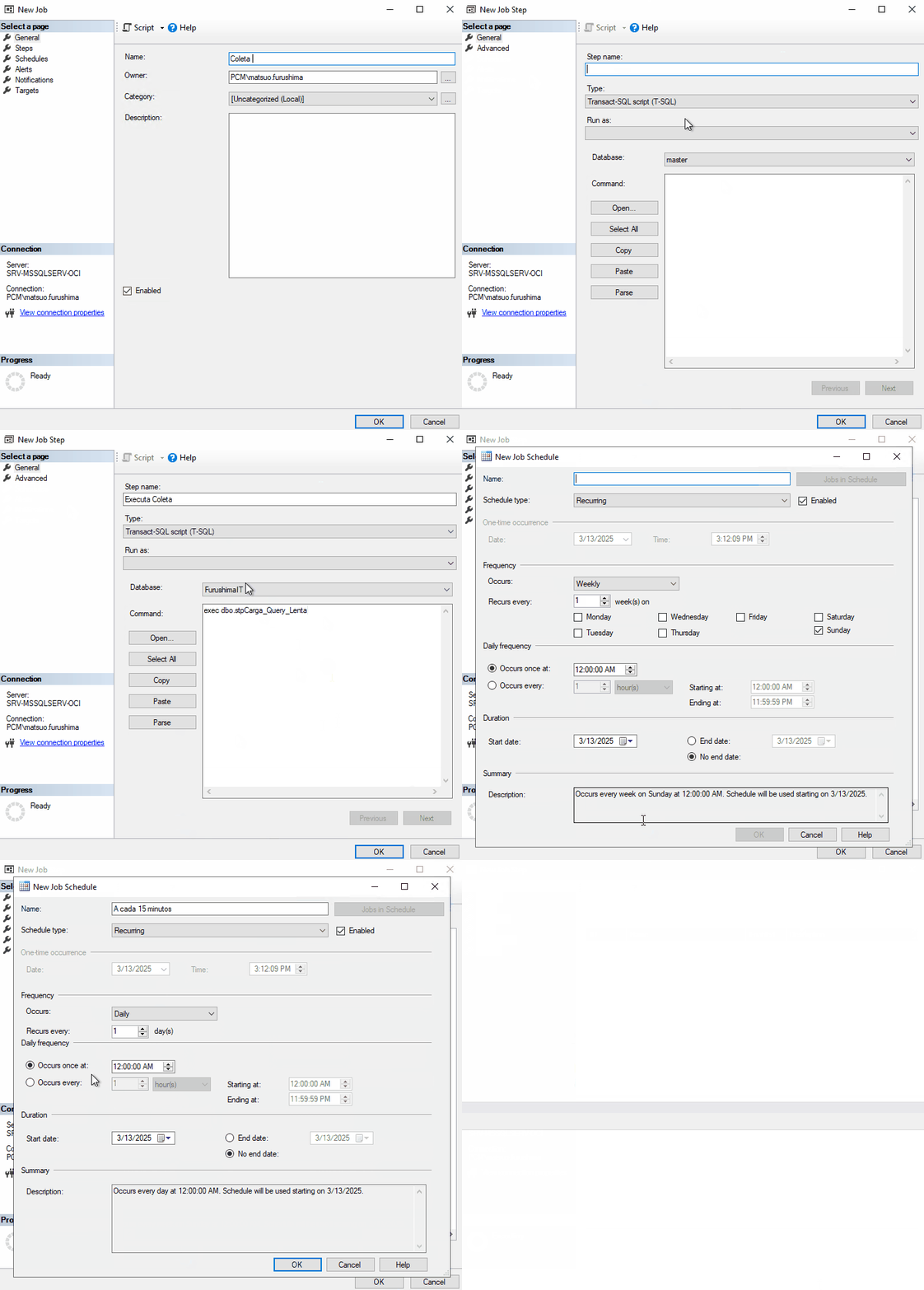
Then we can query our Historico_Query_Lenta table, where our data will be.