

How does Oracle store data?
The Oracle Database storage structure is designed to be highly efficient and flexible, allowing large volumes of data to be stored and managed in an organized, secure way.
Storage structure overview
Oracle organizes data in several hierarchical layers, ensuring scalability and optimization. The main Oracle storage structures are:
- Database
- Tablespace
- Segment
- Extent
- Oracle Data Block
Each of these levels plays an important role in how data is organized and stored.
Database
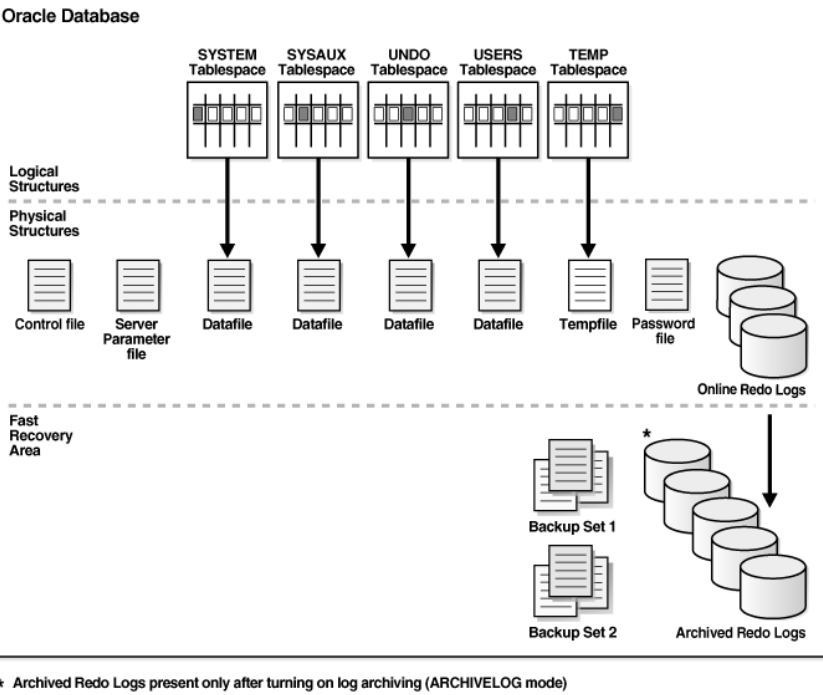
At the top of the hierarchy sits the Database. An Oracle database is made up of several data files that store user information and the metadata the system needs to operate. It is the main container that encompasses every other storage component.
An Oracle Database consists of three main file types:
- Datafiles: Store the actual data.
- Redo Log Files: Keep a history of changes made to the database, used for recovery after a failure.
- Control Files: Contain structural information about the database, such as the location of the datafiles and redo logs.
Tablespace
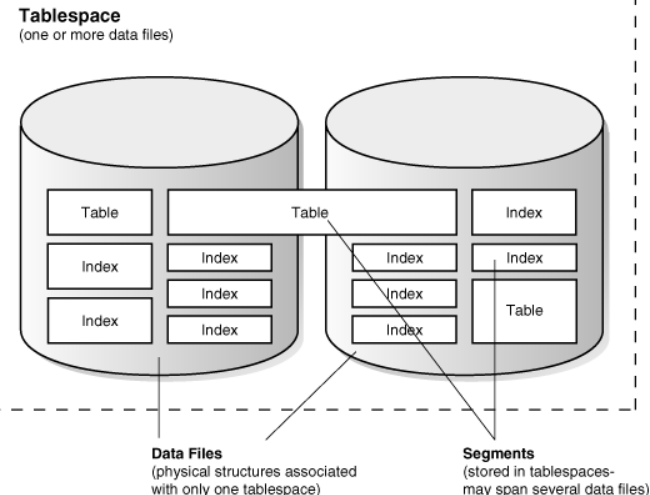
The Tablespace is the next level in the hierarchy and acts as a logical container for organizing data inside the database. It groups multiple datafiles, the physical files in the operating system where the actual data is stored. A database can have several tablespaces, each specialized in storing different types of data objects.
Tablespaces can be divided into two main types:
- Permanent Tablespaces: Store persistent data, such as tables and indexes.
- Temporary Tablespaces: Used for temporary operations, such as sorts or data joins during queries.
Common tablespace examples include:
- SYSTEM: Where the data dictionary (the database metadata) lives.
- SYSAUX: An auxiliary tablespace that stores non-critical components, such as AWR.
- USERS: A typical tablespace for storing user data.
Segment
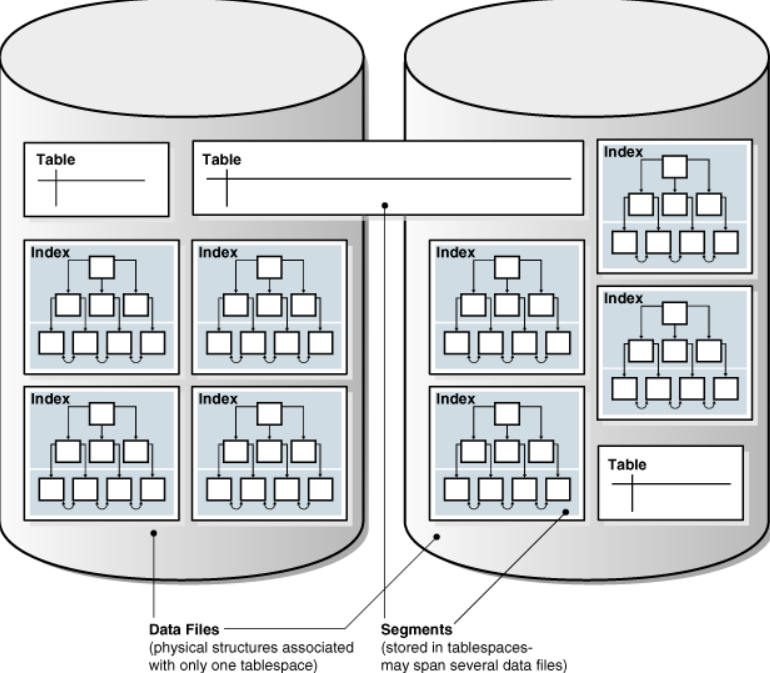
Inside each tablespace we find the segments. A segment is a logical space allocated to store a specific type of database object, such as a table, index, materialized view, rollback segment, and so on.
Each segment type plays a specific role:
- Data Segments: Store the actual table data.
- Index Segments: Hold table indexes to improve lookup performance.
- Temporary Segments: Used for temporary operations, such as running large queries.
- Undo Segments: Used to track transactions, ensuring data consistency and making rollback possible.
Segments are made up of space units called extents.
Extent
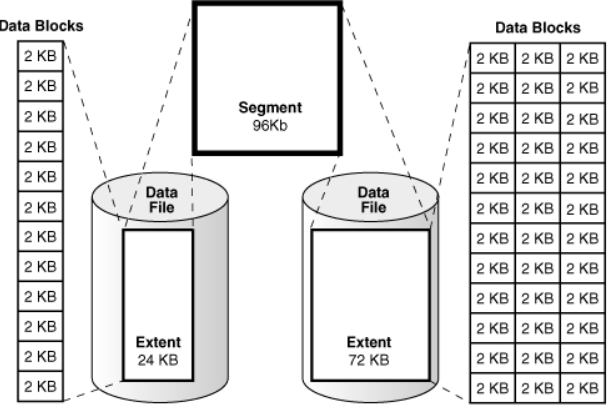
An extent is a contiguous unit of space within a segment, where data is physically stored in the datafiles. A segment consists of one or more extents, allocated as needed to accommodate the growth of the database object (such as a table that keeps increasing in size).
When a segment needs more space, Oracle allocates a new extent for it. Extents ensure data is stored in contiguous blocks, which improves read/write efficiency.
Oracle Data Block
The lowest level of the storage hierarchy is the Oracle Data Block, also called a database block or data block. Data blocks are the smallest unit of storage in Oracle Database. Each extent is made up of multiple data blocks.
Data blocks store the actual data, such as the rows of a table. They are the interface between the database and the underlying file system. The size of data blocks is configurable and can vary (typically 4KB, 8KB, 16KB or 32KB), depending on the needs of the environment.
Data blocks hold several pieces of information beyond user data, such as headers that record important metadata like the block address and transaction information.
Components of an Oracle Data Block
A data block has several substructures:
- Block Header: Contains metadata about the block, such as the block address, identifiers of active transactions and formatting status.
- Table Directory: Keeps information about the tables whose data is stored in this block (important when a block holds data from more than one table).
- Row Directory: A list of pointers to the actual rows stored in the block.
- Row Data: The actual data from the table’s columns.
- Free Space: Unused space in the block that can be used for future inserts or row growth.
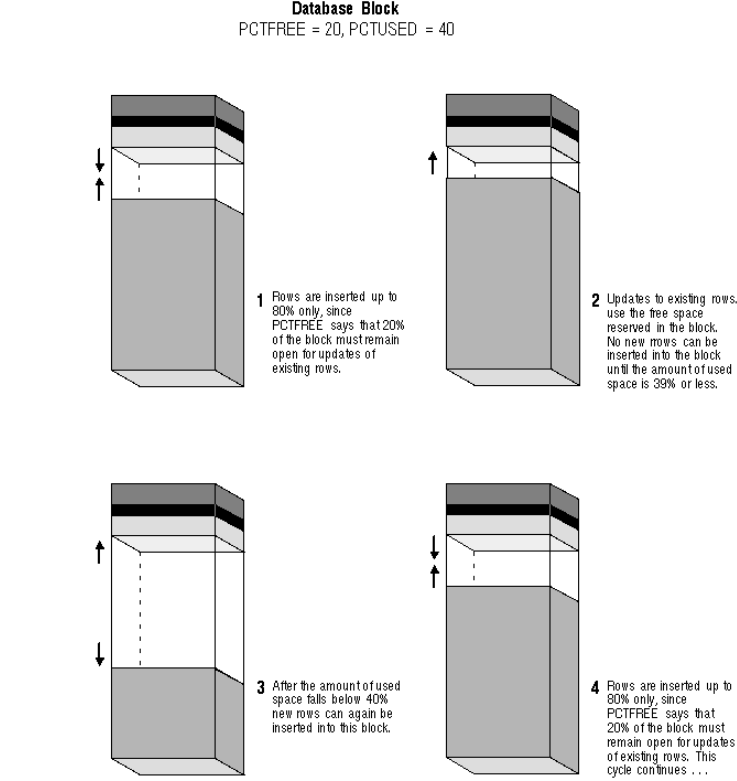
- Space Management: Oracle uses sophisticated methods to manage space inside blocks, such as PCTFREE (the percentage of space reserved for future updates) and PCTUSED (the occupancy percentage after which new data can be inserted into the block).
Tables and indexes in the Oracle Data Block
Data blocks can store table and index data. When working with tables:
- The table’s rows are stored inside the data blocks.
- During an update, if the row grows and no longer fits in its original block, row migration or row chaining can occur, where the row is moved to another block, which can hurt performance.
For indexes, data blocks are used to store the B-tree structures that organize data and speed up lookups.
In Oracle Database, the storage settings of a table, defined by the STORAGE clause, determine how disk space is allocated and managed for that table. These parameters are essential to optimize space usage, control segment growth and reduce fragmentation. They influence aspects such as extent size, the space reserved for future updates and how often new extents are allocated. Let’s explore these parameters using the example table “empregados”:
CREATE TABLE empregados (
    empregado_id NUMBER PRIMARY KEY,
    nome VARCHAR2(100),
    cargo VARCHAR2(50),
    salario NUMBER(10, 2),
    data_admissao DATE DEFAULT SYSDATE,
    departamento_id NUMBER,
    CONSTRAINT fk_departamento
    FOREIGN KEY (departamento_id) REFERENCES departamentos(departamento_id)
) TABLESPACE meu_tablespace
STORAGE (
    INITIAL 64K
    NEXT 128K
    PCTINCREASE 0
)
PCTFREE 10
PCTUSED 40;
Storage parameters (STORAGE clause)
1. INITIAL
- Description: Sets the size of the first extent allocated to the table’s segment. An extent is a contiguous unit of disk space allocated to store data.
- Example: "INITIAL 64K" means the first extent will be 64 kilobytes. This determines the initial space reserved for the table when it is created, influencing its initial storage capacity.
2. NEXT
- Description: Specifies the size of the subsequent extents allocated after the first one. As the table grows and the first extent fills up, a new extent is allocated with the size defined here.
- Example: "NEXT 128K" indicates that each new extent allocated after the first will be 128 kilobytes. This value helps control table growth over time, ensuring efficient space allocation.
3. PCTINCREASE
- Description: Sets the percentage by which each new extent grows relative to the previous one. This controls the progressive growth of extents.
- Example: "PCTINCREASE 0" indicates that all subsequent extents will keep the size defined in "NEXT", that is, 128K. If a non-zero value were configured, each new extent would be larger than the previous one, growing by the specified percentage. For example, if "PCTINCREASE" were 50, the next extent after 128K would be 192K (50% larger).
Other table parameters
1. PCTFREE
- Description: Determines the percentage of space in each data block reserved for future updates to existing rows. This ensures that when a row’s values change, the block has enough room to store the new data without moving it to a different block.
- Example: "PCTFREE 10" reserves 10% of each data block for future updates. If a row is updated and its new data exceeds the space previously allocated to it, the reserved 10% is used to avoid migrating rows to other blocks, which could hurt performance.
2. PCTUSED
- Description: Sets the minimum occupancy percentage of a data block before it is reused for new data inserts. After rows are deleted or moved, if the block’s usage falls below this threshold, the block is reused for new inserts.
- Example: "PCTUSED 40" indicates that when block occupancy drops below 40%, the block is marked as available for new data inserts. This parameter helps prevent fragmentation and improves the reuse of partially filled blocks.
How these parameters work together
- Initial allocation and extent growth:
- When the table is created, Oracle allocates an initial extent of 64K, as defined in "INITIAL". As data is inserted and the initial extent fills up, Oracle allocates new 128K extents, as specified in "NEXT". Since "PCTINCREASE" is set to 0, all subsequent extents will keep the same 128K size. This keeps table growth linear and predictable.
- Free space management in data blocks:
- The "PCTFREE 10" parameter guarantees that 10% of each data block is reserved for data updates. This matters because it keeps frequent row updates from pushing data into new blocks, which would reduce read efficiency. The reserved space lets rows grow within the same block.
- The "PCTUSED 40" parameter ensures that partially used blocks are reused for new inserts once their occupancy drops below 40%. This helps avoid wasting space in blocks that are not completely full and reduces the need to allocate new blocks, optimizing space usage.
Benefits of configuring storage parameters correctly
With storage parameters configured correctly, you can optimize space usage and improve table performance. These parameters allow the DBA to:
- Control segment growth: By specifying appropriate extent sizes and defining clear policies for subsequent allocation, table growth is managed efficiently, avoiding excessive fragmentation.
- Manage updates and inserts: Parameters like "PCTFREE" and "PCTUSED" ensure data blocks are used intelligently, reserving space for updates and reusing blocks that fell below the minimum occupancy.
- Prevent fragmentation: Controlling extent allocation and reusing partially occupied blocks helps minimize fragmentation, which improves read and write performance in the database.
When well configured, these parameters are powerful tools for optimizing table storage and performance in Oracle Database, ensuring efficient use of hardware resources and sustaining performance as the table grows and gets updated over time.