
Every new Protheus release brings the same question to the table: how many hours of operation are we going to sacrifice this time? While the migration tool runs, billing, shipping, finance and closing all wait. In an operation that runs 24 hours a day, that math simply does not work.
This article documents, with the numbers and diagrams from the project’s final report, how we executed a zero downtime migration in a large TOTVS Protheus environment: an 11 TB Oracle database on a two-node RAC, two companies in the same environment, each with its own data dictionary, and a jump of several releases at once. The simulation of the conventional cutover measured 20 hours and 38 minutes of unavailability. With the zero downtime architecture, the outage at cutover dropped to about 30 minutes.
Why the conventional cutover hurts
In the traditional method, the recipe is well known: the system stops, the migration tool runs on the production database itself, and the environment only comes back when everything is done. On small databases, it works. On multi-terabyte databases, it does not: the migration alters, recreates and drops structures across the entire database, sequentially and without taking advantage of parallelism. The time grows along with the data.
Before proposing zero downtime, we ran two simulations of the conventional cutover in this environment to measure the process end to end: 2 hours of backup, 8 hours of duplicate handling, 9 hours and 39 minutes of release migration, and almost 1 hour of final adjustments. Total: 20 hours and 38 minutes with the system down.
And there is the risk the stopwatch does not show: if something fails at hour 15, the way back is a restore. With the business stopped, waiting.
The idea behind zero downtime
The methodology inverts the order of things: instead of stopping the operation to migrate the database, we create a second production, already migrated to the new release, and keep it synchronized in real time with the current production. All the heavy lifting happens while the system is up. The cutover stops being an event and becomes a detail: switching the pointer.
- Start capturing transactions on the production database.
- Full production backup via RMAN, with the SCN recorded.
- Restore of that backup, creating the new database.
- Protheus release migration executed on the new database.
- Reconciliation of structures and data between the versions, with in-house tools and RUP handling.
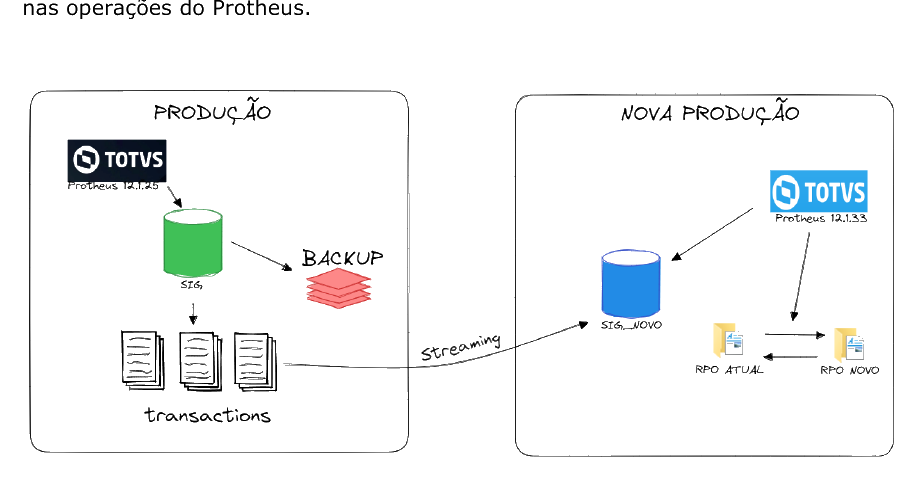
- Continuous data streaming between the two databases until cutover day.
- Cutover: Protheus starts pointing to the new database. That is all.
Inside the architecture
CDC replication, driven by the SCN
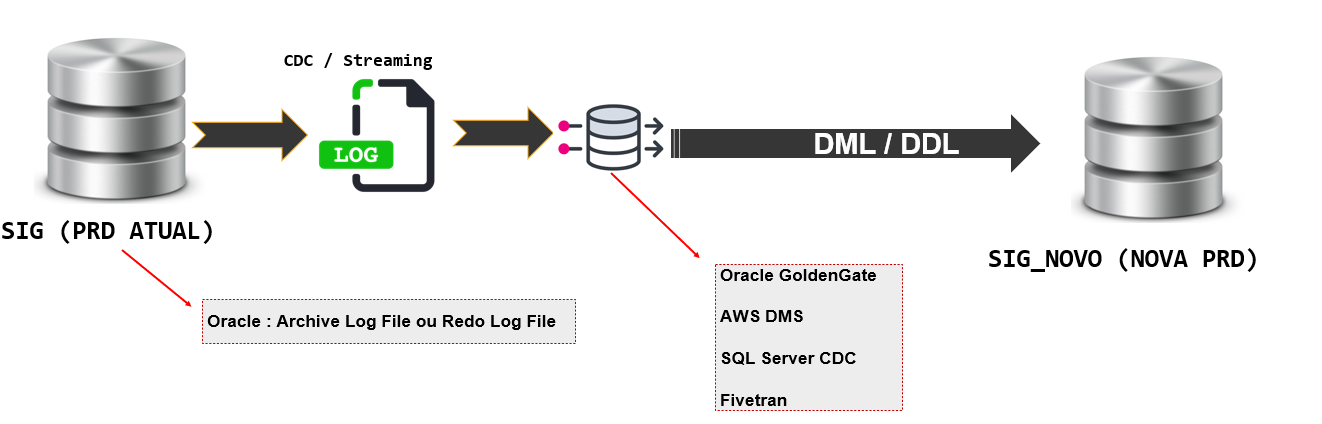
The heart of the solution is CDC (Change Data Capture) replication: every transaction committed on the current database is captured from the archive log or the redo log and reapplied on the new database as DML and DDL, in the exact order it happened, driven by Oracle’s SCN (System Change Number). The mappings and conversions between the versions are applied automatically during this replication.
The streaming tool can vary: Oracle GoldenGate, AWS DMS, SQL Server CDC or Fivetran. The non-negotiable requirement is reading the changes based on the SCN and reproducing them synchronously and sequentially. On the database side, preparation includes supplemental logging, replication parameters, redo log and archive configuration, and a dedicated area for trail files.
Two productions side by side
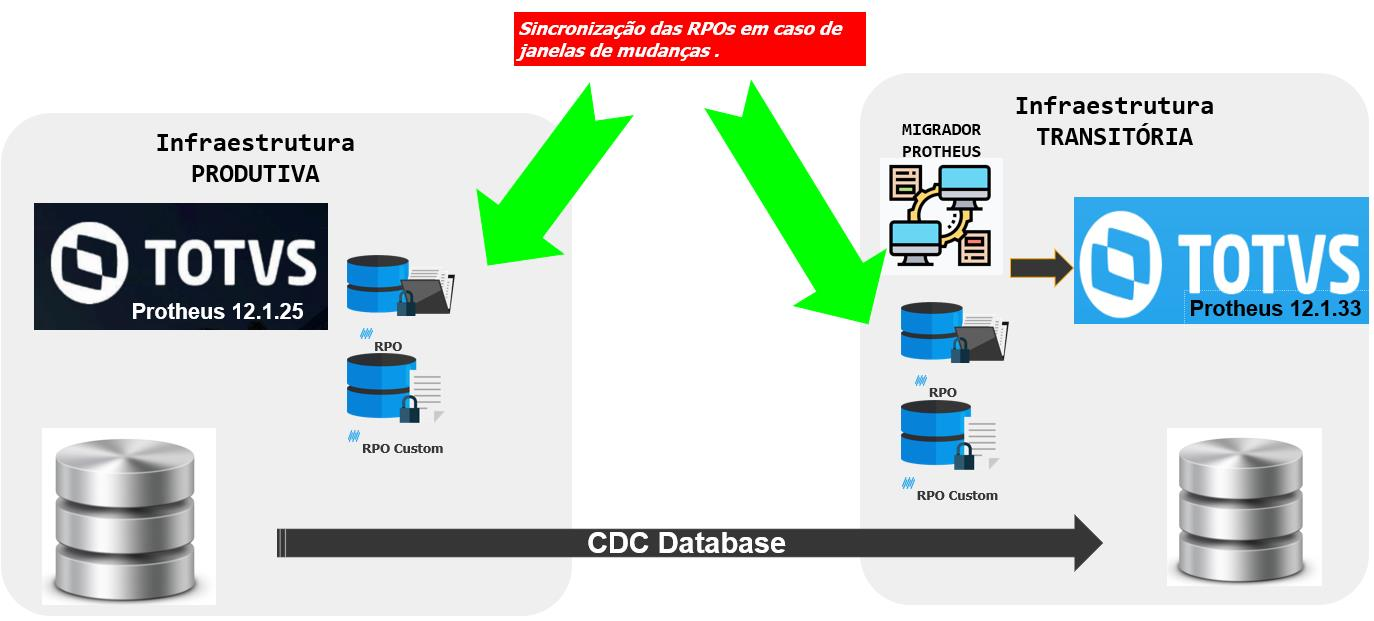
On the ERP side, we build a transitional infrastructure that mirrors production: standard RPO and custom RPO synchronized between the environments, the Protheus migration tool and the database replicated via CDC. If a change window alters production in the middle of the project, the RPOs are synchronized again. Nothing drifts apart for long.
The process, step by step
1. Backup, SCN and the birth of the new database
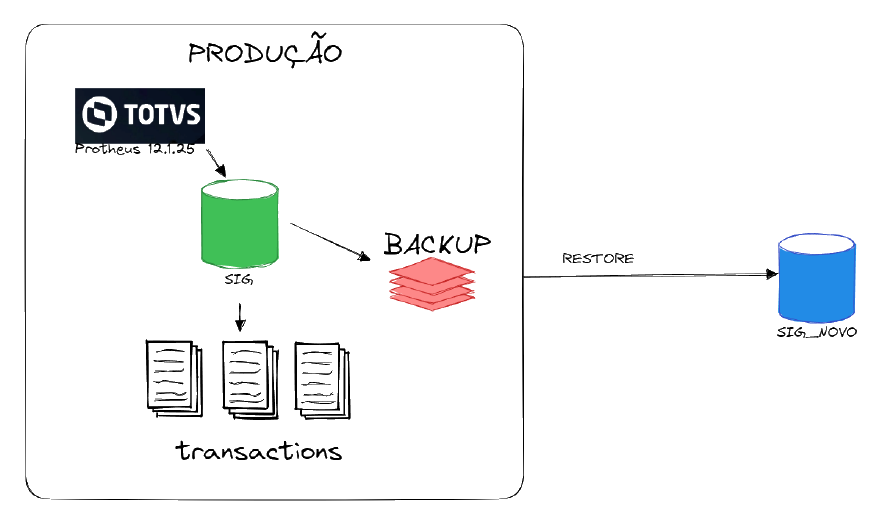
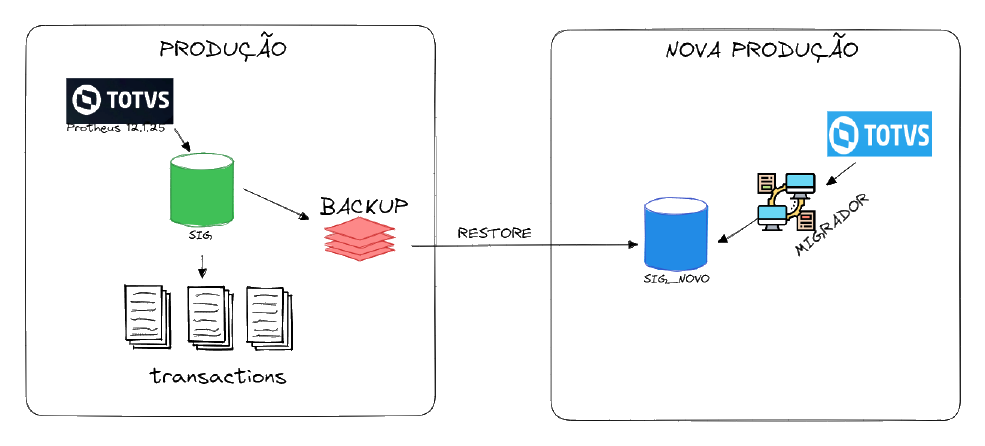
Everything starts with a full production backup via RMAN and one number written down: the SCN of that instant. It is the exact boundary between what the backup carries and what the replication will reapply later. That is what guarantees no transaction gets lost along the way: whatever happened after the backup reaches the new database through streaming, in the right order.
2. The migration tool runs on the new database, production stays up
With the database restored, the entire Protheus release migration runs there: UPDDISTR, UPDBATCH, binary updates and DBAccess. The 9 hours and 39 minutes of migration, which in the conventional cutover would be pure downtime, become backstage work. Users keep working on the current database, without interruption.
3. Reconciling the versions: dictionary, rules and RUP
Two different releases mean different structures. We use in-house tools to map the discrepancies between the two versions’ dictionaries and turn them into replication rules: default values for new fields, handling of columns with different sizes, conditional rules for modified or merged fields. The dictionary tables (the SX and XX families) are deliberately left out of the replica: the migration tool takes care of them.
There is also the chapter TOTVS considers crucial in migrations with data streaming: the RUP, which covers structures that did not change between the versions but whose data did. The same mapping identifies these cases and applies the rules so replication stays consistent across the releases.
4. Continuous replication until cutover day
From then on, the two productions live in parallel: real-time replication keeps the databases identical, and cutover preparation happens days or weeks in advance. Dbaccess, appservers, APO, TSS and the license server of the future environment are already configured in mirrored folders, identical to those of the current production except for one character in the name. On cutover day, the paths and configurations are already the final ones.
Cutover day and plan B
The cutover happened in the early hours, in a window between 1:30 AM and 3:30 AM: final database synchronization, DNS change, sequence adjustments and indexing. The database migration itself came down to a pointer switch, done via DNS and TNS. And plan B was just as simple: if anything goes wrong, the pointer goes back to the previous environment, which remains intact. Reverting the migration costs minutes, not an hours-long restore.
The numbers, side by side
| Step | Conventional cutover | Zero downtime |
|---|---|---|
| Full backup | 2h00 with the system down | days earlier, with the system up |
| Duplicate handling | 8h00 | before cutover, no outage |
| Release migration (UPDDISTR) | 9h39 | before cutover, on the new database |
| Final adjustments (UPDBATCH) | 0h59 | before cutover |
| Pointer switch | included in the window | about 30 minutes |
| Total unavailability | 20h38 | 0h30 |
From 20 hours and 38 minutes to 30 minutes: 97.68% less unavailability at cutover.
When zero downtime is worth it
Being honest with both sides: the conventional cutover is simpler and self-guided, and it remains a reasonable choice for small databases with a comfortable outage window and tolerance for unavailability. Zero downtime demands more planning time and advanced knowledge of replication, dictionary and infrastructure to build and manage the process.
In return, it delivers what the traditional method cannot: the system available throughout the entire process, tests and validations with real data before the cutover, trivial rollback and much more safety for the data. For 24×7 operations, databases that never stop growing and big release jumps, the migration time of the conventional method grows along with the database. The zero downtime one does not.
What the tests taught us
No migration this size comes out perfect on the first try, and that is exactly why the methodology includes simulations and acceptance testing before day 0. It was in the tests that we found duplicates in the data dictionary (tables SX3010 and SX3020), out-of-order sequences causing uniqueness violations, fixed by equalizing the triggers, and custom triggers invalidated by the structure changes. All mapped, fixed and validated before production. In the real cutover, none of it showed up.
Since that first execution, the process has become routine in this environment: with every release cycle, the new production is born next to the current one and the operation does not stop. The summary of this story, with the most recent result, is on our case studies page.
Frequently asked questions
O que é uma migração de Protheus com zero downtime?
É a metodologia que cria uma segunda produção, já migrada para a release nova e sincronizada em tempo real com a atual por CDC. Todo o trabalho pesado acontece com o sistema no ar e a virada se resume a mudar o apontamento do Protheus para a base nova.
Quanto tempo o sistema fica indisponível na virada?
Neste projeto, cerca de 30 minutos de mudança de apontamento, em uma janela de madrugada, contra 20 horas e 38 minutos medidos na simulação da virada convencional: 97,68% menos indisponibilidade.
E se algo der errado depois da virada?
O rollback é voltar o apontamento para o ambiente anterior, que permanece intacto e sincronizado. A reversão custa minutos, sem restore e sem perda de dados.
A metodologia funciona com qualquer banco e ferramenta de replicação?
O requisito é uma replicação por CDC capaz de ler as mudanças na ordem das transações, como Oracle GoldenGate, AWS DMS, SQL Server CDC ou Fivetran. Cobrimos os dois mundos do Protheus, Oracle e SQL Server, e adaptamos a ferramenta ao ambiente do cliente.
Want to move up a release without stopping your operation? Get to know the Protheus upgrade with zero downtime within our Protheus consulting and 24×7 managed support practice, which also takes care of the database behind the ERP. Or talk to a specialist directly: you describe the scenario and leave the conversation with an honest path forward.