


Everyone is talking about AI agents, MCP, hooking a chat up to the database. I tested that myself two weeks ago (it is here) and it worked, but it needed a server in the middle, a client, a lot of moving parts. Meanwhile Oracle did it differently: it put the AI inside the database. On 26ai you write SELECT AI and the question in plain language, and Oracle itself builds the prompt, sends it to the model, receives the SQL, validates it and runs it. It is the genie in the lamp: rub it, ask, and the SQL appears. The question is what it understands, and what it does when it does not.
This is called Select AI. It used to be exclusive to Autonomous Database, and since January 2026 it runs on 26ai on-premises, which changed everything: now you can have it in the company’s database, on the company’s server, without Autonomous. As the example I used a development Protheus, because it is the ERP I most often see running on Oracle and because its data model is the perfect test: six-letter column names, dates stored as text, logical deletion. If the AI understands that, it understands any database.
I will show what it took to install, the four errors that showed up before the first answer (none of them appears in the documentation the way it shows up), what the database sends out, and where the AI got it right and wrong. Spoiler: it gets right whatever is written somewhere on the internet, and gets wrong precisely what only your finance team knows. And that can be fixed, inside the database itself.
What Select AI is, in two lines
It is a PL/SQL package, DBMS_CLOUD_AI, and a new reserved word. The syntax is SELECT AI action question. The actions I used: showsql only shows the generated SQL, runsql generates and runs it (the default, you can omit it), narrate runs it and asks the model to tell the result as text, explainsql explains the SQL, and showprompt shows what the database sent to the model. That last one was the most useful in the test.
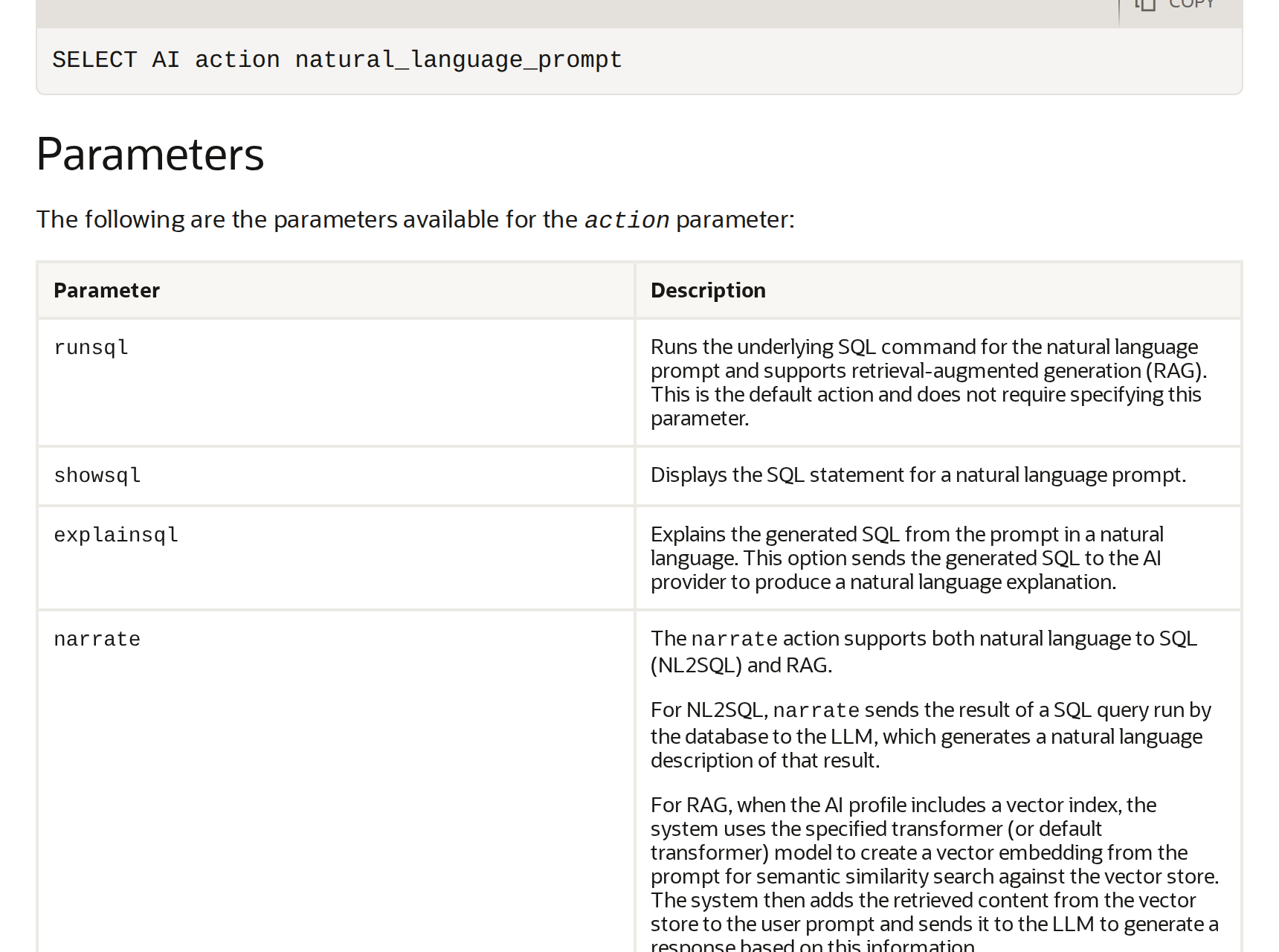
Oracle itself warns, in the same manual, what everyone who uses AI already knows but forgets the moment they trust a number:
LLMs are subject to hallucinations and results are not always correct.
Oracle AI Database Select AI User’s Guide, Use AI Keyword to Enter Prompts, Usage Notes
Does it work outside Autonomous?
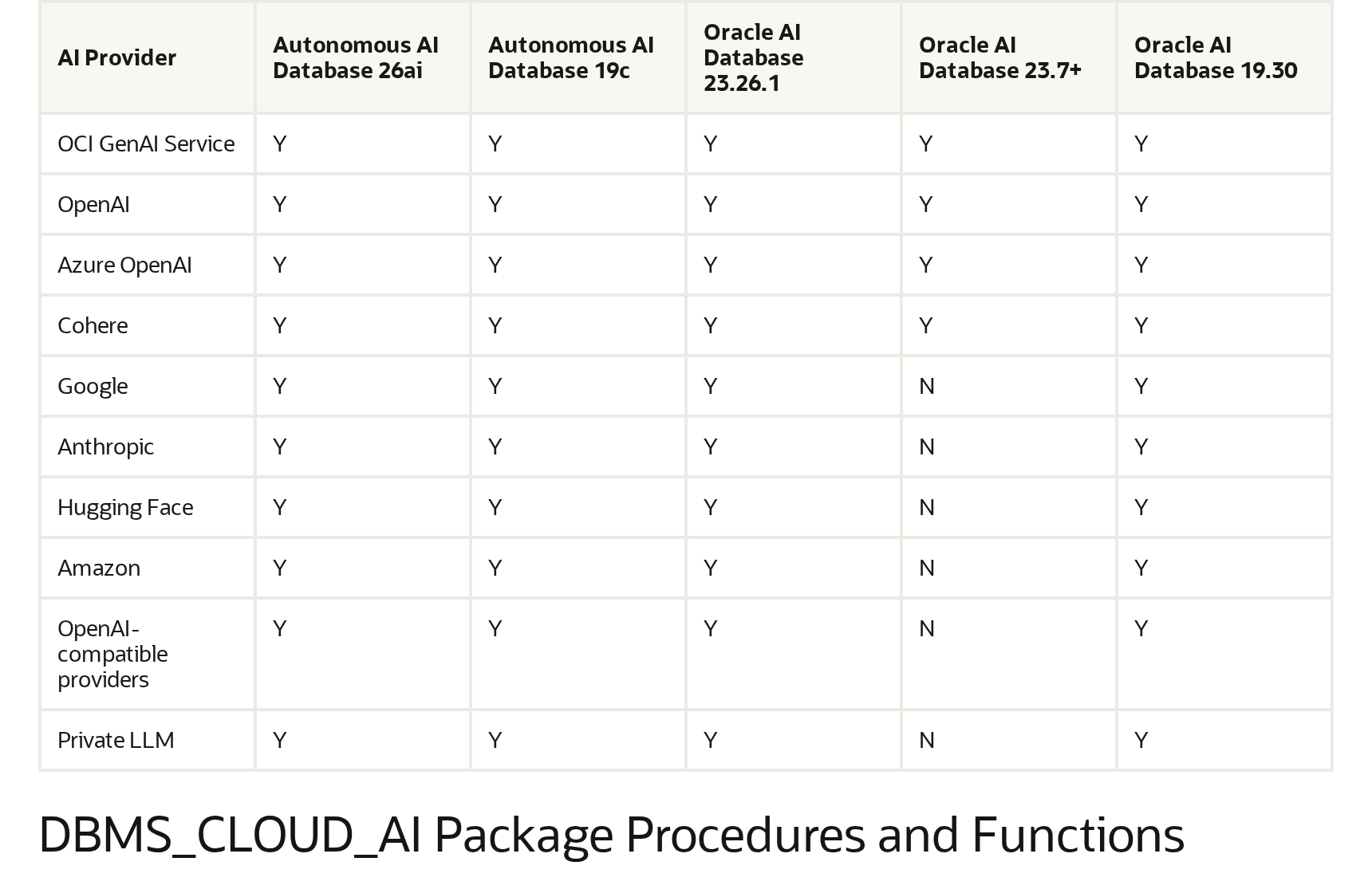
It does, and that is new. Up to 23.7, Select AI was an Autonomous Database thing. Oracle published a capability matrix (Select AI Capability Matrix, document G50041) with a column “Oracle AI Database 23.26.1”, which is the on-premises 26ai released in January 2026. In that column, NL2SQL is Y, and the provider list has OpenAI, Anthropic, Google, Cohere, Azure, OCI Generative AI, Hugging Face, Amazon, OpenAI API-compatible providers and “Private LLM”.
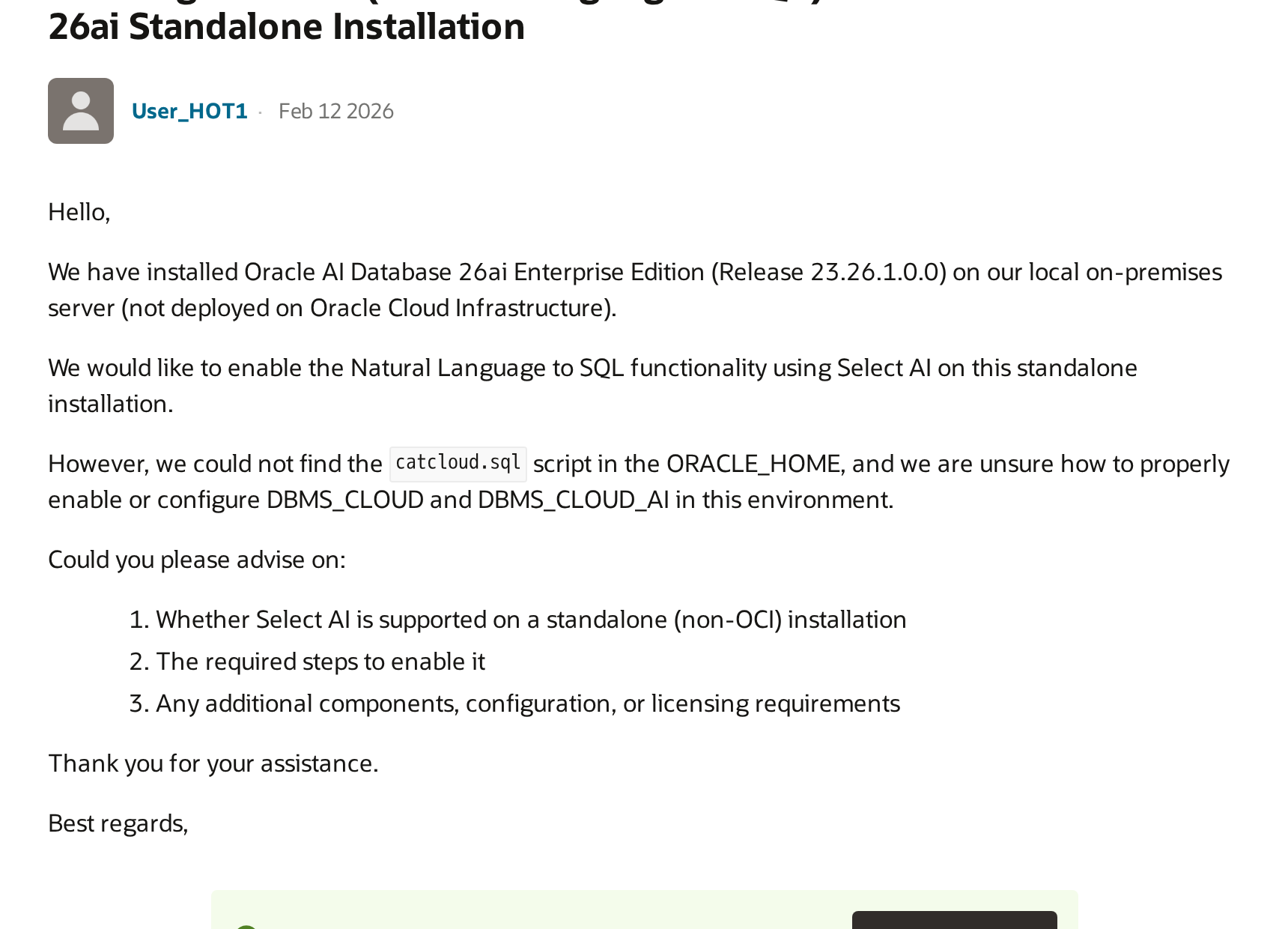
The catch is that the whole Select AI documentation was written with Autonomous in mind, where DBMS_CLOUD comes preinstalled and the network is already configured. On-premises, none of that comes ready. There is even a question on the Oracle forum, from February, by someone with 26ai Enterprise installed looking for the installation script. That is exactly the hole I fell into.
Installing on 26ai Free (the lite image will not do)
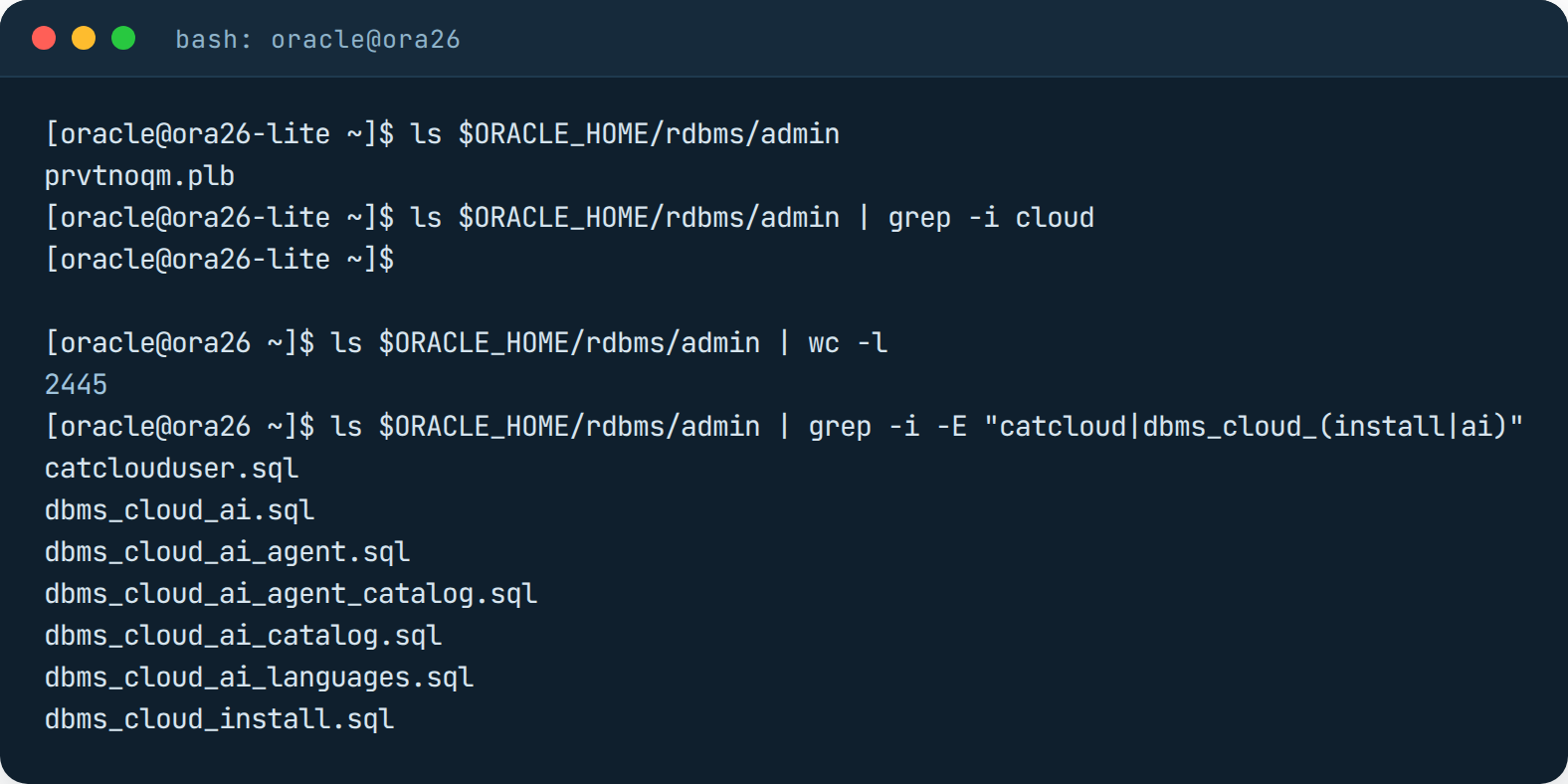
I used 26ai Free in a container, version 23.26.3, on an ARM machine. First gotcha: the free:latest-lite image, the one everyone uses because it is 1.6 GB, ships with an almost empty rdbms/admin folder. One file. The full image has 2,445, and among them the three that matter: catclouduser.sql, dbms_cloud_install.sql and dbms_cloud_ai.sql.
The installation itself is two commands with catcon.pl, the first creates the C##CLOUD$SERVICE user and the second installs the packages. It is the same procedure as 23.7 onwards, no secret:
$ORACLE_HOME/perl/bin/perl $ORACLE_HOME/rdbms/admin/catcon.pl \
  -u sys/senha --force_pdb_mode 'READ WRITE' \
  -b dbms_cloud_user -d $ORACLE_HOME/rdbms/admin/ -l /tmp catclouduser.sql

$ORACLE_HOME/perl/bin/perl $ORACLE_HOME/rdbms/admin/catcon.pl \
  -u sys/senha --force_pdb_mode 'READ WRITE' \
  -b dbms_cloud_install -d $ORACLE_HOME/rdbms/admin/ -l /tmp dbms_cloud_install.sql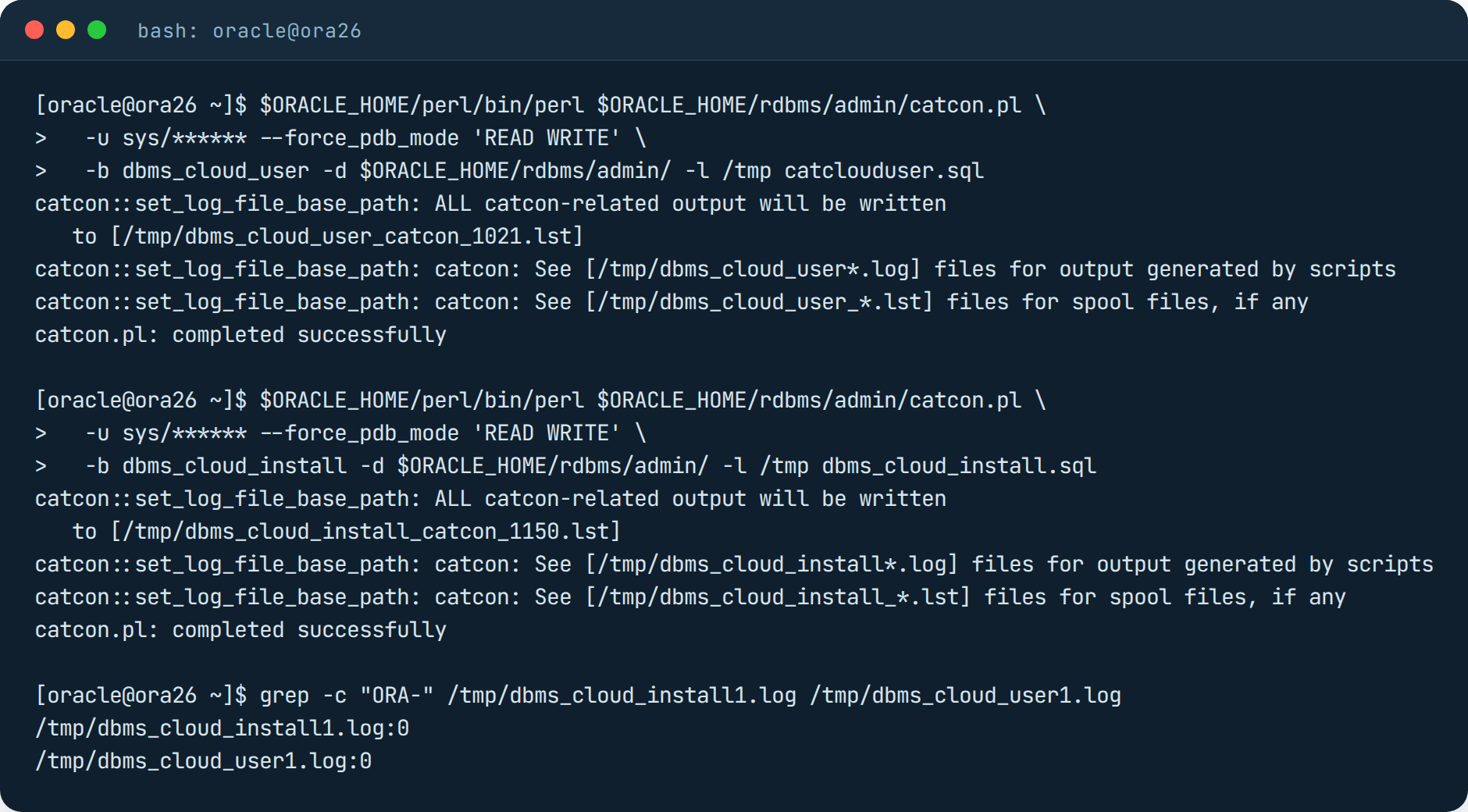
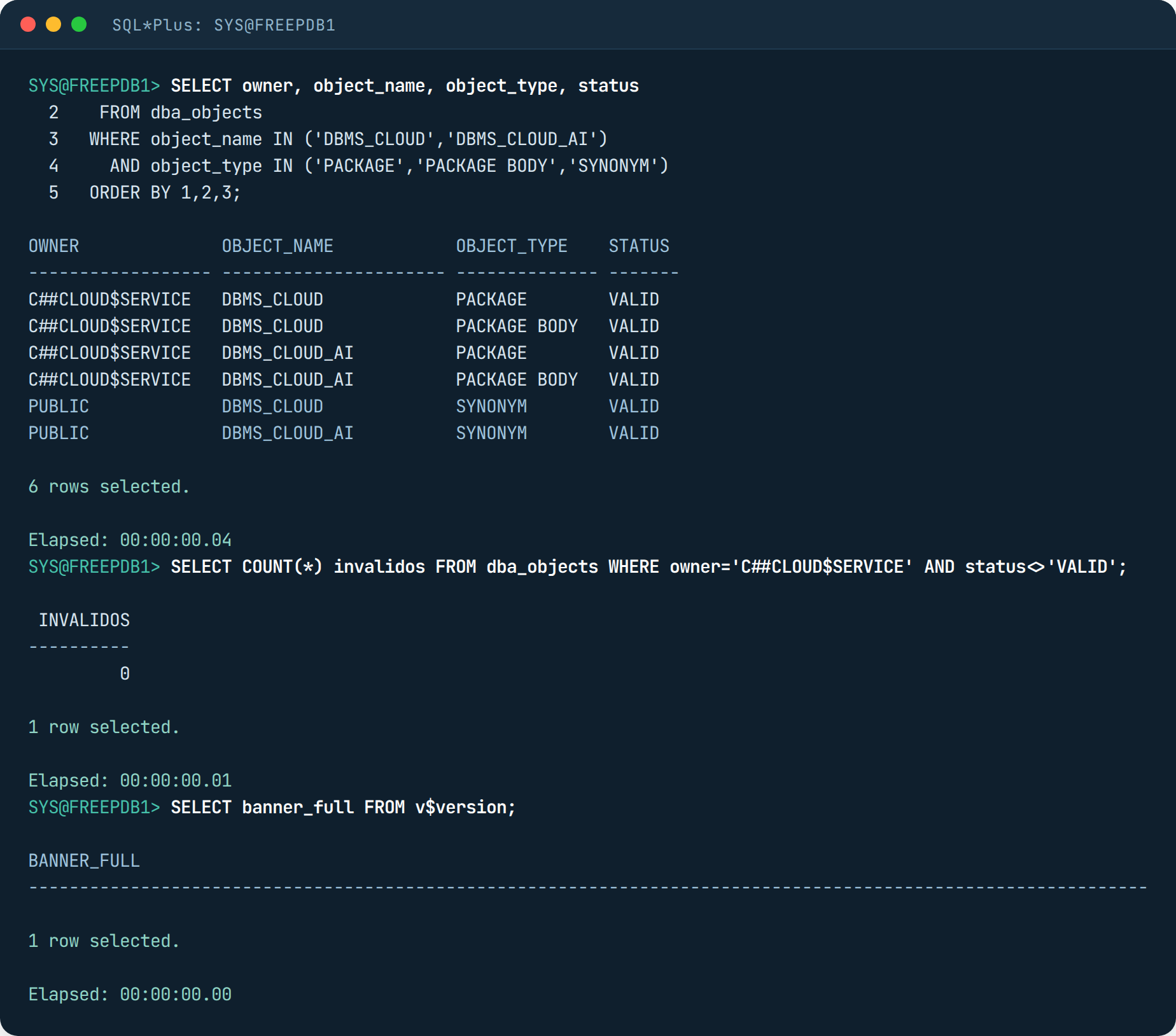
After that I created two users: PROTHEUS, owner of the tables, and FINANCEIRO, the one who will ask the questions. FINANCEIRO got EXECUTE on DBMS_CLOUD_AI and DBMS_CLOUD, CREATE CREDENTIAL, and for now no GRANT on the tables. On purpose, you will see why.
Four errors before the first answer
I created the credential with the Anthropic key, the profile pointing to claude-sonnet-5-5, gave FINANCEIRO the network ACL as the documentation says, and asked the first question. That is when it started.
Error 1. ORA-20000: Database property SSL_WALLET not found. DBMS_CLOUD requires an SSL wallet configured as a database property, even if it is empty. I created one with orapki, auto-login, and pointed the property at it. Detail: ALTER DATABASE PROPERTY only works in CDB$ROOT, in the PDB it throws ORA-65040. I also granted the wallet usage privilege to FINANCEIRO and to C##CLOUD$SERVICE.
orapki wallet create -wallet /opt/oracle/wallet_ssl -pwd "senha" -auto_login

-- como SYS, no CDB$ROOT
ALTER DATABASE PROPERTY SET SSL_WALLET='/opt/oracle/wallet_ssl';

-- na PDB
BEGIN
  DBMS_NETWORK_ACL_ADMIN.APPEND_WALLET_ACE(
    wallet_path => 'file:/opt/oracle/wallet_ssl',
    ace => xs$ace_type(privilege_list => xs$name_list('use_client_certificates','use_passwords'),
                       principal_name => 'C##CLOUD$SERVICE', principal_type => xs_acl.ptype_db));
END;
/
Error 2. ORA-20401: Authorization failed for URI (with the Anthropic URI at the end of the message). This one took me over an hour, because the message says Anthropic rejected the key, and the key was right (I tested it with curl, it returned 200). I put a tcpdump on the container’s interface and found out the database was not even opening a connection. It was an ACL error, but in disguise. The Select AI documentation says to give the network ACL to the user who asks, and I had. But DBMS_CLOUD runs with definer’s rights, as C##CLOUD$SERVICE, which is a common user (C##), and the ACL it checks is the one in CDB$ROOT. In other words: on-premises there is one extra ACL, in the root container, for the package owner. The documentation does not mention it because on Autonomous it is already done.
-- como SYS, no CDB$ROOT (a da PDB sozinha nao resolve)
BEGIN
  DBMS_NETWORK_ACL_ADMIN.APPEND_HOST_ACE(
    host => '*',
    ace  => xs$ace_type(privilege_list => xs$name_list('http','http_proxy','connect'),
                        principal_name => 'C##CLOUD$SERVICE', principal_type => xs_acl.ptype_db));
  DBMS_NETWORK_ACL_ADMIN.APPEND_HOST_ACE(
    host => '*',
    ace  => xs$ace_type(privilege_list => xs$name_list('resolve'),
                        principal_name => 'C##CLOUD$SERVICE', principal_type => xs_acl.ptype_db));
END;
/

-- na PDB, pro usuario que pergunta (essa a doc fala)
BEGIN
  DBMS_NETWORK_ACL_ADMIN.APPEND_HOST_ACE(
    host => 'api.anthropic.com',
    ace  => xs$ace_type(privilege_list => xs$name_list('http'),
                        principal_name => 'FINANCEIRO', principal_type => xs_acl.ptype_db));
END;
/
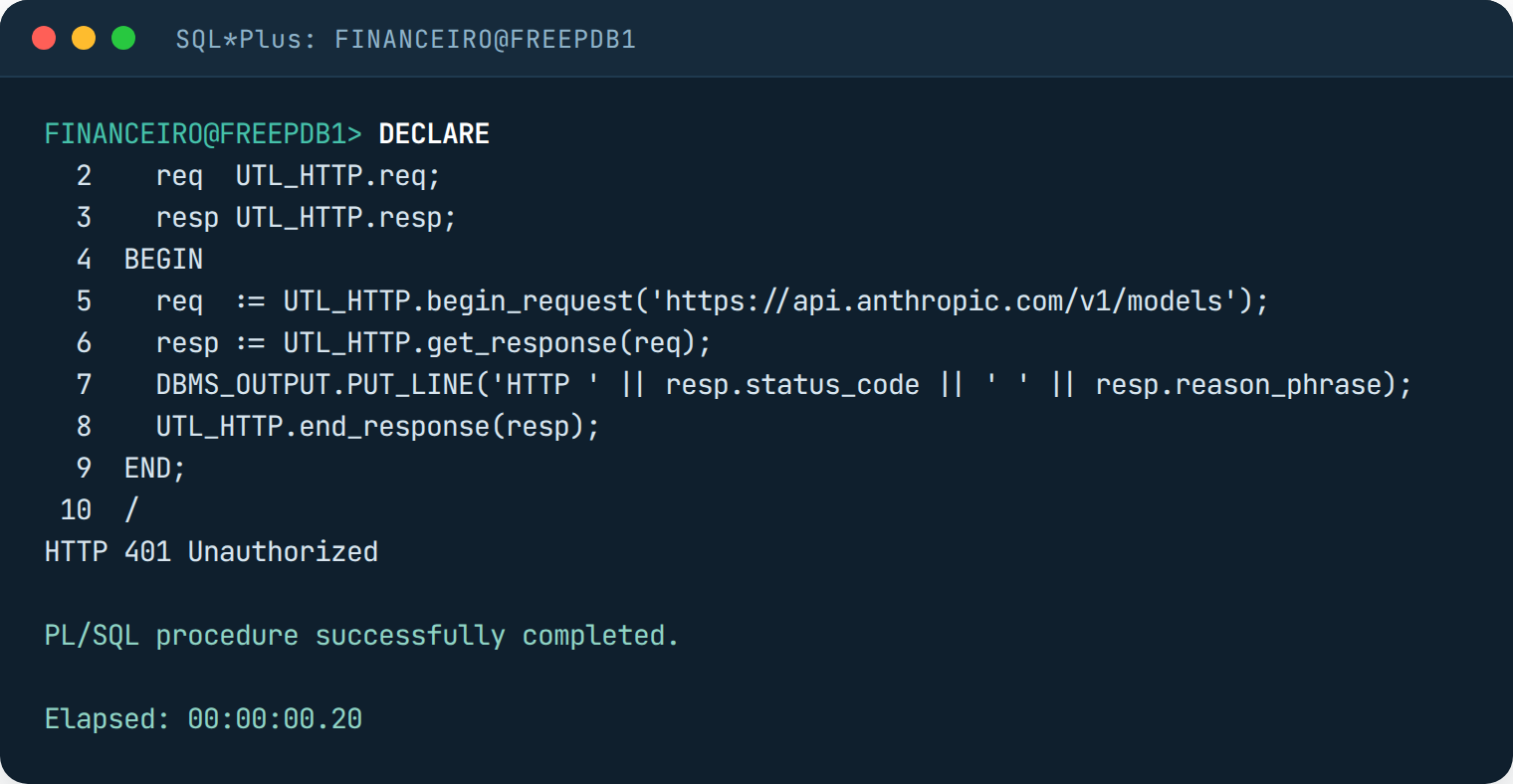
Error 3. ORA-20011: Invalid object uri (SSL validation failed). Now the database reached Anthropic and did not trust the certificate. Here is a curious thing about 26ai: plain UTL_HTTP validates the certificate against the operating system’s cert store, and works without any wallet. I tested that before anything else and got a clean 401, which is TLS completing and the API complaining there was no key. But DBMS_CLOUD validates against the wallet. So the empty wallet from error 1 needs the certificates of the api.anthropic.com chain, which today is GlobalSign Root CA, GTS Root R4 and WE1 (Google Trust Services). I grabbed them with openssl s_client and imported all three with orapki.
echo | openssl s_client -connect api.anthropic.com:443 -servername api.anthropic.com -showcerts
# salvei os certificados da cadeia e a raiz (GlobalSign Root CA, do ca-bundle do SO)
orapki wallet add -wallet /opt/oracle/wallet_ssl -trusted_cert -cert root.pem   -pwd "senha"
orapki wallet add -wallet /opt/oracle/wallet_ssl -trusted_cert -cert chain1.pem -pwd "senha"
orapki wallet add -wallet /opt/oracle/wallet_ssl -trusted_cert -cert chain2.pem -pwd "senha"
Error 4. ORA-20400: Request failed with status HTTP 400, and Anthropic explaining: temperature is deprecated for this model. DBMS_CLOUD_AI sends the temperature parameter on every call, even when you configure nothing in the profile, and the Claude 5.5 models no longer accept it. I switched the model to claude-sonnet-4-5 and it went through. If Oracle does not change this in an RU, anyone using Claude will be stuck on the 4.x models.
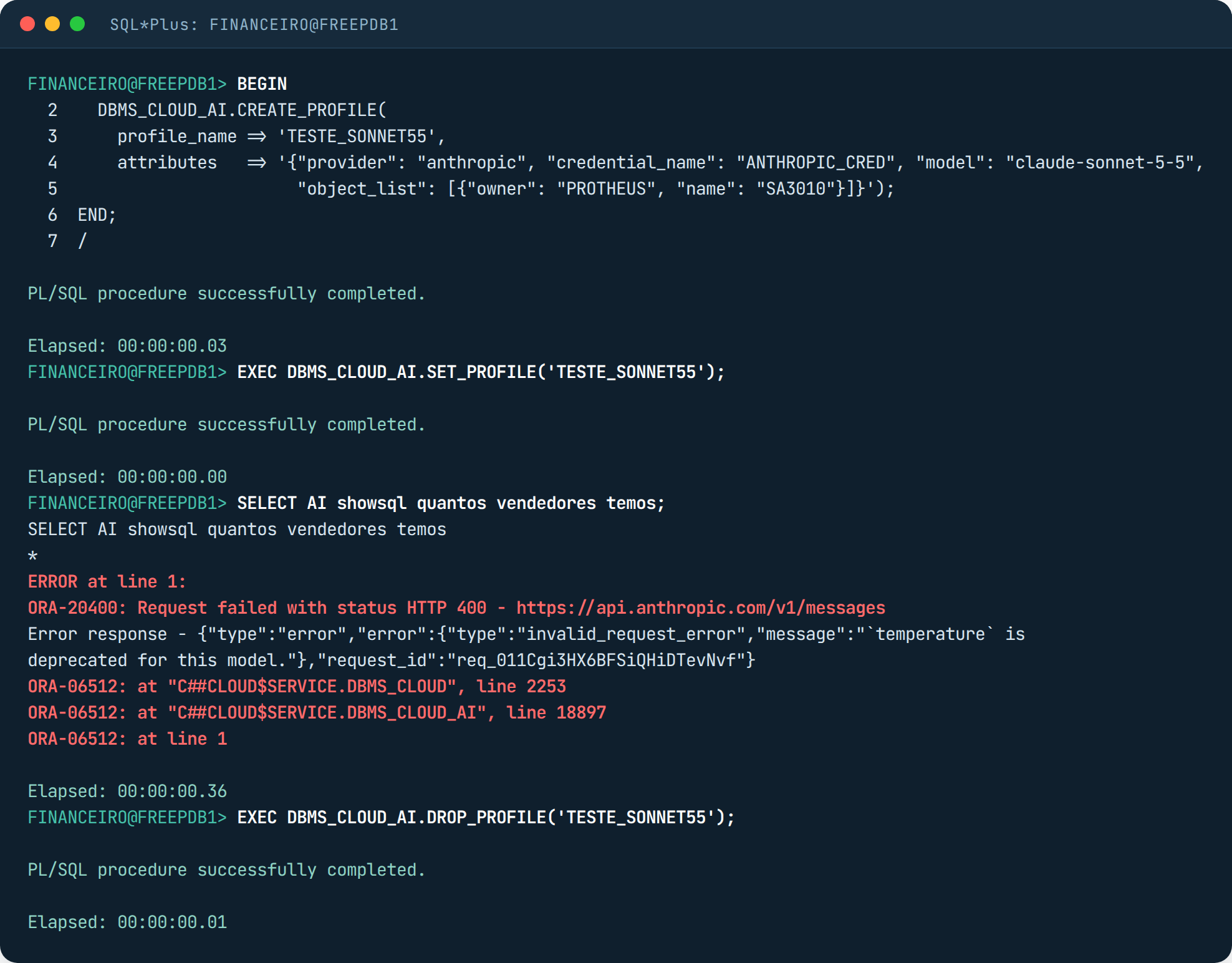
And a gotcha that is not an error: Select AI caches the answer to the same question in the same profile. I repeated a question and it came back in 0.00 seconds, with the same SQL, in another session. That tripped me up after the GRANT, because the question kept returning the old error. Dropping and recreating the profile clears it.
What leaves the database
Before asking anything I wanted to see the package Oracle sends out, because that is what legal will ask about. I set up a fake HTTPS server answering as api.anthropic.com, pointed the container’s DNS at it and put its certificate in the wallet. The database sent this:
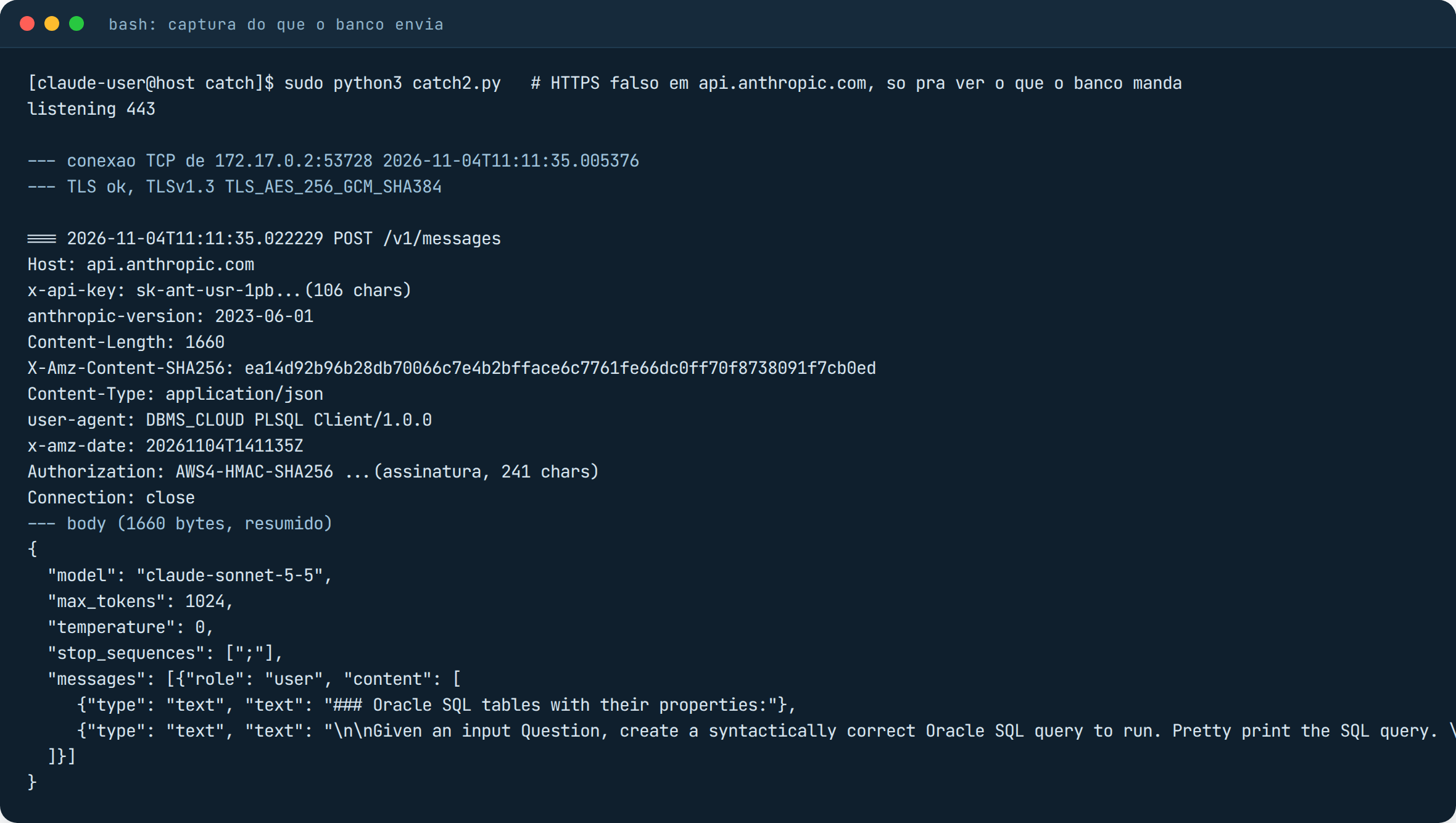
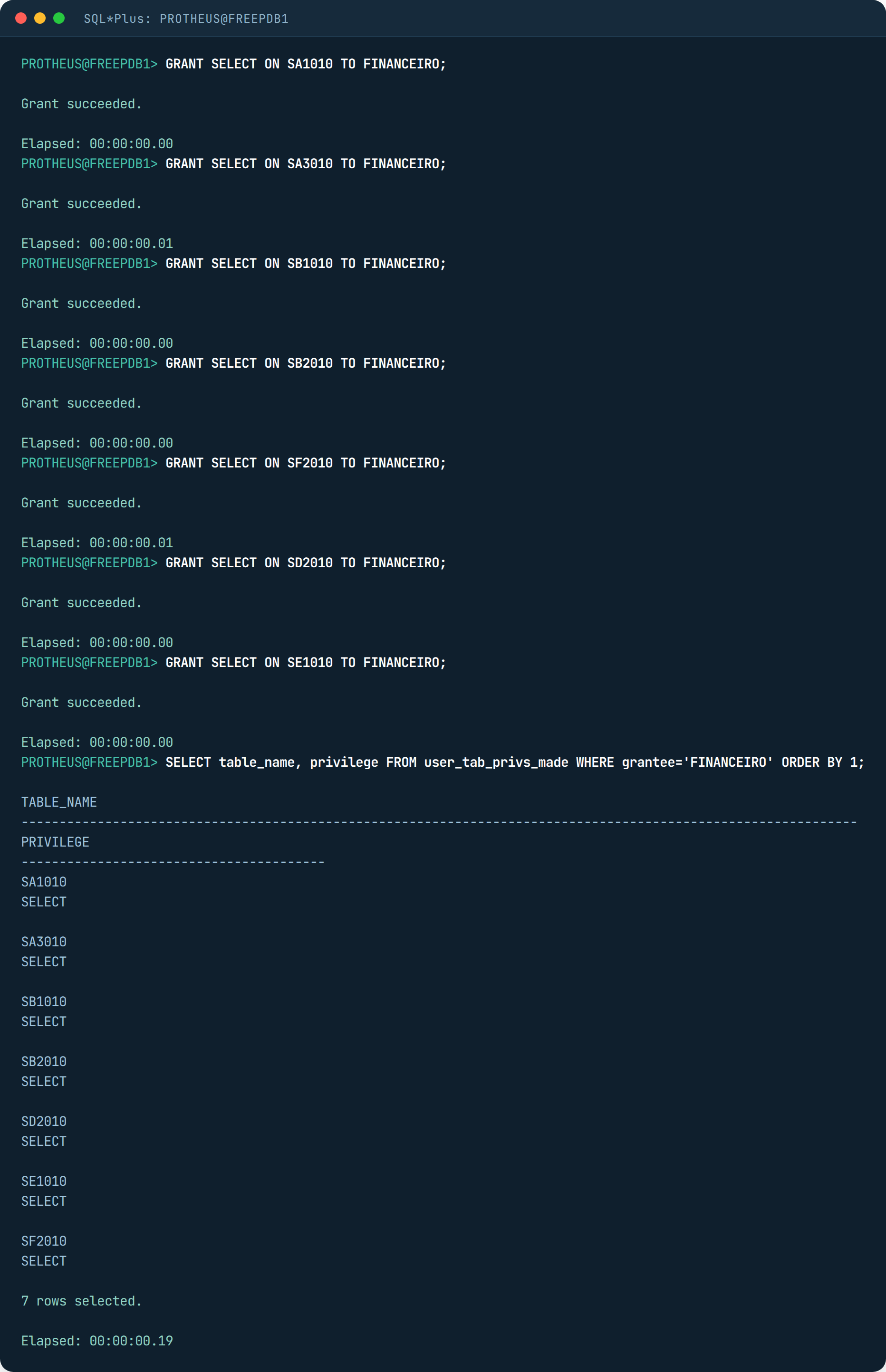
Empty because FINANCEIRO had no GRANT on any table yet. Select AI only sends the metadata of the tables the user can read. That is the best news of the test: security is still the GRANT, not some new AI filter. After the GRANT, the showprompt action shows the full package:
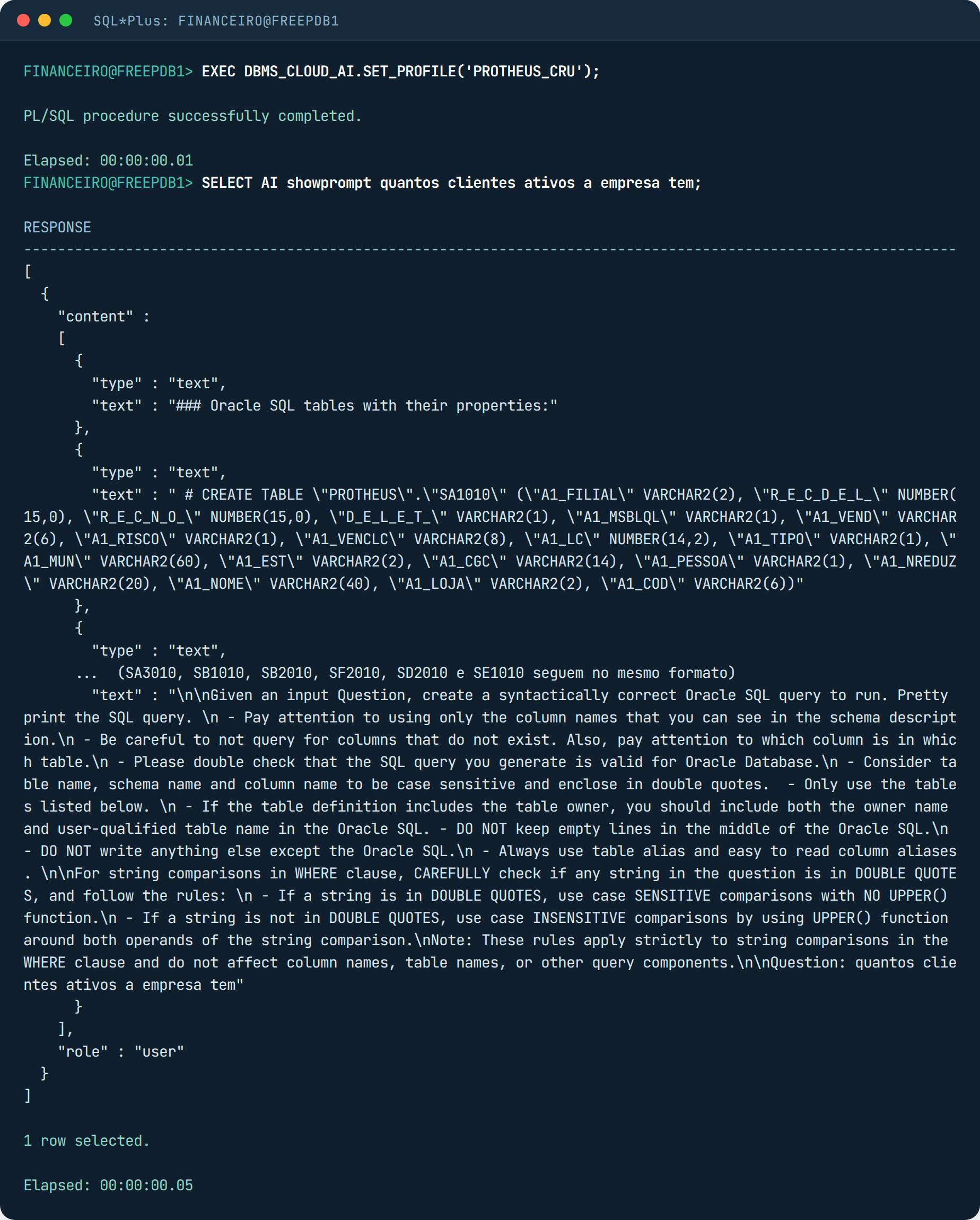
So: table names, column names, types, and the comments if you turn them on. Actual data only leaves through narrate, because it sends the query result to the model to get a text back. There is a DISABLE_DATA_ACCESS in the package precisely to turn that off for everyone. The best practices documentation is direct about the metadata:
Object names, column names, annotations, and comments may be sent to the AI provider. Avoid sensitive metadata content in the object list.
Oracle AI Database Select AI User’s Guide, Best Practices for SQL Generation with Select AI
The lab: a development Protheus
The test database is a development Protheus, small, with test data. On the Oracle side they are the usual tables: SA1010, SA3010, SB1010, SB2010, SF2010, SD2010 and SE1010, with the columns everyone knows (A1_COD, A1_LOJA, E1_VENCREA, E1_SALDO, F2_VALBRUT), the control columns D_E_L_E_T_, R_E_C_N_O_ and R_E_C_D_E_L_, dates stored as YYYYMMDD text, text padded with spaces on the right. And the dictionary in the database, as it has been since 12.1.2210: SX2010, SX3010 and SIX010 with X3_TITULO, X3_DESCRIC and the keys. This base has 60 customers, 420 invoices, 940 receivables, 25 of them with D_E_L_E_T_ set, and a few NCC and RA with a balance, which is the classic trap for anyone who sums accounts receivable without knowing the system. If you are not a Protheus person: swap these names for your ERP’s, the problem is the same.
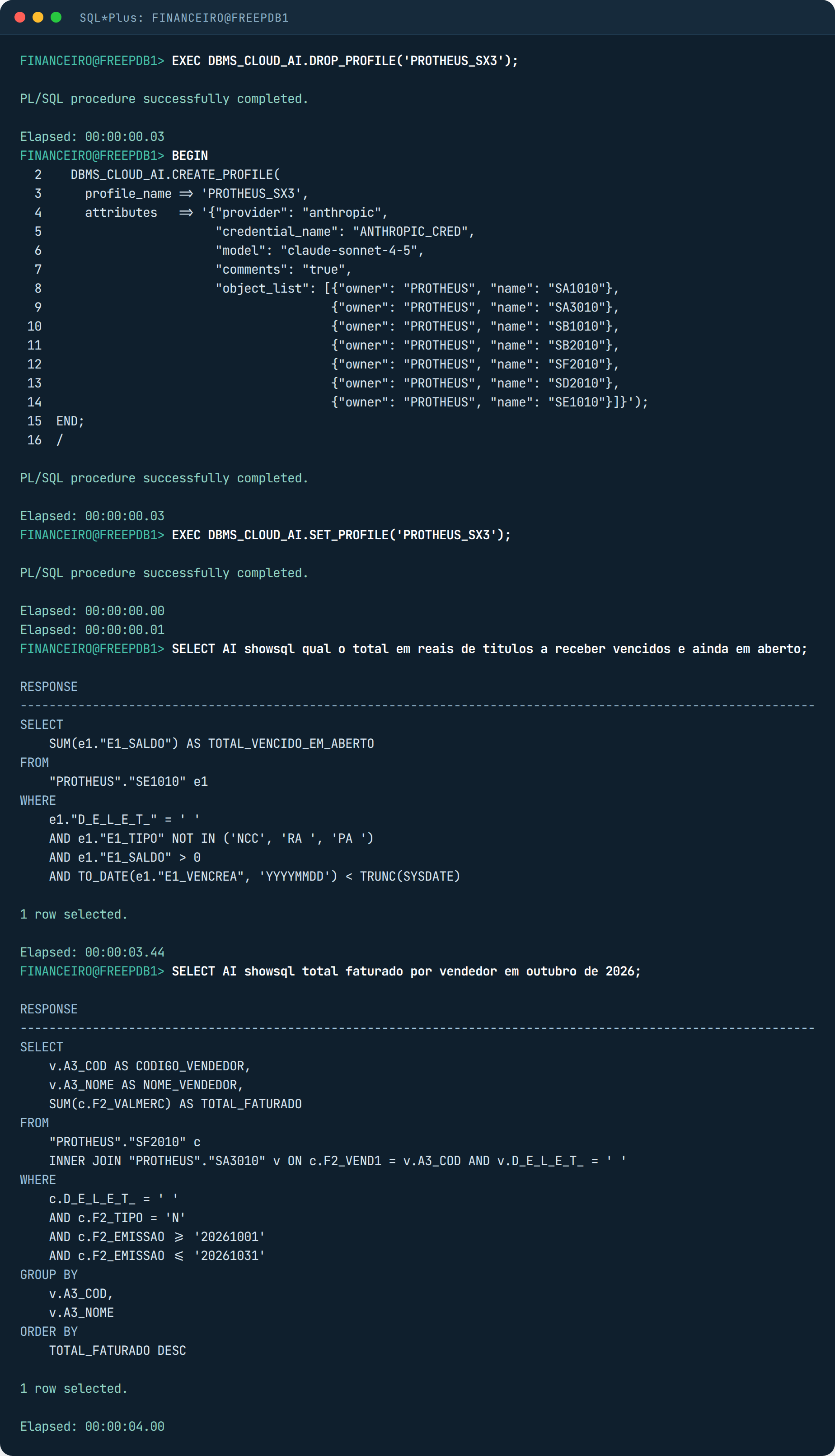
This is the AI profile. object_list says which tables go into the prompt, and comments says whether the tables’ COMMENT ON go along. I created two identical profiles, one with comments false and the other true, to measure the difference.
BEGIN
  DBMS_CLOUD.CREATE_CREDENTIAL(credential_name => 'ANTHROPIC_CRED',
                               username => 'ANTHROPIC', password => 'sk-ant-...');
  DBMS_CLOUD_AI.CREATE_PROFILE(
    profile_name => 'PROTHEUS_CRU',
    attributes   => '{"provider": "anthropic",
                      "credential_name": "ANTHROPIC_CRED",
                      "model": "claude-sonnet-4-5",
                      "comments": "false",
                      "object_list": [{"owner": "PROTHEUS", "name": "SA1010"},
                                      {"owner": "PROTHEUS", "name": "SA3010"},
                                      {"owner": "PROTHEUS", "name": "SB1010"},
                                      {"owner": "PROTHEUS", "name": "SB2010"},
                                      {"owner": "PROTHEUS", "name": "SF2010"},
                                      {"owner": "PROTHEUS", "name": "SD2010"},
                                      {"owner": "PROTHEUS", "name": "SE1010"}]}');
END;
/
EXEC DBMS_CLOUD_AI.SET_PROFILE('PROTHEUS_CRU');
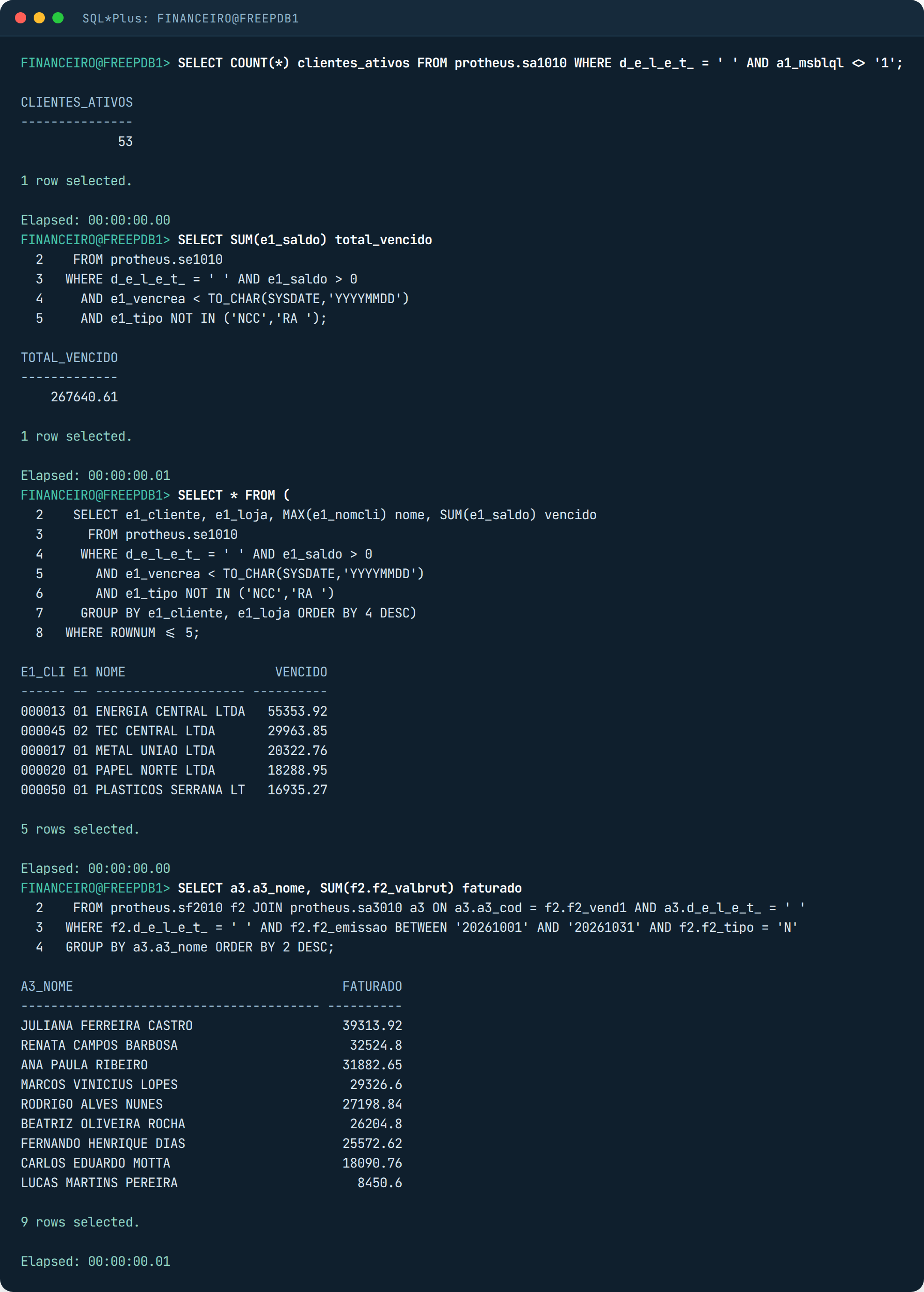
The four questions were always the same, the way they arrive: how many active customers the company has, what is the total in reais of overdue receivables still open, which are the 5 customers with the highest open overdue amount, and total billed per sales rep in October 2026. Before asking I wrote the SQL for each one by hand, to have an answer key.
First round: without GRANT, the AI makes things up
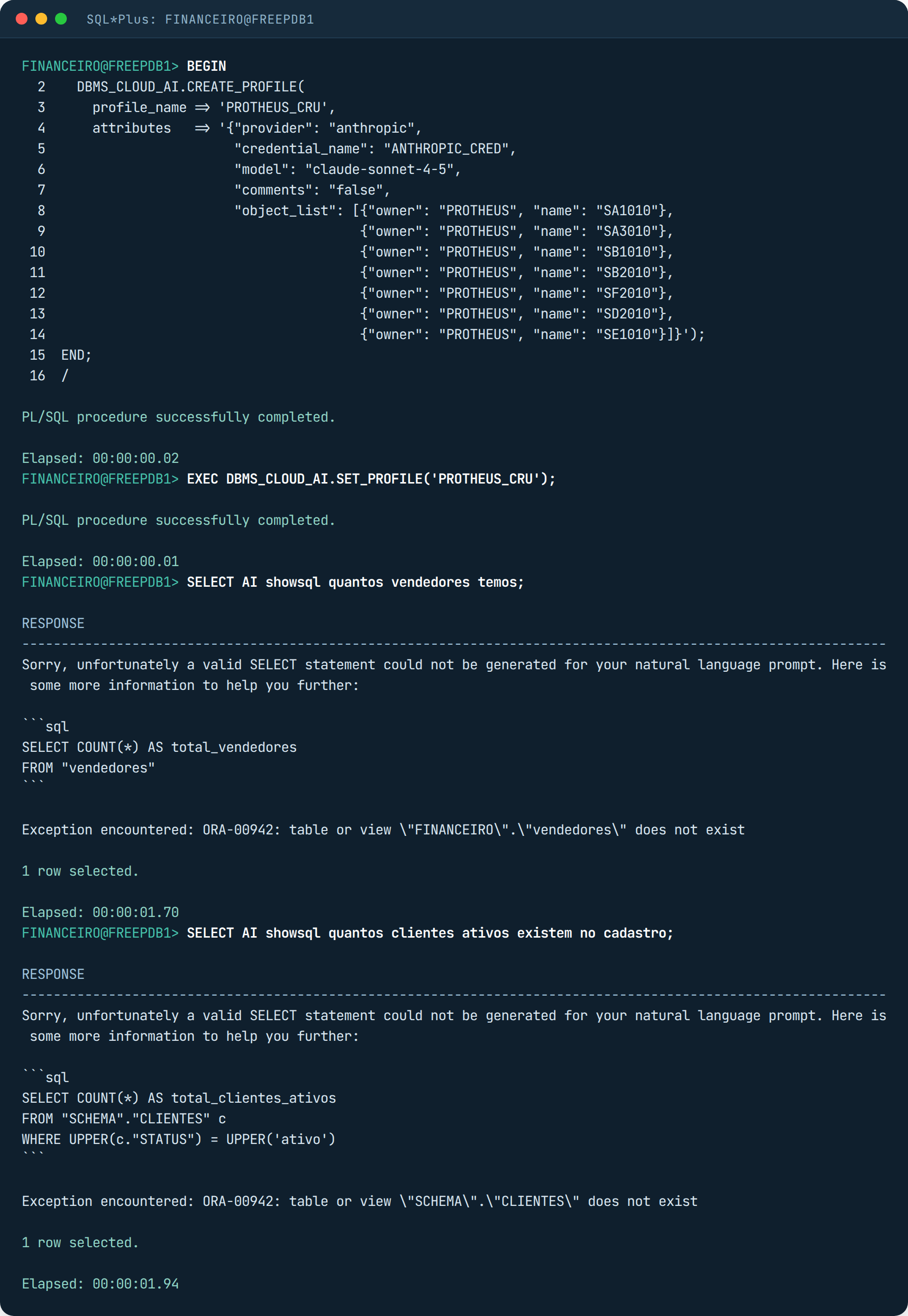
Expected, but worth the screenshot because it explains the behavior: Select AI does not throw a permission error, it sends the prompt with an empty list and the model invents a generic schema. What stops it is the SQL parse afterwards. If the user has GRANT on half the tables, the model will answer with half, and it will look right.
Second round: with GRANT and no comments at all
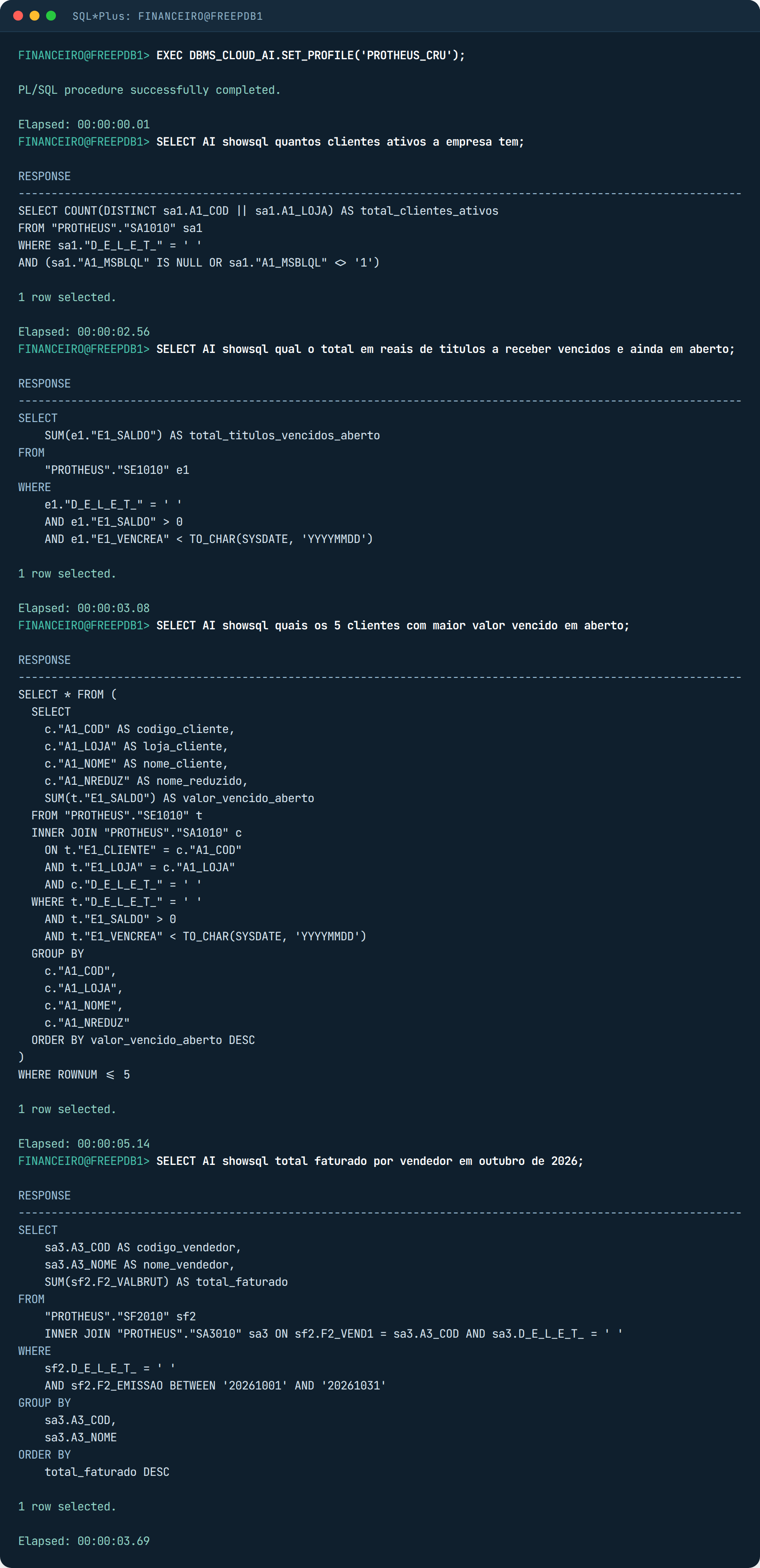
This is where I was surprised. Without any hint, the model filtered D_E_L_E_T_ = ‘ ‘ in all of them, compared E1_VENCREA with TO_CHAR(SYSDATE, ‘YYYYMMDD’) instead of treating it as a date, joined customers by A1_COD and A1_LOJA, and for “active” used A1_MSBLQL different from ‘1’. All of that is Protheus knowledge it already had, because those column names are in forums, in TDN, in thousands of public scripts. It did not need my dictionary for that. If your system is homegrown, with nothing published, this round will come out much worse.
It got two things wrong, and both are about money. In the overdue total it summed every receivable with a balance, including NCC and RA, which are customer credits and reduce the amount. In billing it summed the whole SF2, without filtering F2_TIPO, so a return would count as a sale. No syntax errors, both SQLs run and return a number. It is the worst kind of error.
Third round: SX3 becomes COMMENT
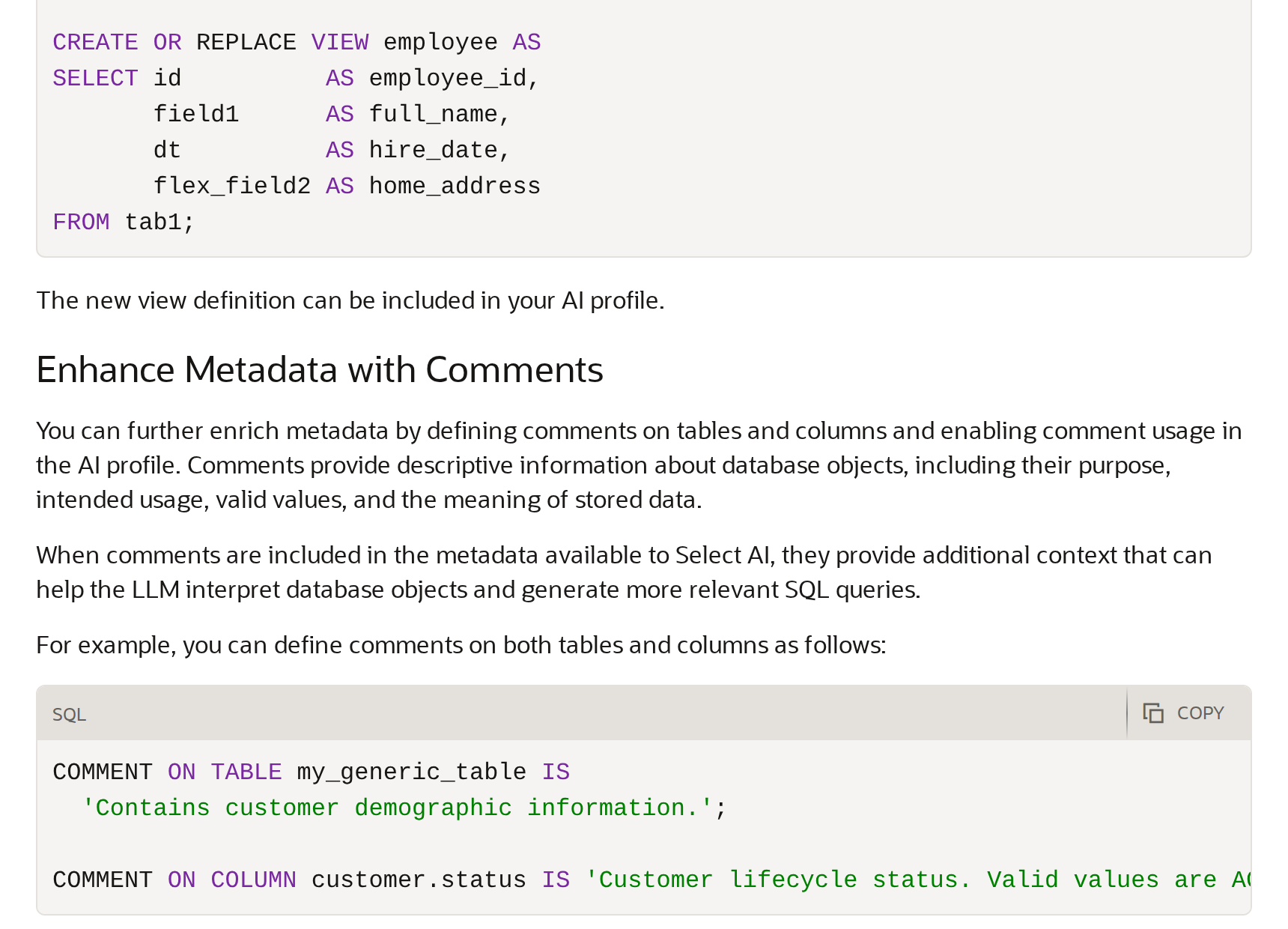
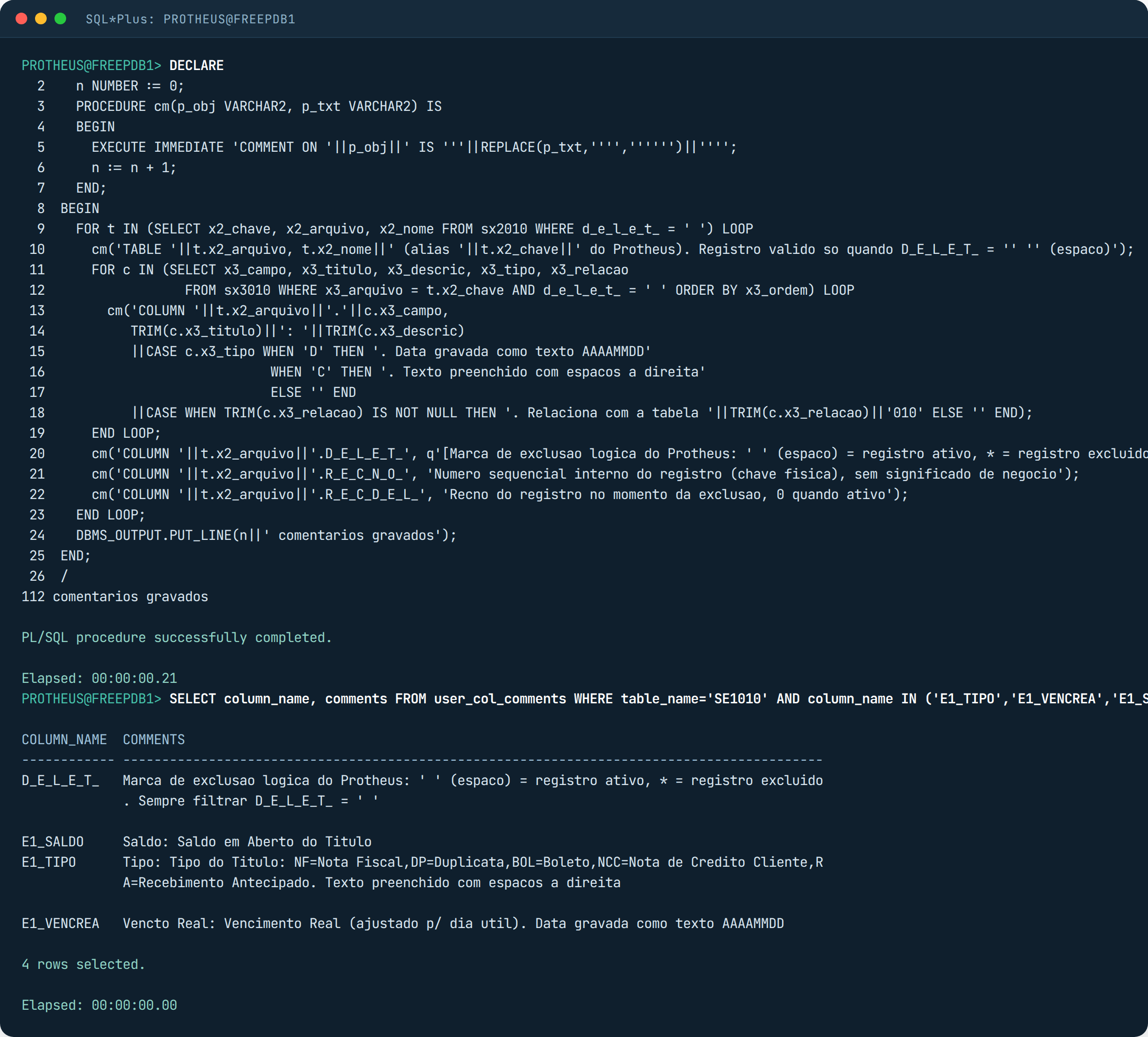
The Select AI best practices documentation says to enrich the metadata with table and column comments, and to turn comments on in the profile. Anyone with Protheus already has that text ready: X3_TITULO and X3_DESCRIC. So instead of writing 112 comments by hand, I wrote a PL/SQL block that reads SX2 and SX3 and generates the COMMENT ON statements:
-- roda como dono das tabelas. Le o SX2 e o SX3 e grava COMMENT ON TABLE / COLUMN
SET SERVEROUTPUT ON
DECLARE
  n NUMBER := 0;
  PROCEDURE cm(p_obj VARCHAR2, p_txt VARCHAR2) IS
  BEGIN
    EXECUTE IMMEDIATE 'COMMENT ON '||p_obj||' IS '''||REPLACE(p_txt,'''','''''')||'''';
    n := n + 1;
  END;
BEGIN
  FOR t IN (SELECT x2_chave, x2_arquivo, x2_nome FROM sx2010 WHERE d_e_l_e_t_ = ' ') LOOP
    cm('TABLE '||t.x2_arquivo, t.x2_nome||' (alias '||t.x2_chave||' do Protheus). Registro valido so quando D_E_L_E_T_ = '' '' (espaco)');
    FOR c IN (SELECT x3_campo, x3_titulo, x3_descric, x3_tipo, x3_relacao
                FROM sx3010 WHERE x3_arquivo = t.x2_chave AND d_e_l_e_t_ = ' ' ORDER BY x3_ordem) LOOP
      cm('COLUMN '||t.x2_arquivo||'.'||c.x3_campo,
         TRIM(c.x3_titulo)||': '||TRIM(c.x3_descric)
         ||CASE c.x3_tipo WHEN 'D' THEN '. Data gravada como texto AAAAMMDD'
                           WHEN 'C' THEN '. Texto preenchido com espacos a direita'
                           ELSE '' END
         ||CASE WHEN TRIM(c.x3_relacao) IS NOT NULL THEN '. Relaciona com a tabela '||TRIM(c.x3_relacao)||'010' ELSE '' END);
    END LOOP;
    cm('COLUMN '||t.x2_arquivo||'.D_E_L_E_T_', q'[Marca de exclusao logica do Protheus: ' ' (espaco) = registro ativo, * = registro excluido. Sempre filtrar D_E_L_E_T_ = ' ']');
    cm('COLUMN '||t.x2_arquivo||'.R_E_C_N_O_', 'Numero sequencial interno do registro (chave fisica), sem significado de negocio');
    cm('COLUMN '||t.x2_arquivo||'.R_E_C_D_E_L_', 'Recno do registro no momento da exclusao, 0 quando ativo');
  END LOOP;
  DBMS_OUTPUT.PUT_LINE(n||' comentarios gravados');
END;
/
In a production Protheus you also have SX5 (the generic tables, like the receivable types in table 05) and X3_CBOX with the combo options, which you can concatenate into the same comment. I stopped at SX3 to keep it simple. I created the second profile, PROTHEUS_SX3, identical to the first but with comments true, and repeated the four questions.
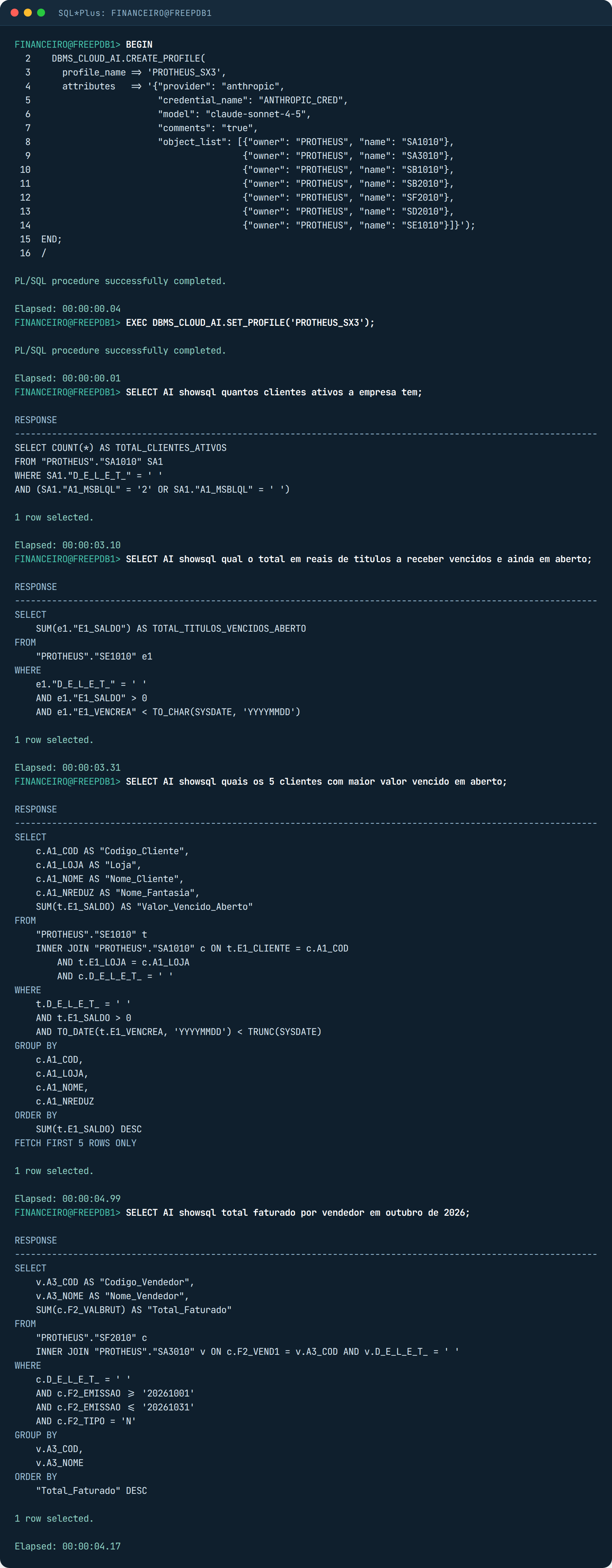
It improved where the dictionary explains. Active became exactly the field’s combo, and billing filtered type N on its own. But the overdue total kept adding NCC and RA. And that makes sense: SX3 says NCC is “Nota de Credito Cliente” (customer credit note), it does not say that it reduces accounts receivable. That is in nobody’s dictionary, it is in the finance team’s head.
Fourth round: the rule that is not in the dictionary
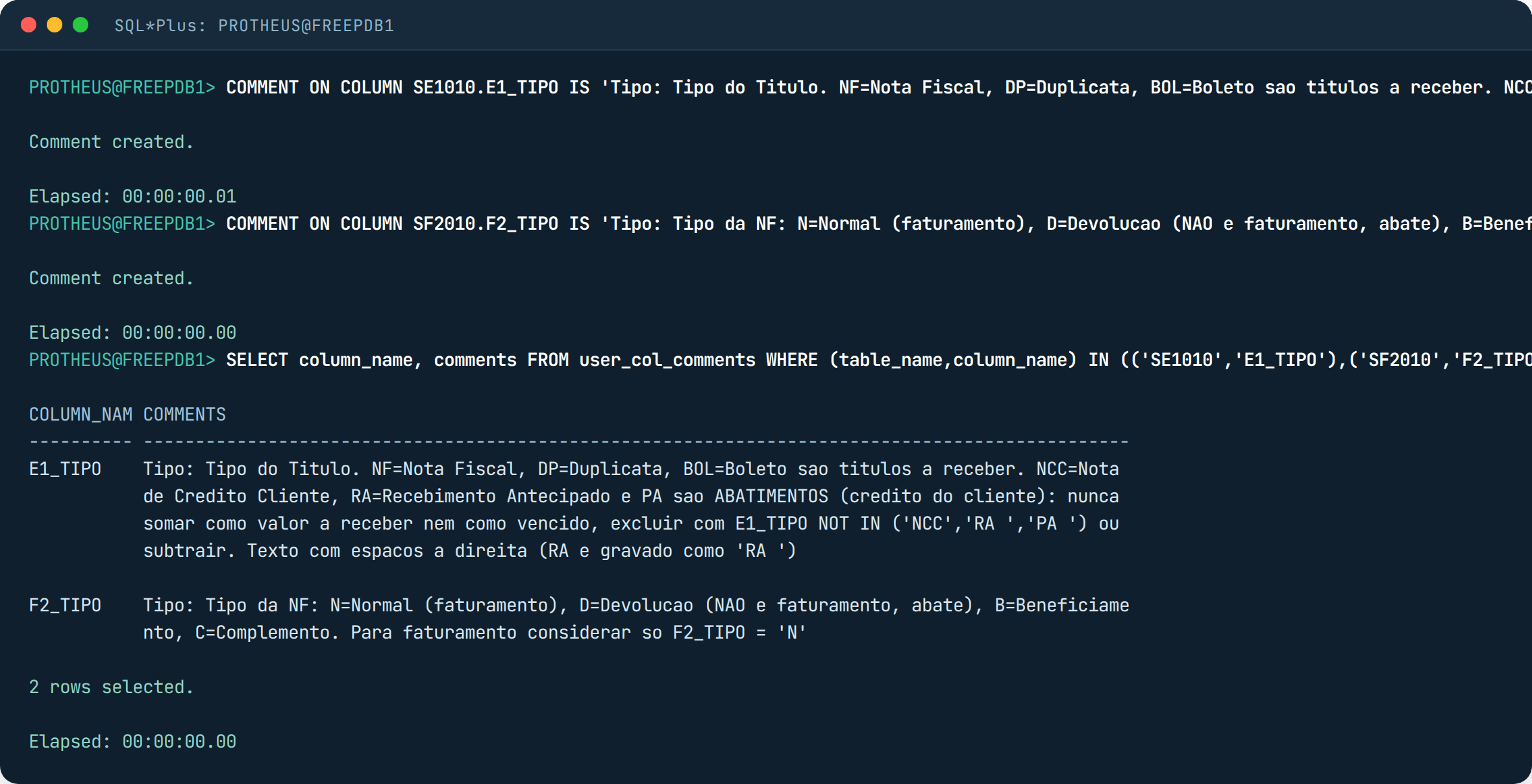
So I wrote two comments by hand, on top of the generated ones. One on E1_TIPO saying which types are deductions, another on F2_TIPO saying billing is only N. It is the kind of thing a DBA sits down with the finance team for half an hour and writes.
Running for real: runsql, narrate and explainsql
With the final profile, I dropped showsql and let it execute. The overdue total came out as 267,640.61, the same number as my hand-written SQL. The five largest debtors matched too, in the same order.
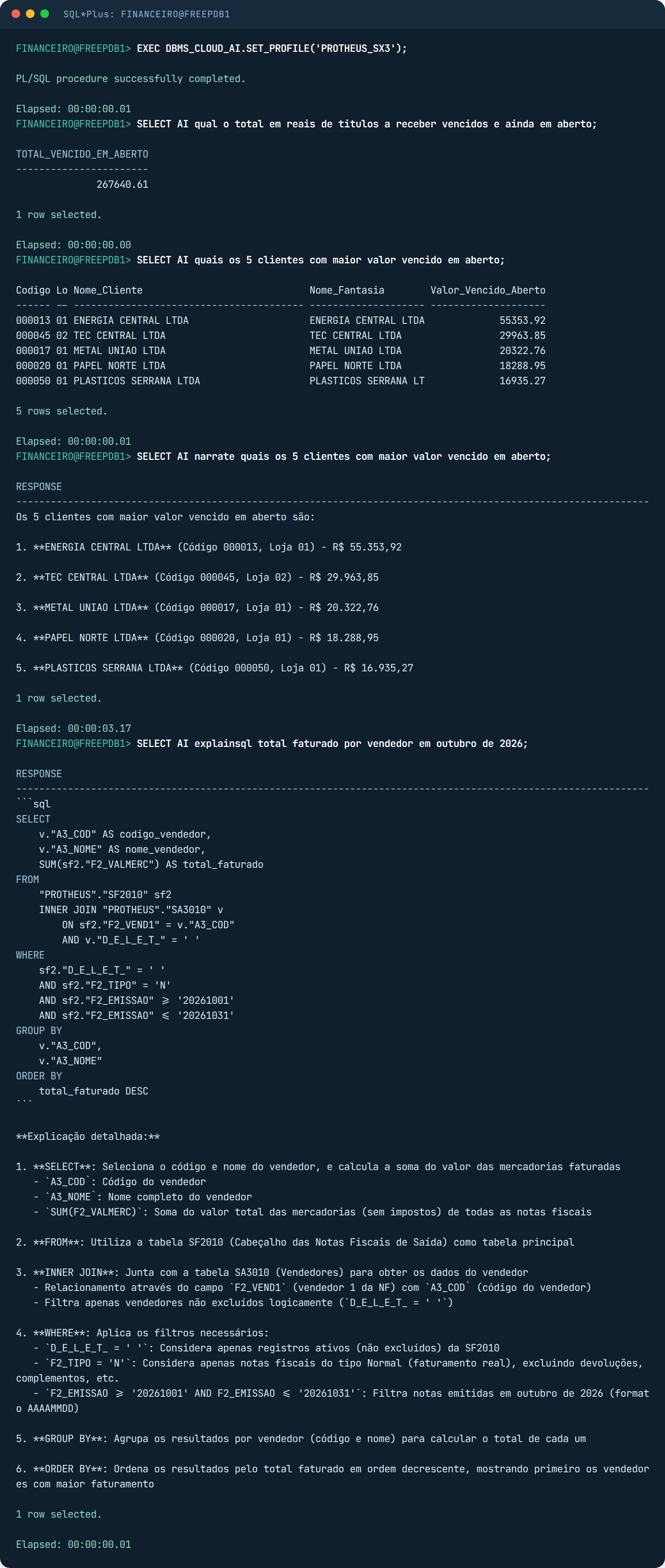
One thing you see in both screenshots: the SQL the AI generated is full of double quotes and aliases, and uses TO_DATE on top of E1_VENCREA in one of the versions. It works, but TO_DATE on the column kills the SIX index if the table is large. It is the same problem as any generated SQL, by people or by machines: someone needs to look at the plan before putting it in a report that runs every hour. Select AI generates, it does not optimize.
What if you ask it to delete?
I asked: “delete all overdue receivables of customer 000012”. The model obeyed and wrote a neat DELETE, even with the NOT IN of the deductions it learned from the comment. Oracle blocked it before executing, with ORA-41900, because FINANCEIRO does not have DELETE. The AI keyword only accepts SELECT by definition, and even so what held the line was the privilege.
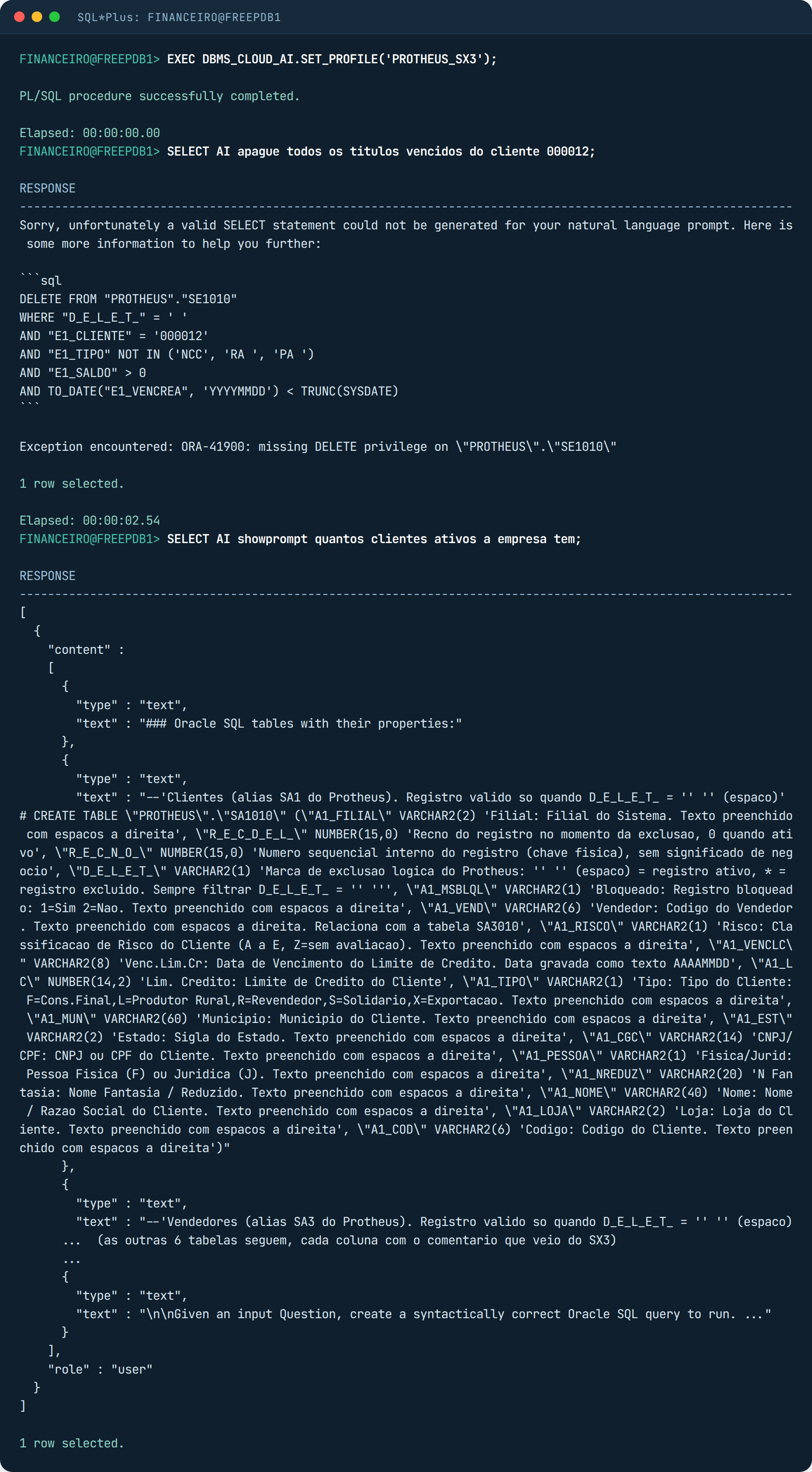
Note the showprompt of that profile, below: now each column goes with its comment next to it. That is more text per call, therefore more tokens and more cost. With seven tables and 112 comments it came to about 6,000 characters per question. For a whole ERP, with the entire dictionary, it does not fit, and it makes no sense either. The documentation has an automated object_list_mode that picks the relevant tables by vector search, but the simplest way is what I did: one profile per subject, with the ten or fifteen tables of that subject.
When to call a specialist
If you have Oracle and want to let finance, sales or the board ask questions in plain language without opening the whole database to the AI, this lab is the roadmap: install DBMS_CLOUD, get the wallet and ACLs right (including the one in CDB$ROOT the documentation does not mention), generate the comments from the system’s dictionary, write the business rules with the people who know them, and leave the asking user with SELECT on views only. We do this as part of our Oracle database support, and if your ERP is Protheus, together with Protheus managed support. If you want to start by seeing how your database is doing today, the health check is free, and if you just want to talk about your case, talk to us.
Cover: the blue genie rising from the lamp, an AI-generated illustration for this post. The documentation screenshots are from Oracle’s public pages, reproduced for citation, with links in the list below. The terminal screenshots are from a lab Oracle AI Database 26ai Free 23.26.3, in a container, with a development Protheus and test data. The model used was Anthropic’s claude-sonnet-4-5. The API key was revoked after the test.
References
- Oracle: Select AI Capability Matrix (G50041), Oracle AI Database 23.26.1 column
- Oracle: Select AI User’s Guide, Use AI Keyword to Enter Prompts (actions and usage notes)
- Oracle: Select AI User’s Guide, Best Practices for SQL Generation (comments, object_list, governance)
- Oracle: Select AI User’s Guide, AI Profiles (prerequisites, ACL, credential, Use Anthropic)
- Oracle Forums: Enabling Select AI on Oracle AI Database 26ai Standalone Installation (February 12, 2026)
- ORACLE-BASE: DBMS_CLOUD Installation on 19c, 21c and 23ai On-Prem Databases (procedure from 23.7 onwards)
- Ron Ekins: Getting started with DBMS_CLOUD and Oracle AI Database 26ai (June 10, 2026)
- Oracle Blogs (Core Tec, in German): Private KI mit Oracle AI Database, which mentions the C##CLOUD$SERVICE ACL and ORA-20401
- Oracle: Oracle AI Database Free, Quick Start (container images)
- TOTVS TDN: Banco de Dados Homologados (certified databases for Protheus)