


What is vector search, and which database does it best? Today the four databases you see most often in Brazilian companies all claim to do vector search: Oracle 26ai, SQL Server 2025, PostgreSQL with pgvector and MySQL 9.7. I added MariaDB 11.8 to the list, because it was born from MySQL, runs in place of it in a lot of companies and has a native vector index. I went and tested what each one really does. I took the product table (SB1) from a development Protheus, asked the same 100 questions in each database, on the same server, and measured. Before showing the results, I explain from scratch what this search is and which tools I used, because without that the numbers mean nothing. SQL Server 2025 stayed out of the lab because of licensing: its part comes from Microsoft’s documentation, and I point out where.
What vector search is, explained from scratch
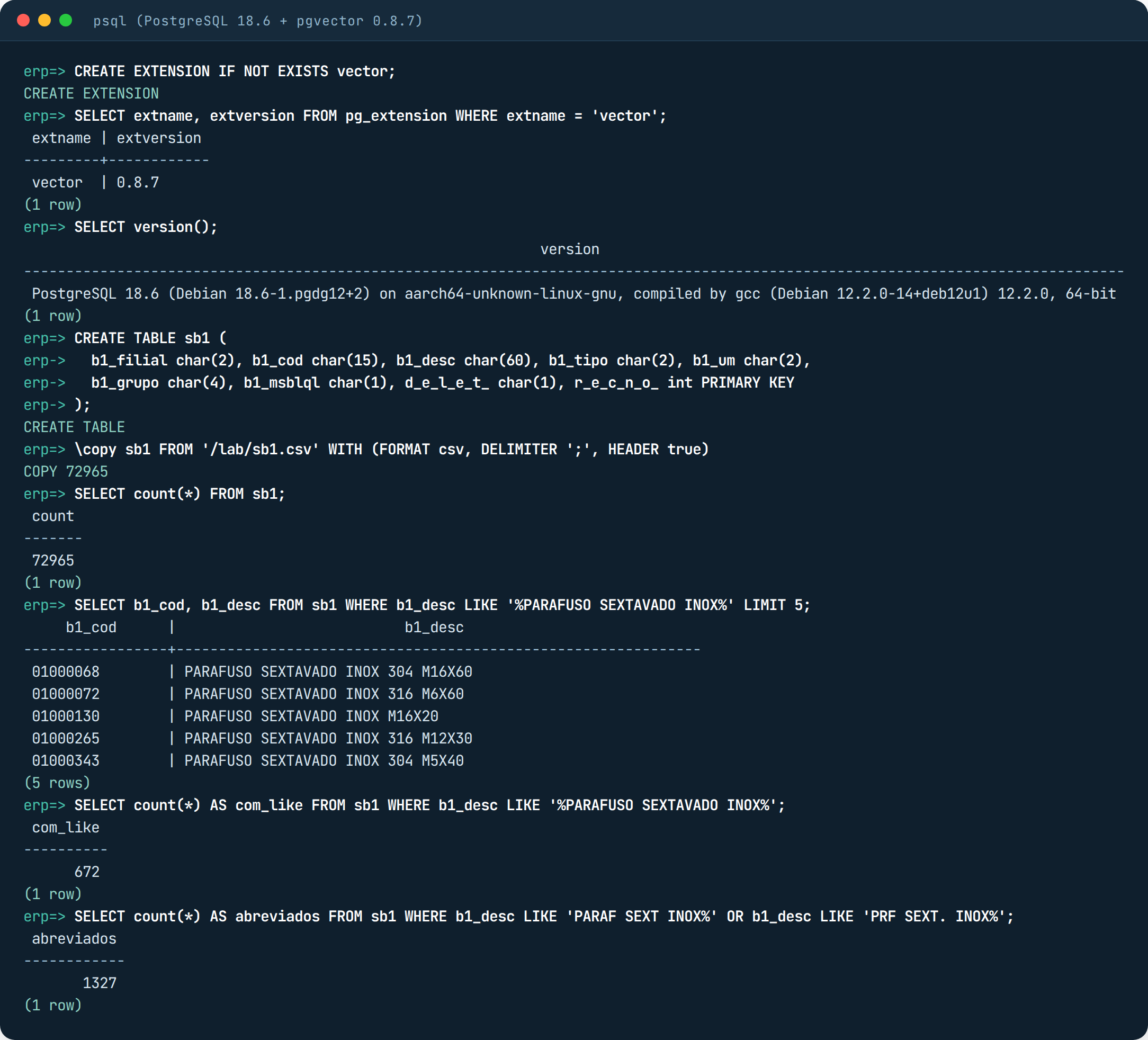
The search every system has is by written word. In the database that is LIKE: you look for ‘%PARAFUSO SEXTAVADO INOX%’ (stainless steel hex bolt, in Portuguese) and it returns the rows that contain exactly that piece of text. If the product was registered as PARAF SEXT INOX, it does not show up, even though it is the same bolt. ERP master data is full of this.
Vector search is search by meaning. Instead of comparing letters, it compares what the text means. To do that, each text becomes a vector, which is just a list of numbers. That list is generated by a model, a program trained to read text and return numbers in such a way that texts with similar meaning become similar lists. “Parafuso sextavado inox” and “PARAF SEXT INOX M8X30” become nearly identical lists, even though they are written differently. The usual name for this vector is embedding; it is the same thing.
With the vectors stored in the table, the search works like this: the person’s question also becomes a vector, and the database looks for the products whose vector is closest to the question’s vector. “Close” is a distance calculation between the two lists, and the smaller the distance, the more similar the meaning. The 10 closest are the answer.
That calculation can be done in two ways. The full way compares the question with every product, one by one. It never misses, but on a large table it gets slow, because the time grows with the table. The indexed way uses a shortcut the database prepares beforehand, so the search looks at only part of the products. It is fast, but it can miss someone. Each database has its own kind of shortcut, and I explain each one in a section just for that, before getting into the tests.
That is why the shortcut gets a grade, called recall. Of the 10 products the shortcut returned, how many are as good as the 10 from the full search? 100% recall is the shortcut getting everything right. 75% recall means that, out of the 10, about 2 or 3 should not be there. I will use this word all the time from here on.
The lab tools and how I used each one
The data. I built a fake SB1 that looks like a real one: 72,965 products in 21 groups (bolts, cables, paints, PPE and so on). The descriptions come mixed up the way real master data does, the same bolt as PARAFUSO SEXTAVADO INOX M8X30, PARAF SEXT INOX M8X30 and PRF SEXT. INOX 8X30MM. There are also 3% deleted records (D_E_L_E_T_ = ‘*’) and 4% blocked ones, because that is how the table lives. LIKE shows the problem right away: searching for ‘%PARAFUSO SEXTAVADO INOX%’ finds 672 items and leaves 1,327 abbreviated ones out.
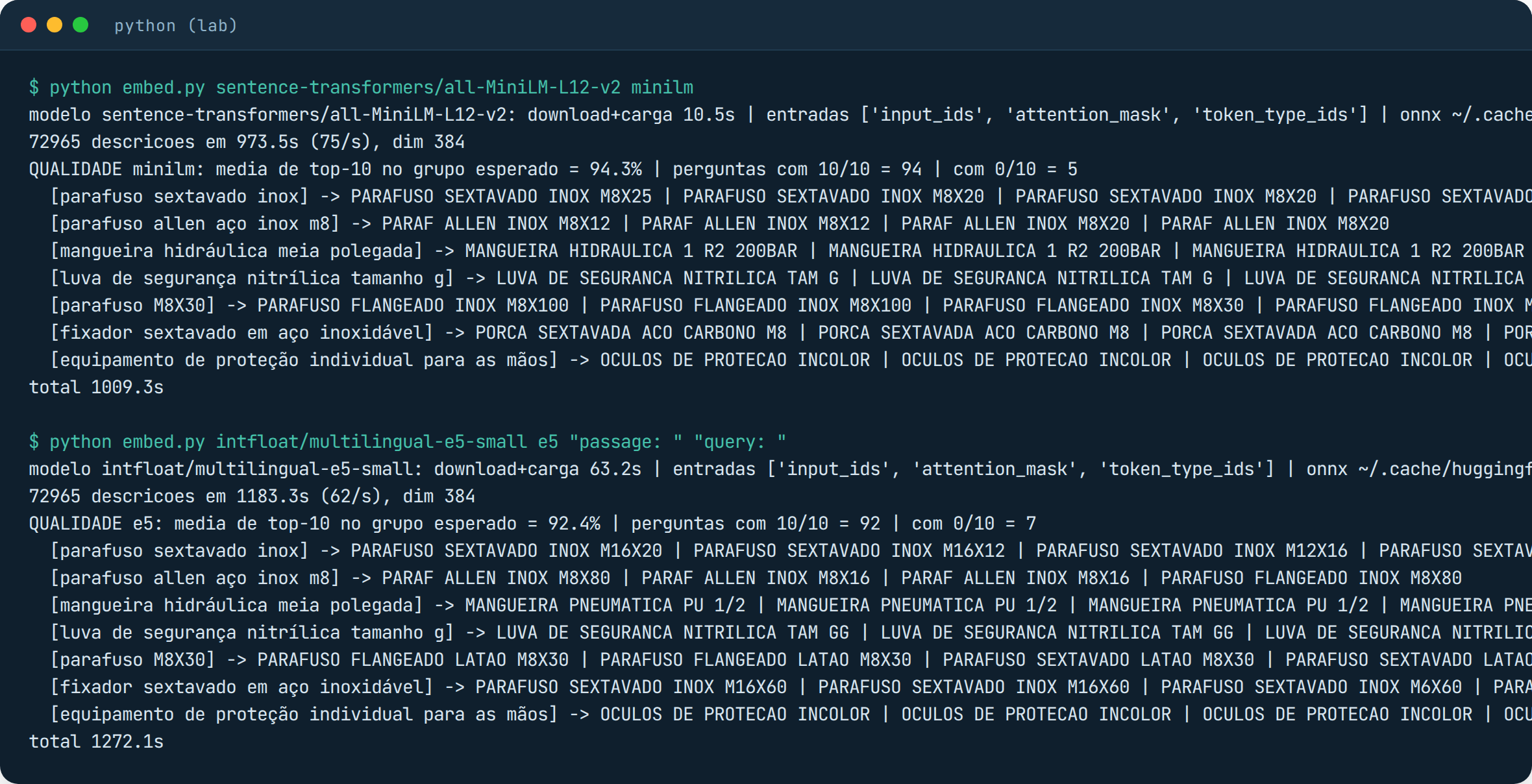
The model. I used all-MiniLM-L12-v2, which generates lists of 384 numbers (we say 384 dimensions). To run the model I used ONNX Runtime, a lightweight engine for executing this kind of program, with no need to install PyTorch, which is heavy. I generated the vector for each of the 72,965 products only once, outside the databases, and saved everything to a file. I did it this way on purpose: if each database generated its own vector, I would not know whether a difference in the result came from the database or from the vector. With the same file in all four, the comparison is fair. Vectorizing everything took 16 minutes on the 2 cores, about 75 products per second.
I also tested a second model, the multilingual e5-small, thinking it would win because it understands Portuguese. It lost by a little: 92.4% against 94.3% for MiniLM. That percentage is a simple calculation I made to choose: I take the 10 most similar products the model returns for each question and count how many fall in the right group (I asked about bolts, did bolts come back?). I stayed with MiniLM, which on top of that is the model Oracle ships ready to run inside the database (I come back to this).
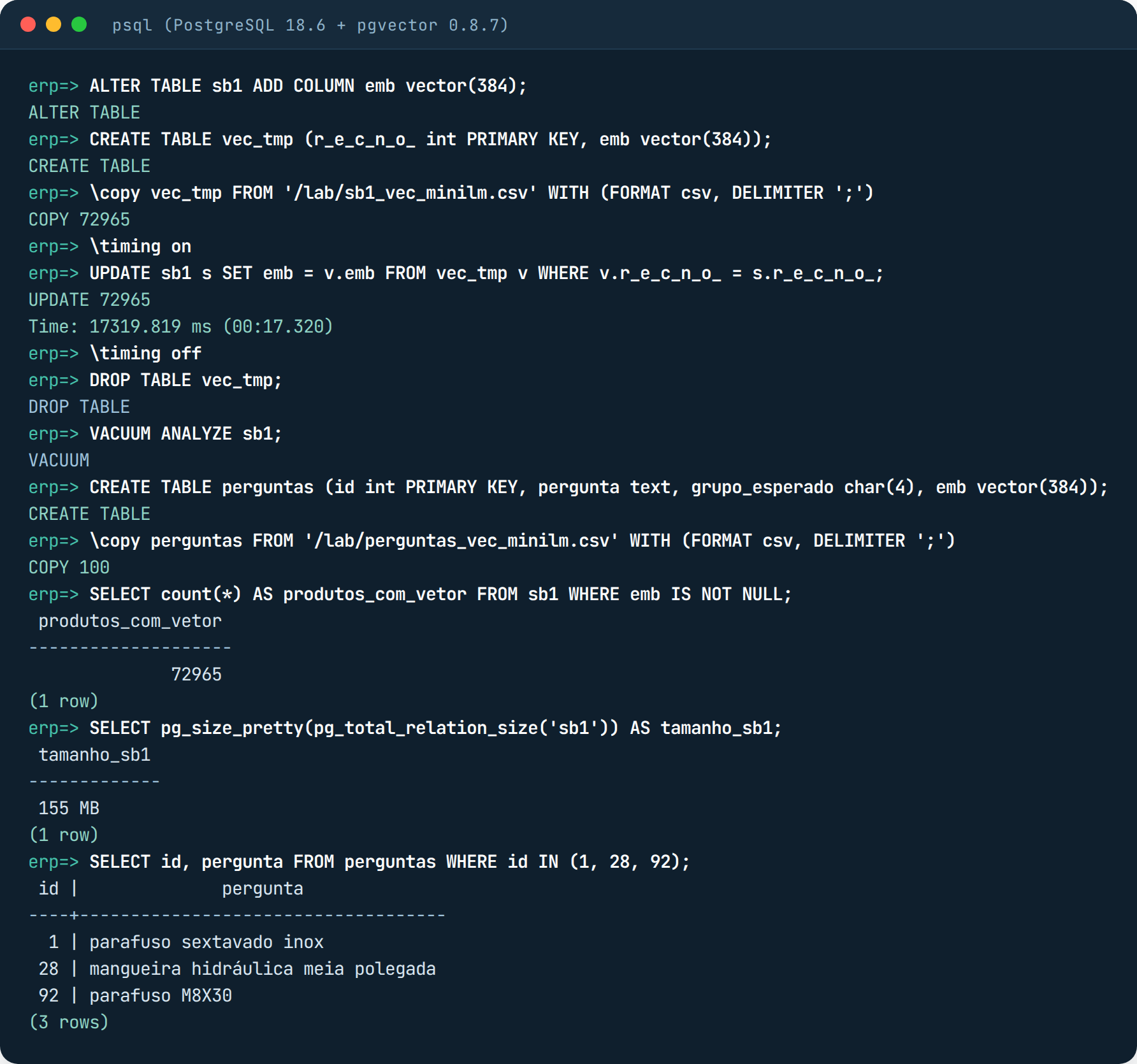
The questions. There are 100 of them, in everyday Portuguese: “parafuso sextavado inox”, “mangueira hidráulica meia polegada”, “luva de segurança nitrílica tamanho g” (stainless hex bolt, half-inch hydraulic hose, size L nitrile safety glove). Each one became a vector with the same model, and that vector was stored in a small table in each database, so the query does not depend on anything outside.
The measurement. A Python script asks the same 100 questions in each database, three times, throws away the first round (the warm-up) and records three things: the median, which is the “middle” time (half of the questions were faster, half slower); the p95, which is the time only 5% of the questions exceeded; and the recall, comparing the database’s answer with the full search done outside, on the same vectors. Since there are many repeated descriptions in the master data (identical vectors), recall compares by distance and not by product code, otherwise ties would drag the grade down for no reason.
The databases. PostgreSQL 18.6 with pgvector 0.8.7, Oracle AI Database 26ai Free (version 23.26.3), MySQL 9.7.4 Community and MariaDB 11.8.8, each in a Docker container, one at a time, on the same server with 2 vCPUs and 6.7 GB of RAM. SQL Server 2025 comes in through the documentation only. Now, one by one.
The indexes that show up in this lab, and the difference between them
First, what an execution plan is, because it shows up in several screenshots. When you send a SELECT, the database decides on its own how to fetch the data: read the whole table, go through an index, in what order. That decision is the plan. The EXPLAIN command shows the plan so you do not have to guess. In the PostgreSQL screenshots, Seq Scan means it read the 72,965 rows one by one; Index Scan using sb1_emb_hnsw means it went through the index. In Oracle it is the same thing with other names: TABLE ACCESS FULL is reading everything, VECTOR INDEX HNSW SCAN is going through the index. That is how I know whether the database used the shortcut or not, instead of trusting the timing.
With no index at all, the search is the full one: the database calculates the distance from the question to each of the 72,965 vectors and keeps the 10 smallest. That is what took 49 ms in PostgreSQL and 200 ms in Oracle. It is always right. The only problem is the time, which doubles if the table doubles.
HNSW is the index PostgreSQL and Oracle use, and the idea is a neighborhood map. When building the index, the database links each product to the few products most similar to it, like a network of friends. During the search, it enters the network at some point, looks at the neighbors, jumps to the one closest to the question, looks at that one’s neighbors, and keeps going until it finds nobody closer. Instead of 72,965 comparisons, it makes a few hundred. That is why it takes 0.6 ms instead of 50. The price is that it can stop in one corner of the map thinking it has arrived, when the right product was in another corner; that is where recall below 100% comes from. The ef_search setting, in pgvector, is how many candidates it carries in its pocket while it walks: with 40 (the default) it got 75% right, with 400 it got 94.5%, spending more time.
pgvector’s HNSW and Oracle’s are the same kind of map, but they live in different places. pgvector’s is written to disk, like any PostgreSQL index (it came to 36 MB), and the database brings into memory the piece it uses. Oracle’s exists only in RAM: the full name is ORGANIZATION INMEMORY NEIGHBOR GRAPH, and it lives in a reserved area called the vector pool. That is why in Oracle I had to configure vector_memory_size first, why the build took almost 2 minutes (it builds the whole network in memory and also tunes the accuracy) and why, if the database restarts, the index is built again. In return, Oracle lets you say how much it is allowed to miss, WITH TARGET ACCURACY 95, and it delivers: it came to 96%.
There is one difference that matters more than speed: how each one handles the WHERE. pgvector first walks the map, picks the candidates, and only then applies the filter; if no candidate passes the filter, it comes back empty. Oracle looks at the filter before deciding, and when it thinks the filter leaves few rows, it gives up on the map and runs the full search on those rows only. One errs on the low side, the other spends more. This shows up in each database’s tests.
The hybrid index, which only Oracle has, is something else: it is two indexes in one. A text index, from Oracle Text, which finds the exact word (the “M8X30”); and a vector index, which finds by meaning (“parafuso inox”). In the search both give a score, and the final score combines the two. And it generates the vectors by itself, with the model that sits inside the database, which is why it took 33 minutes to build: it was vectorizing 73 thousand descriptions.
SQL Server 2025’s is called DiskANN. It is also a neighborhood map, but designed to live on SSD, not only in memory, so it can fit a table larger than RAM. That is what is in preview. I did not measure it.
MariaDB has its own, called MHNSW. It is the same kind of neighborhood map as HNSW, stored inside InnoDB as a regular index on the table, and with one nice detail: MariaDB stores the index vectors in a compact form, so the search is fast and the accuracy came out high without touching anything (99% at the default). The setting for how many candidates to look at is called mhnsw_ef_search, and the default is 20. What it lacks is a way to fix the WHERE problem, like pgvector’s iterative scan; you will see that in the tests.
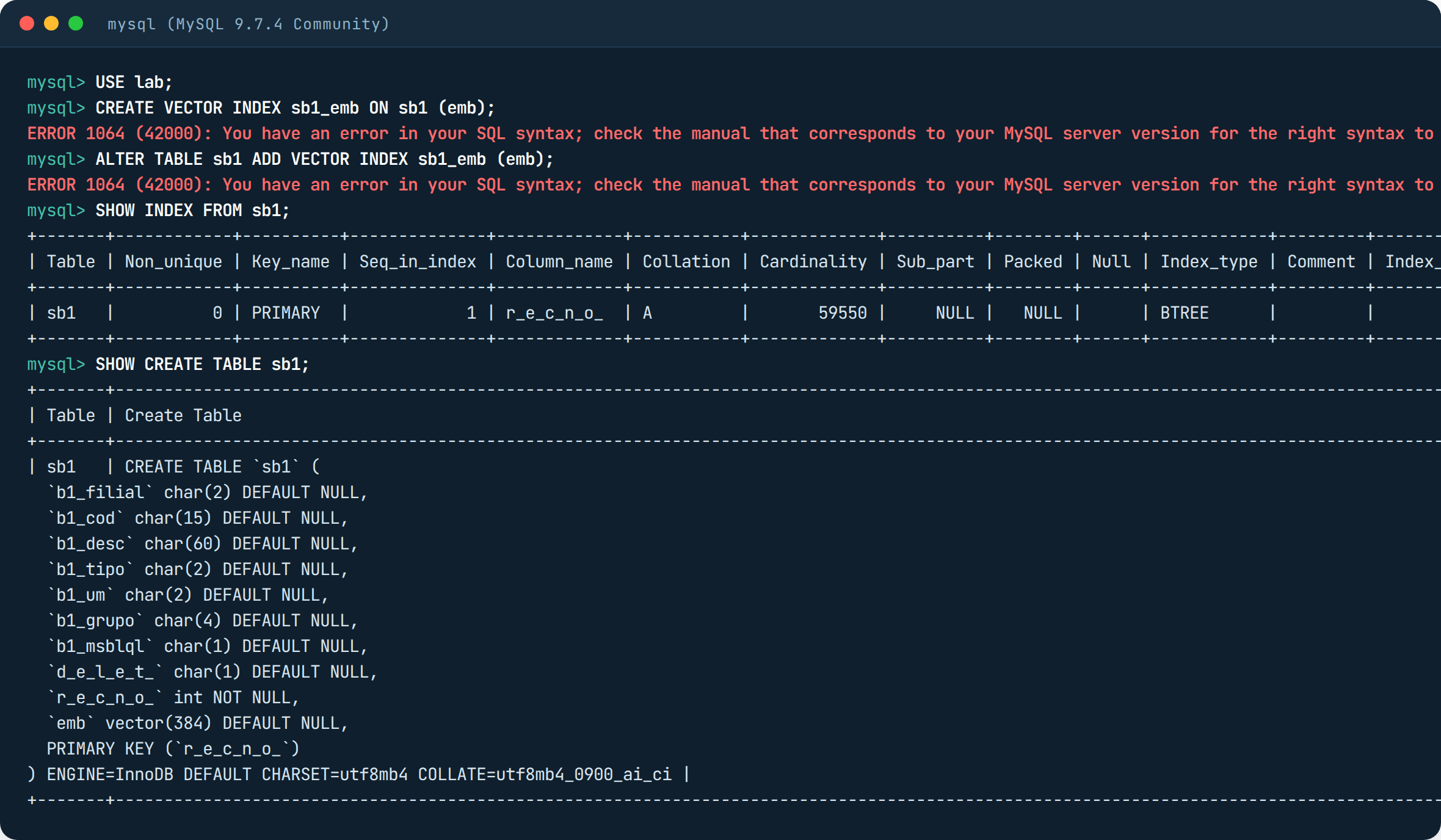
MySQL Community has no vector index at all, so it is not part of this conversation. Now the tests, one database at a time.
PostgreSQL with pgvector: it worked right away, until the filter arrived
pgvector is the extension that gives PostgreSQL the vector column type and the distance calculations. I created the vector(384) column, loaded the vectors from the file through a temporary table and ran an UPDATE to match each vector with its product: 11 seconds, 155 MB in total.
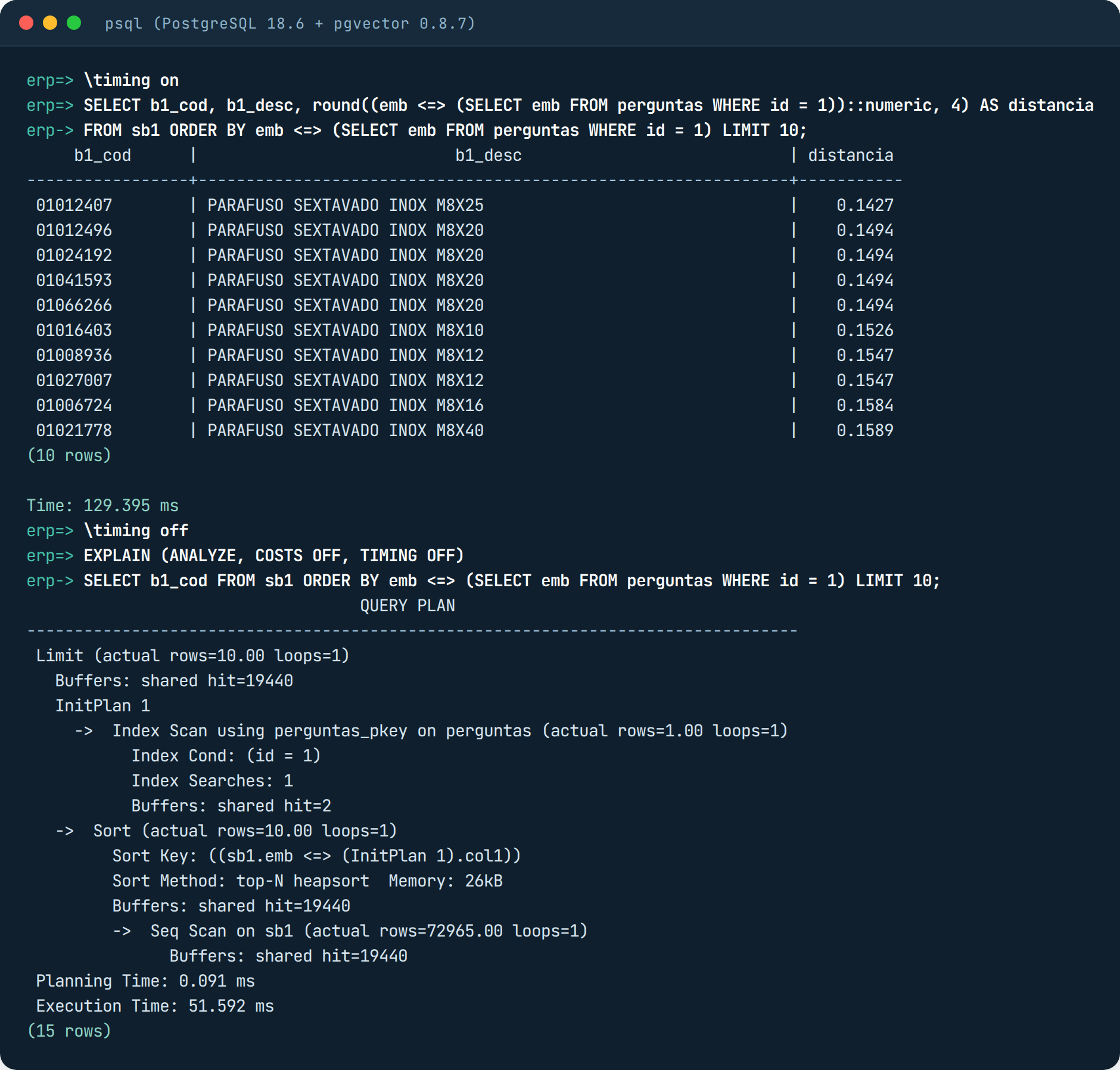
With no index at all the search already works. The <=> operator calculates the distance between two vectors, so ORDER BY emb <=> vector LIMIT 10 means “give me the 10 closest”. It returned the M8 stainless hex bolts in 50 ms. In the screenshot, below the result, is the plan: Seq Scan on sb1, meaning it read the 72,965 rows, and Buffers: shared hit=19440, which are the disk blocks it went through to do that. Keep that number in mind.
Then I went to create the HNSW index and hit the first error of the day:

This error is not pgvector’s, it is Docker’s. The container comes with a shared memory area (/dev/shm) of only 64 MB, and the index build asks for more than that to work in parallel. I started the container again with –shm-size=1g:
docker run -d --name pgvec --memory=2g --shm-size=1g -e POSTGRES_PASSWORD=lab \
  -p 55432:5432 -v /lab:/lab pgvector/pgvector:pg18 \
  -c shared_buffers=512MB -c maintenance_work_mem=512MB -c max_parallel_maintenance_workers=2

CREATE INDEX sb1_emb_hnsw ON sb1 USING hnsw (emb vector_cosine_ops);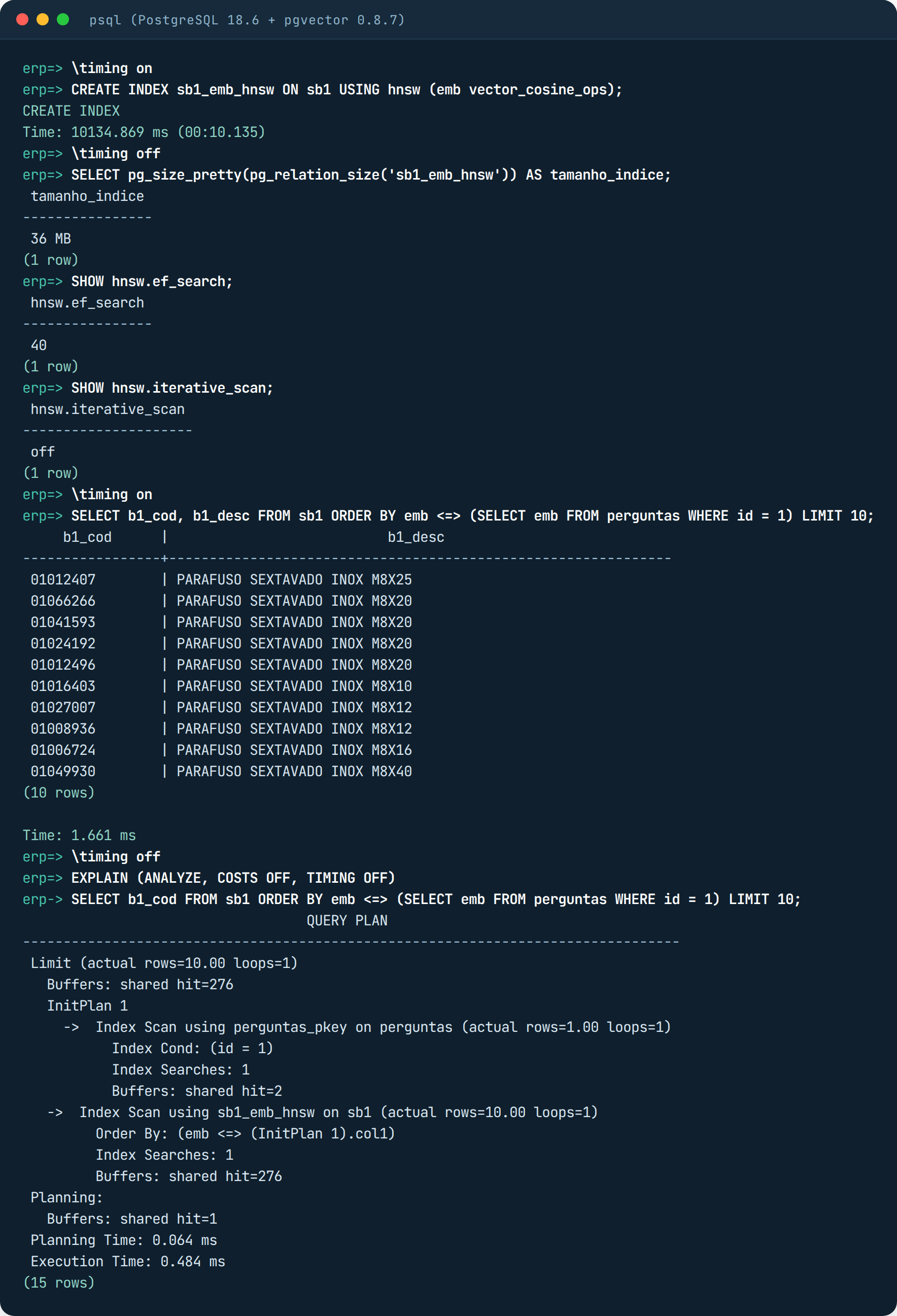
Index ready in 10 seconds, 36 MB. Look at the plan now: Index Scan using sb1_emb_hnsw, and the blocks dropped from 19,440 to 276. The same query went from 50 ms to 0.6 ms. But recall stayed at 75.6%, with ef_search at the default of 40. Raising it to 100 takes it to 84%, 200 takes it to 91%, 400 takes it to 94.5% and the query still stays at 2 ms. There is another reason for the low recall at the default: ERP master data has many repeated descriptions, and repeated vectors get in the way of the HNSW neighbor network.
Now what really matters: filters. No Protheus SQL runs without WHERE D_E_L_E_T_ = ‘ ‘ (only records that were not deleted), and almost always group, branch and type come along. I asked for “correia dentada” (timing belt) inside group 0020, which is the belts and transmission group and has 207 timing belts registered:
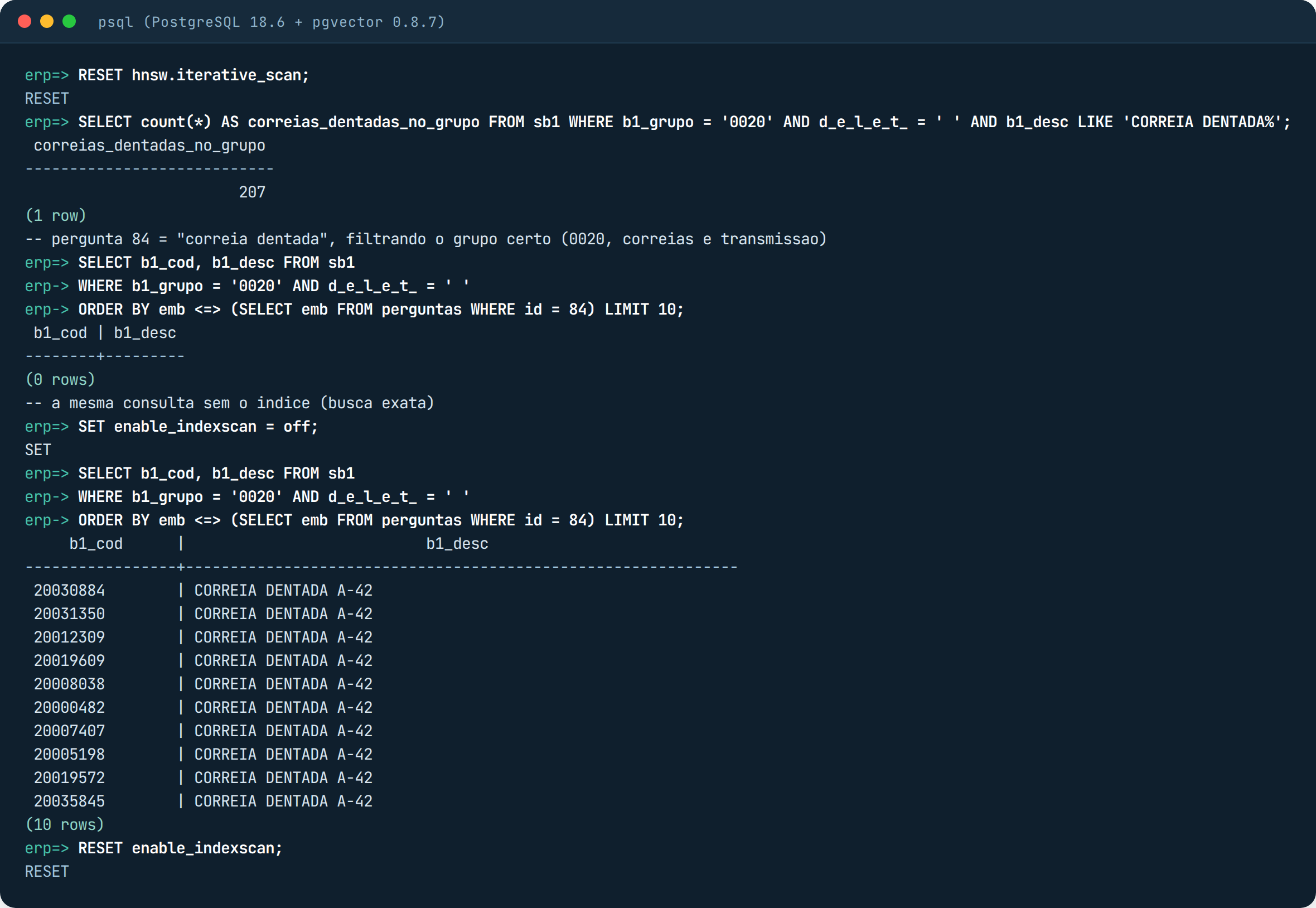
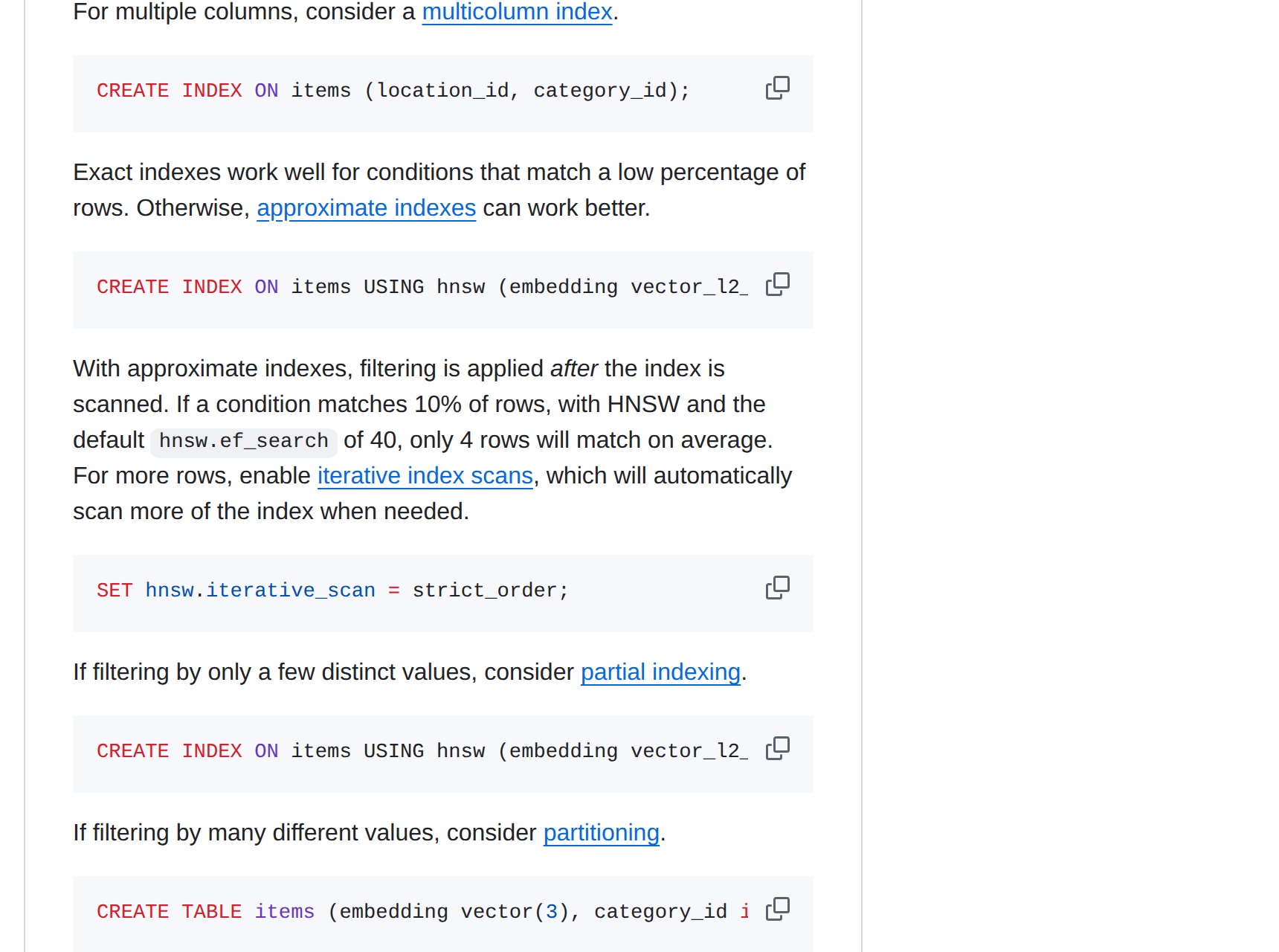
Zero rows. No error, no warning. The full search, on the same query, returns 10 timing belts. What happened: HNSW picked the 40 candidates most similar to “correia dentada” in the whole table, and only then did PostgreSQL apply the WHERE. None of the 40 was in group 0020 and not deleted, so nothing was left. For whoever is at the application screen, it looks like there is no timing belt in the catalog. pgvector’s own documentation describes this:
The fix has existed since version 0.8.0 and ships turned off: the iterative scan. With SET hnsw.iterative_scan = relaxed_order, the database keeps walking the map until it gathers 10 products that pass the filter, instead of stopping at the first 40.
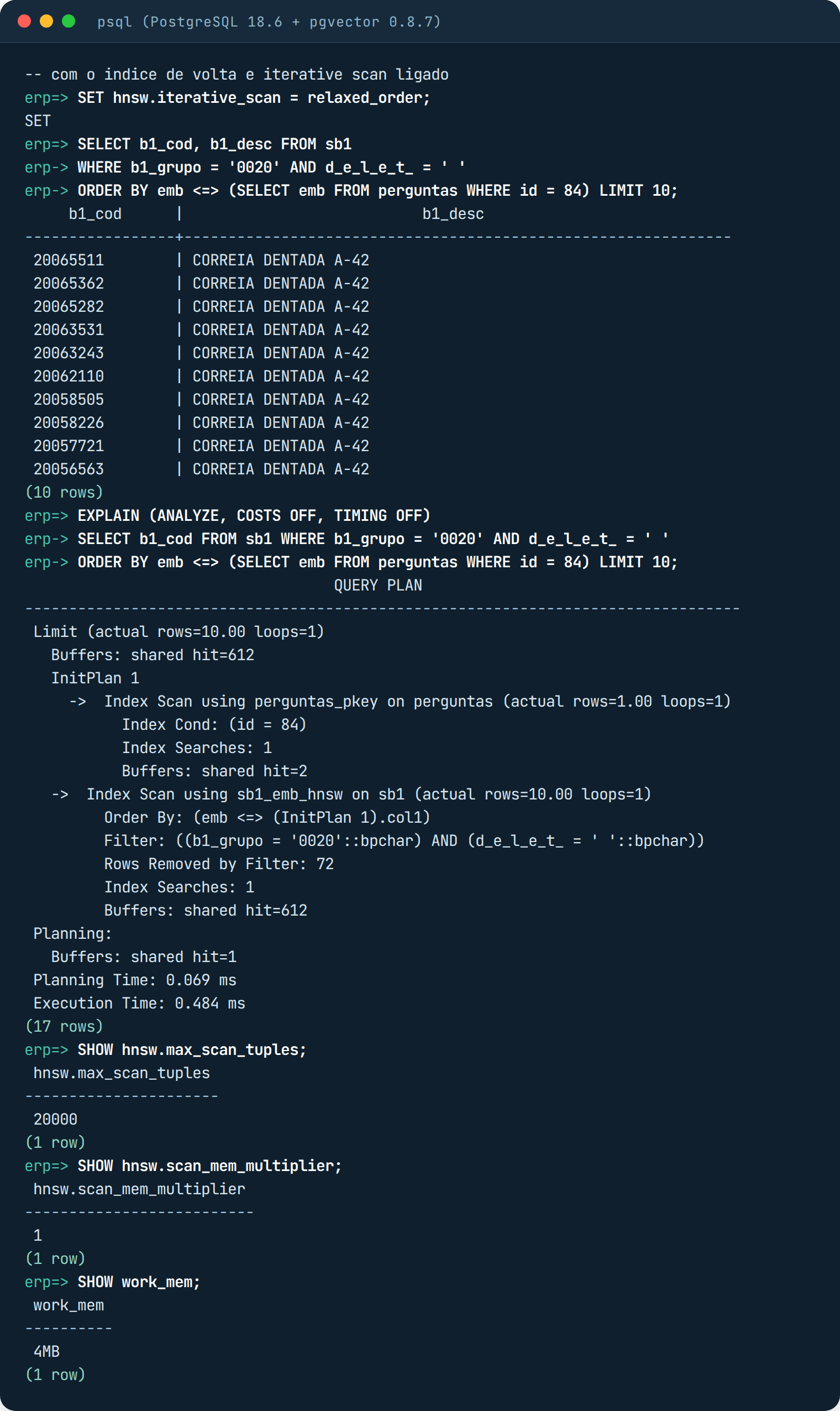
Across the 100 questions with this filter, the average number of rows returned was 0.3 with the default (that is, almost always empty), 9.2 with strict_order and 9.3 with relaxed_order, the latter with 91% recall and 12 ms per question. Seven questions stayed at zero even with much higher limits; they are questions that have nothing to do with the group (“cabo de rede”, “graxa”, meaning network cable and grease), but the full search returns 10 anyway. I have never seen an environment turn on iterative_scan before going through this scare.
Oracle 26ai AI Vector Search: the vector is born inside the database, but the memory does not come ready
Full Oracle AI Database 26ai Free image in a container, nothing to install. The column is of type VECTOR(384, FLOAT32): 384 numbers, each stored in 4 bytes. DESC shows DENSE, which means all 384 numbers are stored.
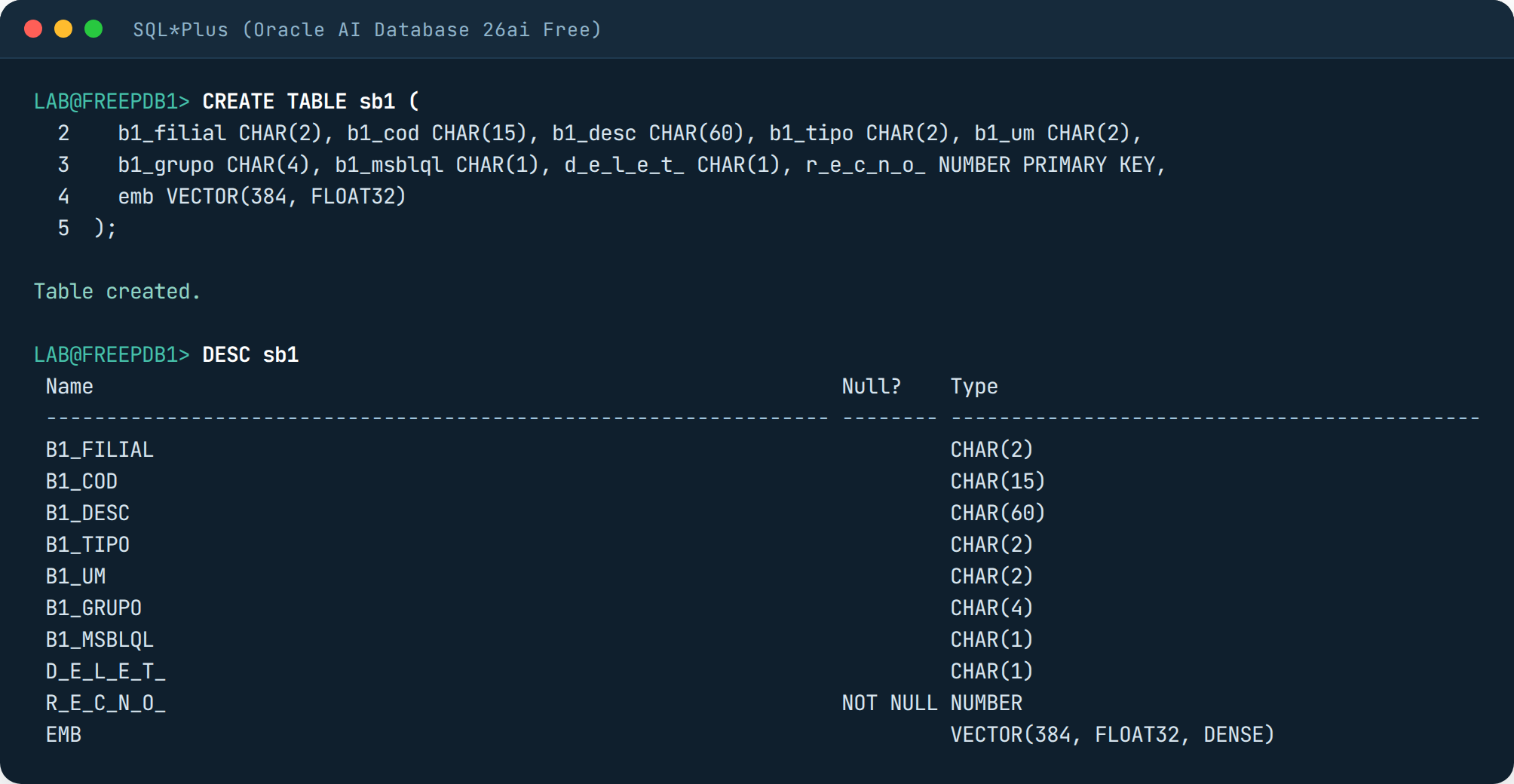
I loaded the same vectors from the file with a Python script (python-oracledb), using TO_VECTOR to convert the text into a vector: 18 seconds, 144 MB. My first blunder: COUNT(emb) on a VECTOR column raises ORA-22849, COUNT does not accept this type; count with IS NOT NULL. The full search, with VECTOR_DISTANCE, returned the same 10 bolts as PostgreSQL.
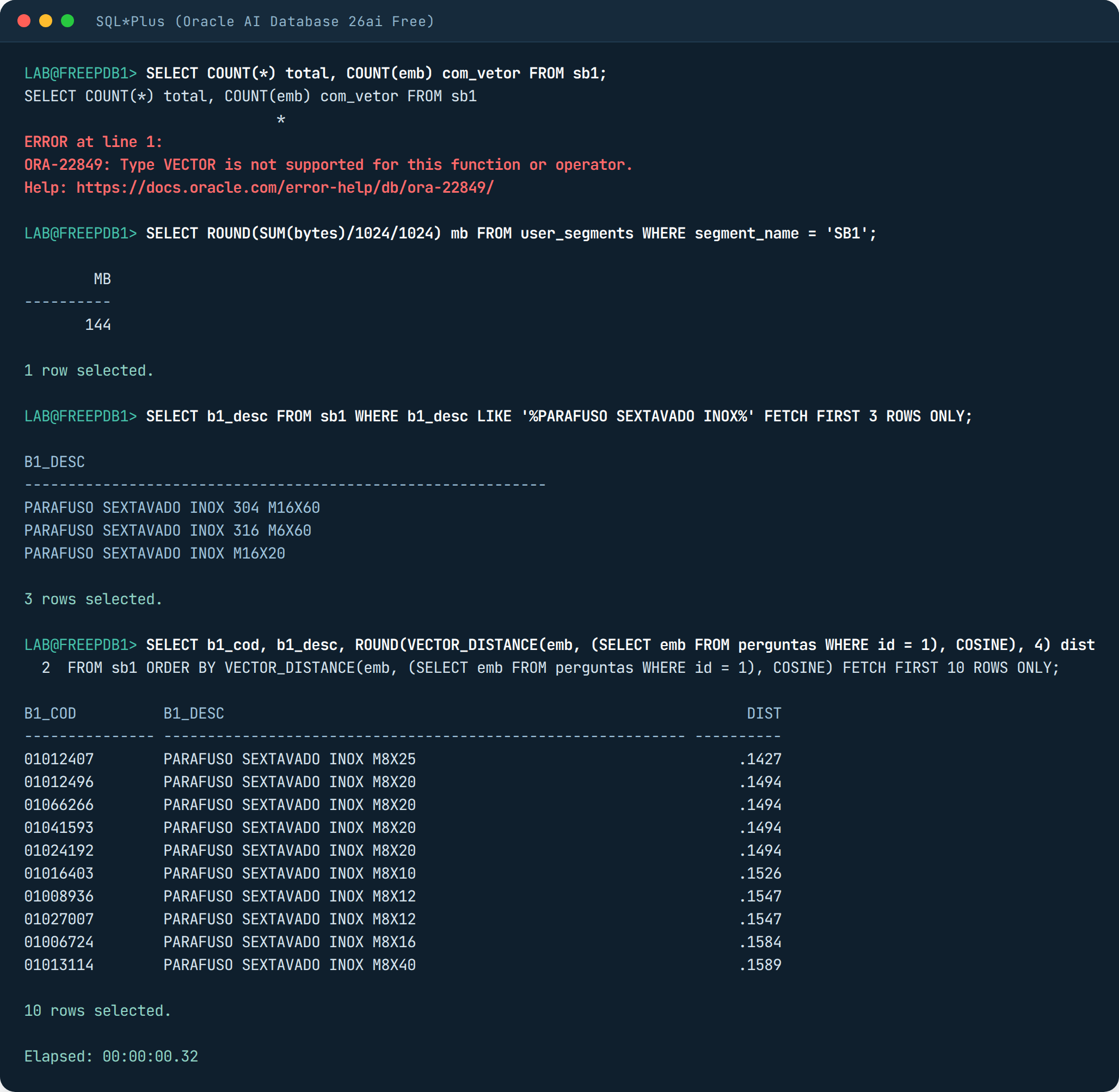
Measuring the 100 questions, the full search took 200 ms per question, four times PostgreSQL on the same machine.
The HNSW index in Oracle lives in RAM, in a reserved piece called the vector pool. In the Free edition that piece comes with size zero, and without it you cannot create the index:
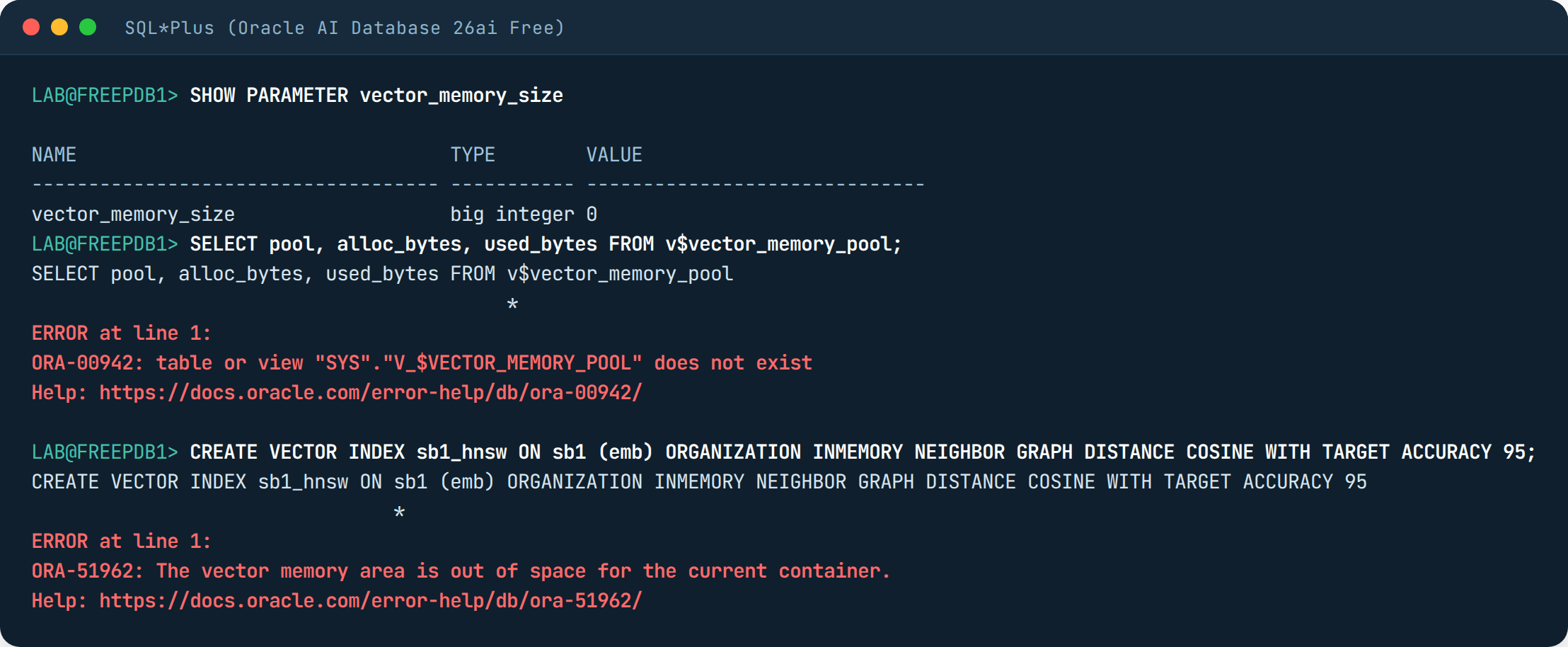
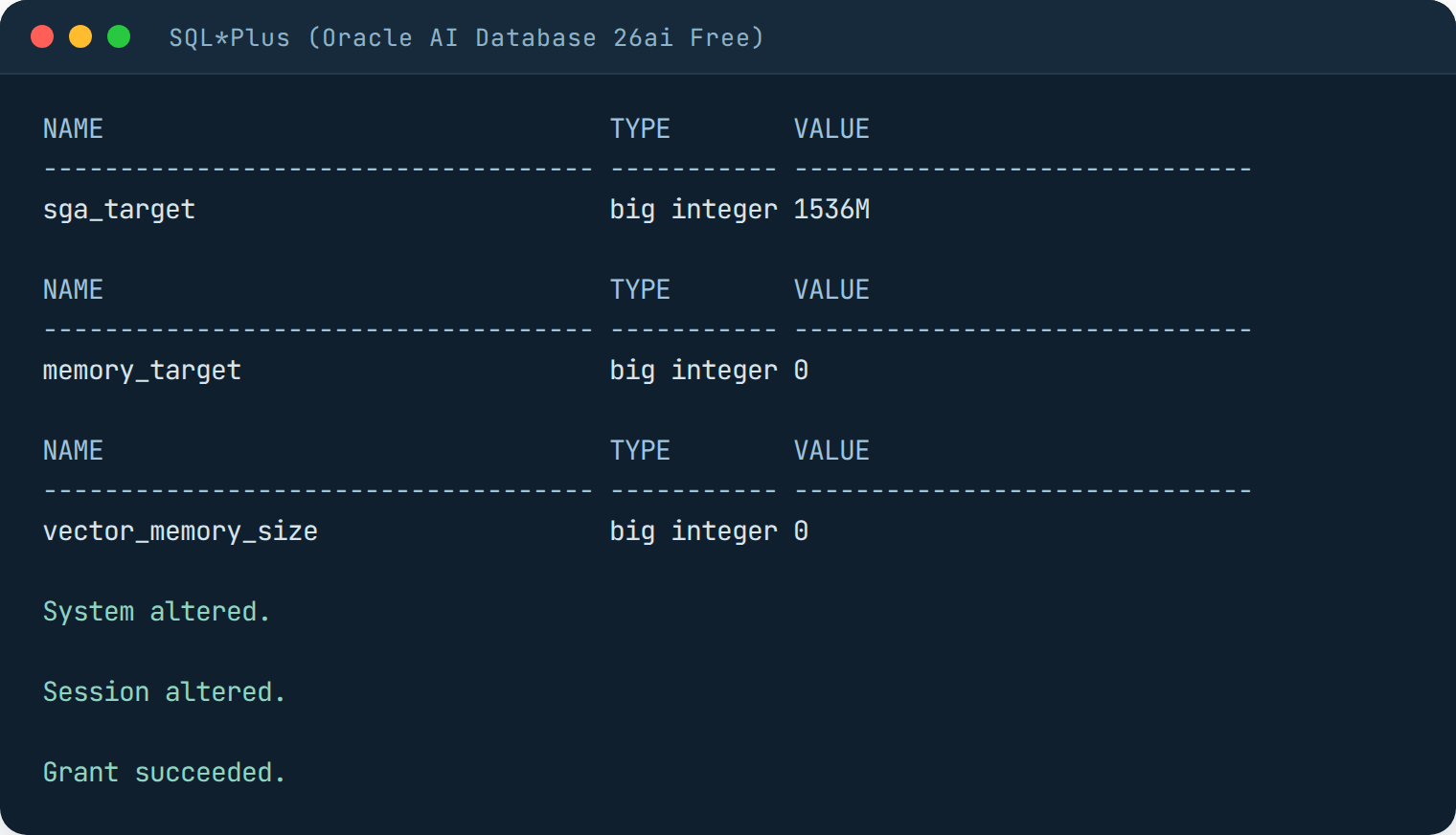
The setting goes in the root database (the CDB), as the SYS user, and only takes effect after a restart. The database’s total memory in the Free edition (sga_target) is 1536M, so reserving 512M for the pool fits. Restarting the container took 25 seconds.
With the pool up the index was created, but it took 1 minute and 47 seconds (pgvector did it in 10 seconds) and used 131 MB of the pool. Since it lives in memory, if the database restarts it is built again.
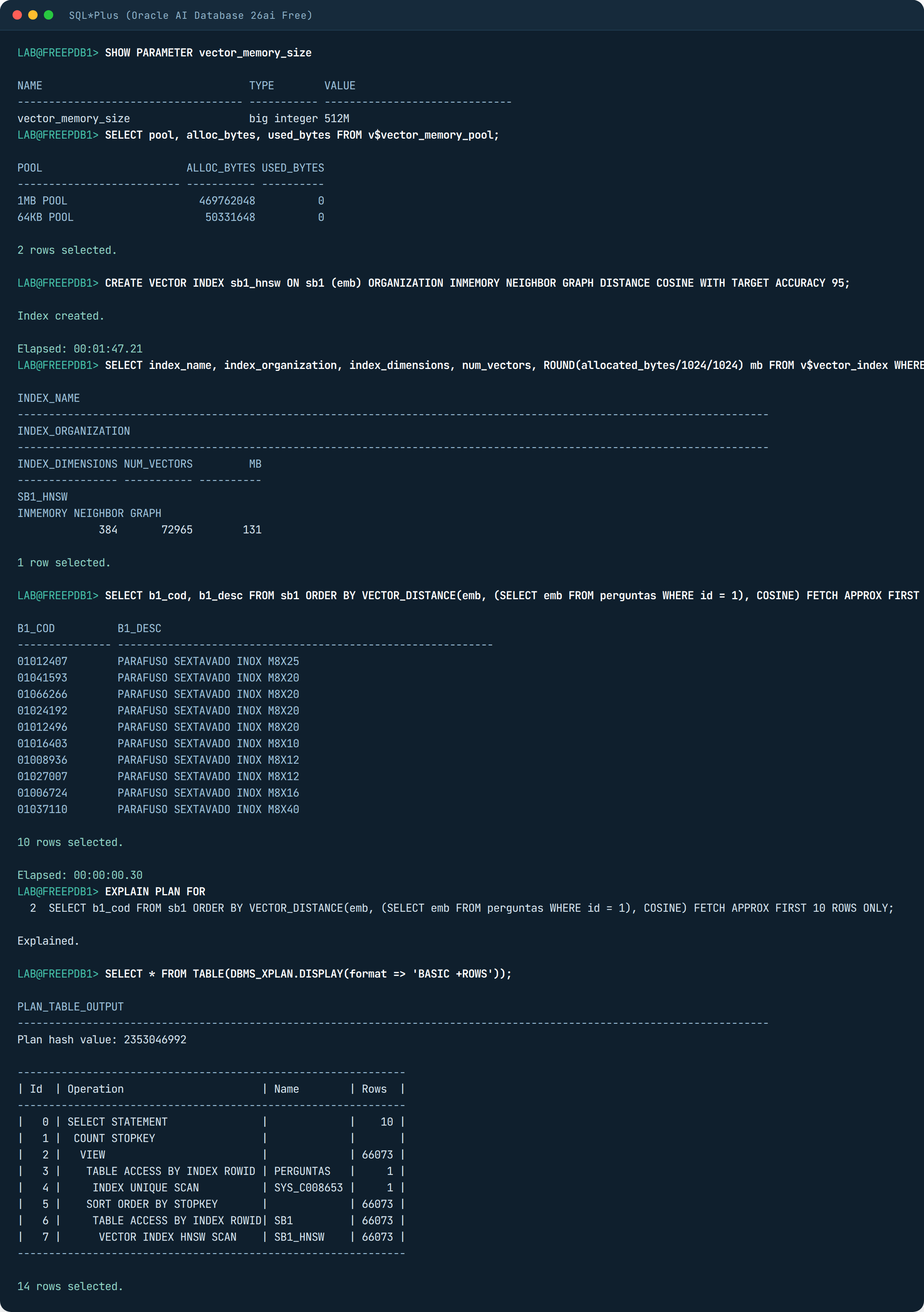
On the other hand, the query turned out well. In Oracle you ask it to use the index with FETCH APPROX FIRST 10 ROWS ONLY (APPROX means “it can be approximate”), and the plan confirms it: VECTOR INDEX HNSW SCAN. It took 1.36 ms per question with 96% recall. When creating the index I asked for WITH TARGET ACCURACY 95, which means “I want at least 95% accuracy”, and it delivered exactly that.
And the filter? The same “correia dentada” in group 0020:
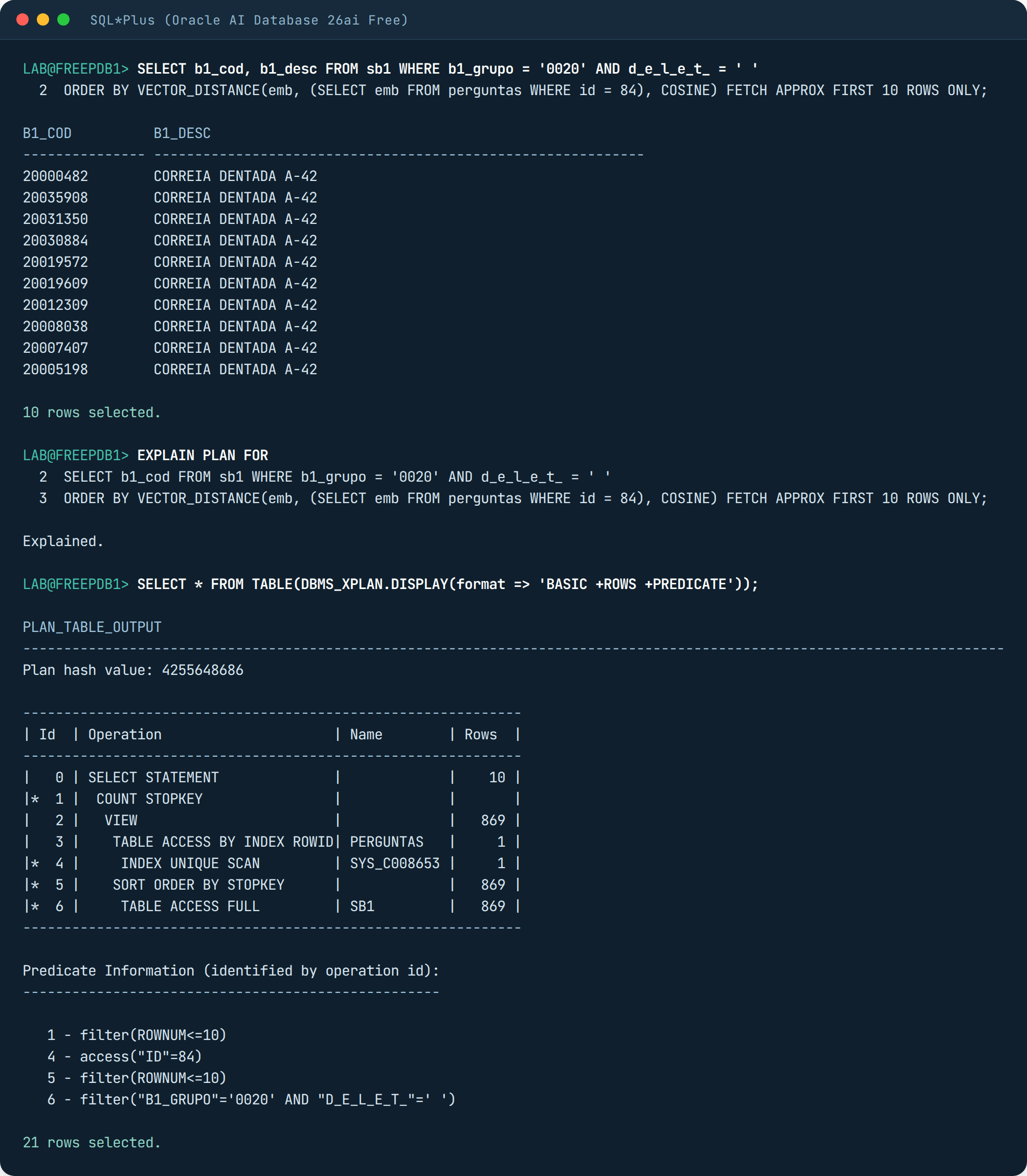
Ten correct rows. But look at the plan: TABLE ACCESS FULL, and no VECTOR INDEX in the list. The optimizer, which is the part of the database that chooses the plan, saw the filter, set the index aside and ran the full search on the 1,206 rows of the group. Across the 100 questions with the filter, 66 ms per question and 100% recall. In other words: PostgreSQL answered fast and empty, Oracle answered right and slow. Neither does what we want on its own. It is a DBA decision, and it has to be made before going to production, not after.
Now the part only Oracle has: the model inside the database. Remember that the model is the program that turns text into a vector? In PostgreSQL and MySQL it stays outside, in a Python process, and the application has to call that Python before asking the database. In Oracle you can load the model into the database itself. I downloaded the all_MiniLM_L12_v2.onnx that Oracle distributes in its own format (133 MB), put it in a folder the database can see (a DIRECTORY) and loaded it with DBMS_VECTOR.LOAD_ONNX_MODEL. From then on, SQL generates the vector by itself:
BEGIN
  DBMS_VECTOR.LOAD_ONNX_MODEL(directory => 'LAB_DIR', file_name => 'all_MiniLM_L12_v2.onnx', model_name => 'MINILM');
END;
/
SELECT VECTOR_EMBEDDING(minilm USING 'parafuso sextavado inox' AS data) FROM dual;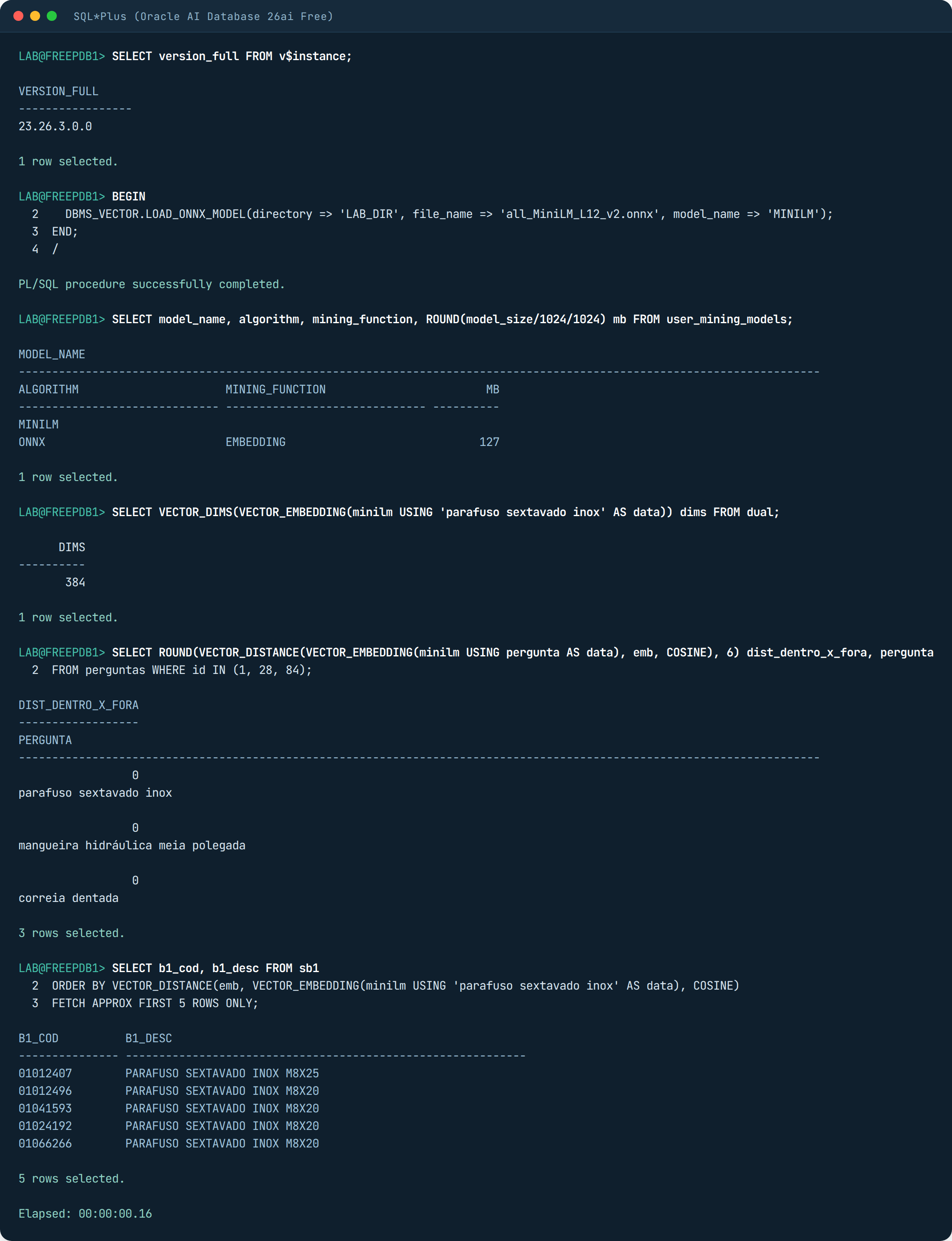
I compared the vector the database generated with the one I had generated outside, with ONNX Runtime, for the same text. Distance zero on the three questions I tested: it is the same model, it gives the same vector. In practice this solves a pain point: the application sends the search text and the database does the rest, with no Python service in the middle. Generating the question’s vector and searching, all together, took 0.16 seconds.
And there is the hybrid index. Hybrid here means it combines two searches into one: the exact word search (from Oracle Text, which is Oracle’s text search engine) and the search by meaning (the vector). A single command, CREATE HYBRID VECTOR INDEX on the B1_DESC column pointing to the model, makes Oracle generate the vector for the 73 thousand descriptions inside the database and build the text index along with it. It took 32 minutes and 59 seconds on this machine, and the index came to 171 MB.
CREATE HYBRID VECTOR INDEX sb1_hib ON sb1 (b1_desc) PARAMETERS ('MODEL MINILM');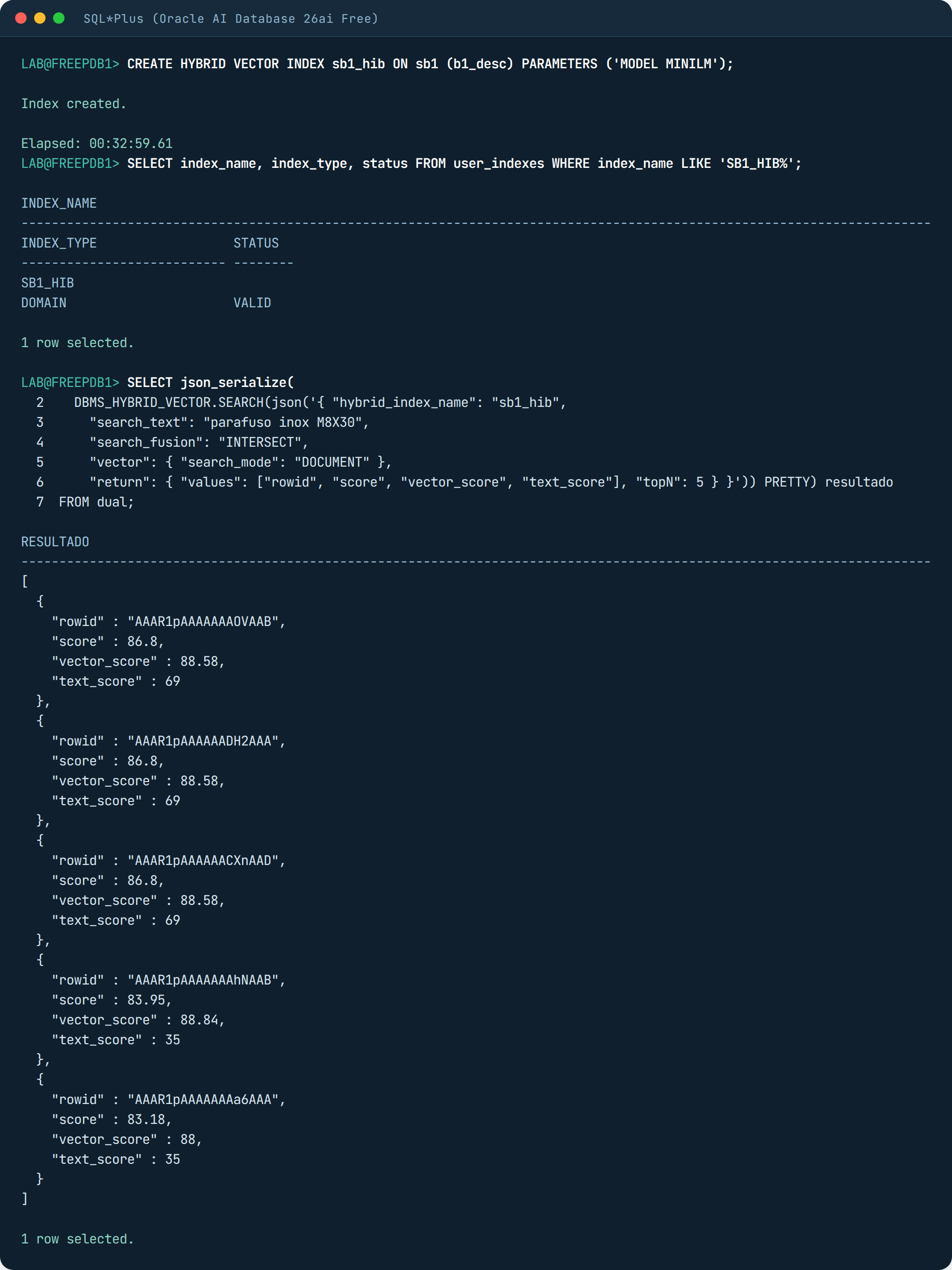
The search goes through the DBMS_HYBRID_VECTOR.SEARCH function. You pass the parameters as text in JSON format and it returns, also in JSON, the text score and the vector score of each product, separately. I joined the rowids (the address of each row) with SB1 to read the descriptions. The question was “parafuso inox M8X30”: M8X30 is a size code, it has to match exactly; “parafuso inox” (stainless bolt) is meaning.
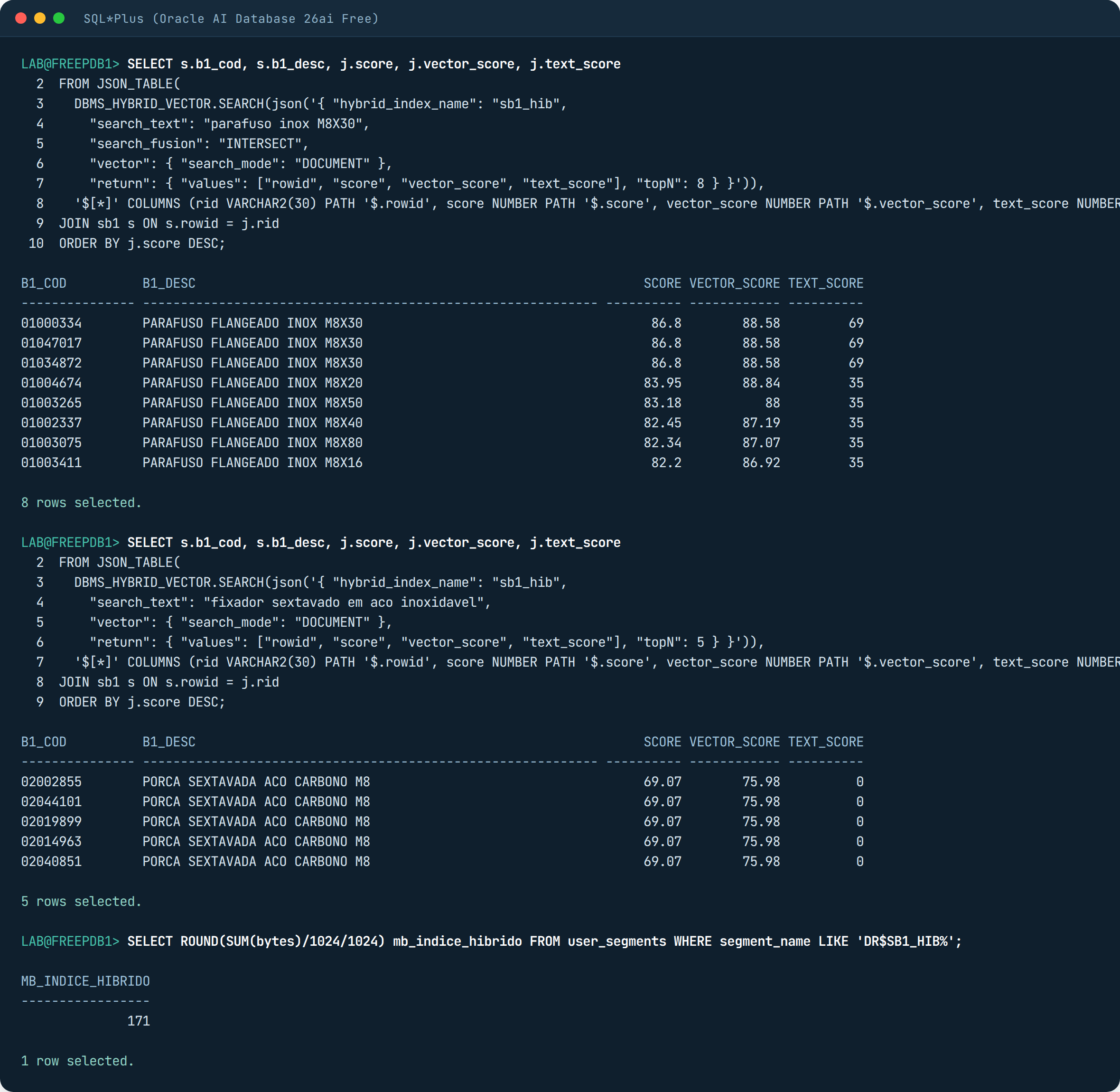
The first three are PARAFUSO FLANGEADO INOX M8X30, with text_score 69 because M8X30 matched; the next ones are M8X20, M8X50 and M8X40, similar in meaning but with text_score dropping to 35. On the second question, “fixador sextavado em aco inoxidavel” (hex fastener in stainless steel), no word exists in the master data written that way, text_score goes to zero and only the vector does the work: it brought hex nuts, which are relatives, but not bolts. For anyone with an ERP this is the most realistic scenario there is: product code is exact search, description is search by meaning, and the hybrid index does both in a single call.
MySQL 9.7 Community: it stores the vector and cannot compare it
MySQL 9.7.4 Community, which is the free edition and the LTS (long-term support) release from April 2026. I created the VECTOR(384) column, loaded SB1 with LOAD DATA and converted the vectors from the file with STRING_TO_VECTOR in an UPDATE: 66 seconds, far more than the other two, and 174 MB. VECTOR_DIM answers 384, so the whole vector is there. So far it looks promising.
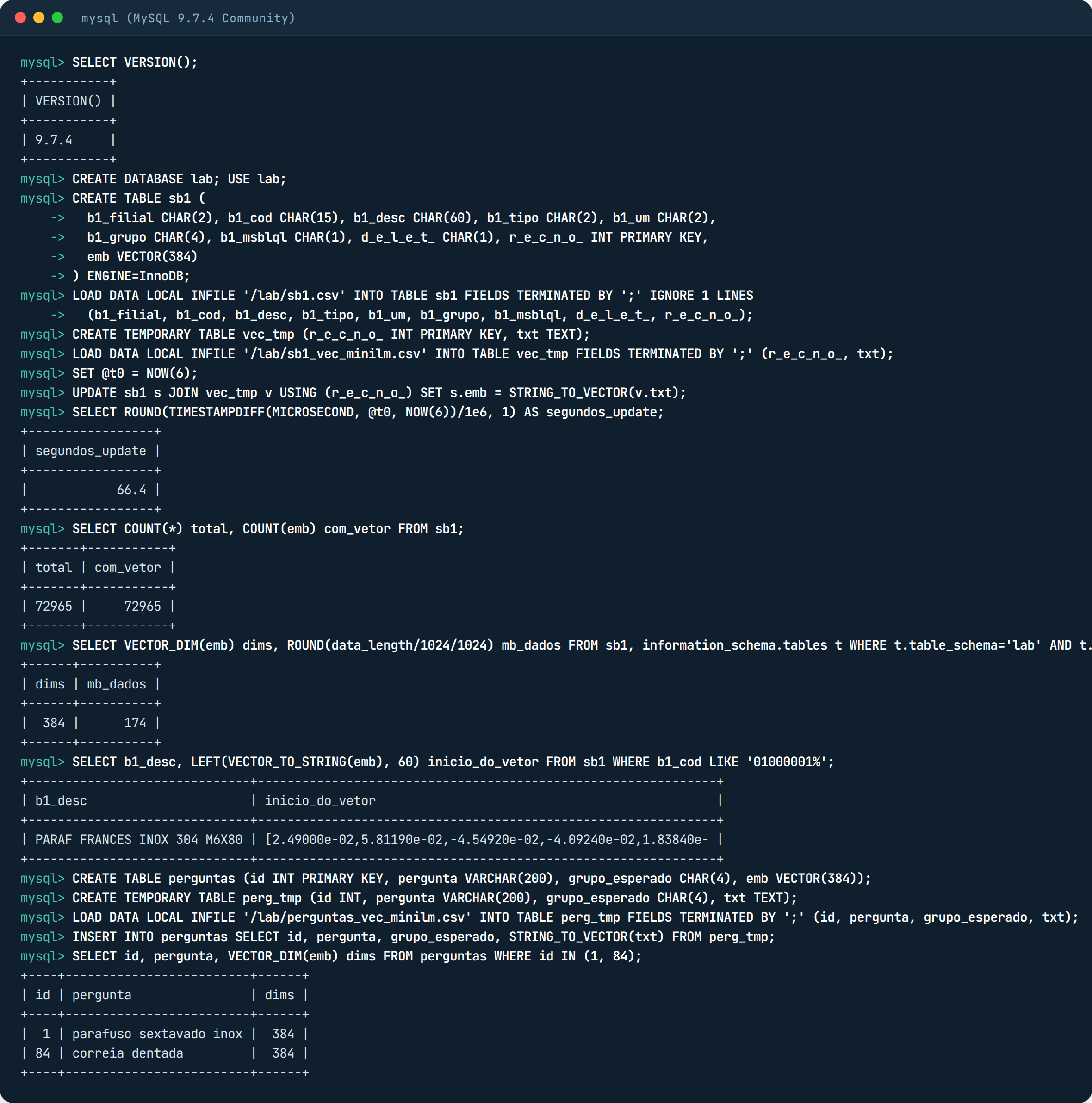
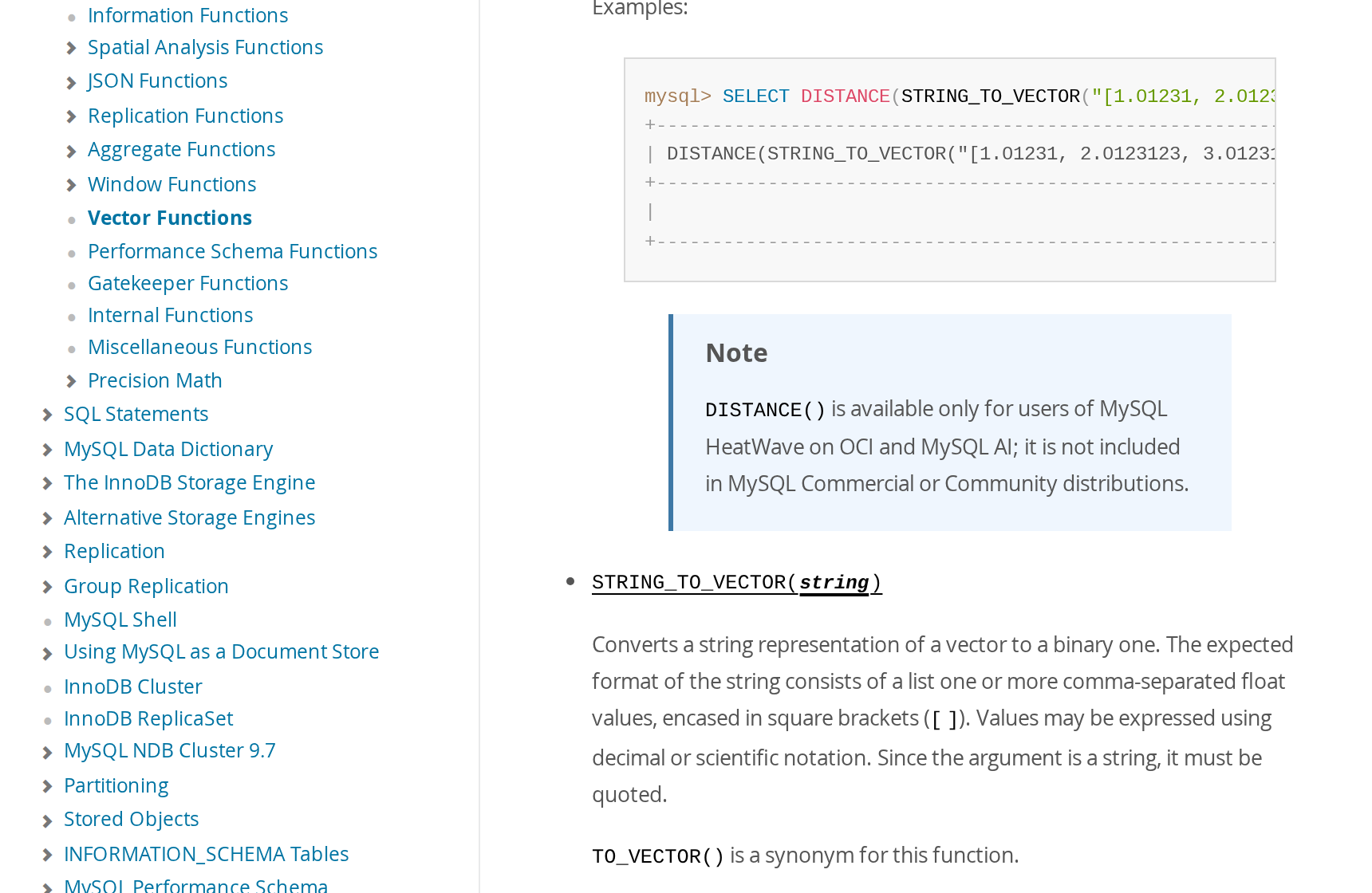
The problem shows up when it is time to compare. To find the similar ones, the database needs a function that calculates the distance between two vectors. In MySQL it is called DISTANCE():

It does not exist. Neither it nor the other name, VECTOR_DISTANCE. The manual explains: this function only ships in MySQL HeatWave (Oracle’s cloud version) and in MySQL AI. In Community and Commercial, it does not.
And MySQL Community has no vector index. I tried the two ways MySQL syntax would accept if it existed, and the database recognizes neither:
What you can do in Community is pull the vectors out of the database and compare in the application. I did it: fetching the 72,965 vectors took 15.8 seconds and used 112 MB of memory in the program; after that each question comes back in 9.5 ms, with 100% recall, because it is the full search. For 70 thousand products it gets by. For 7 million, it does not. Anyone who wants a vector index without leaving this family goes to MariaDB, which is next on the list.
MariaDB 11.8: the MySQL cousin that has an index
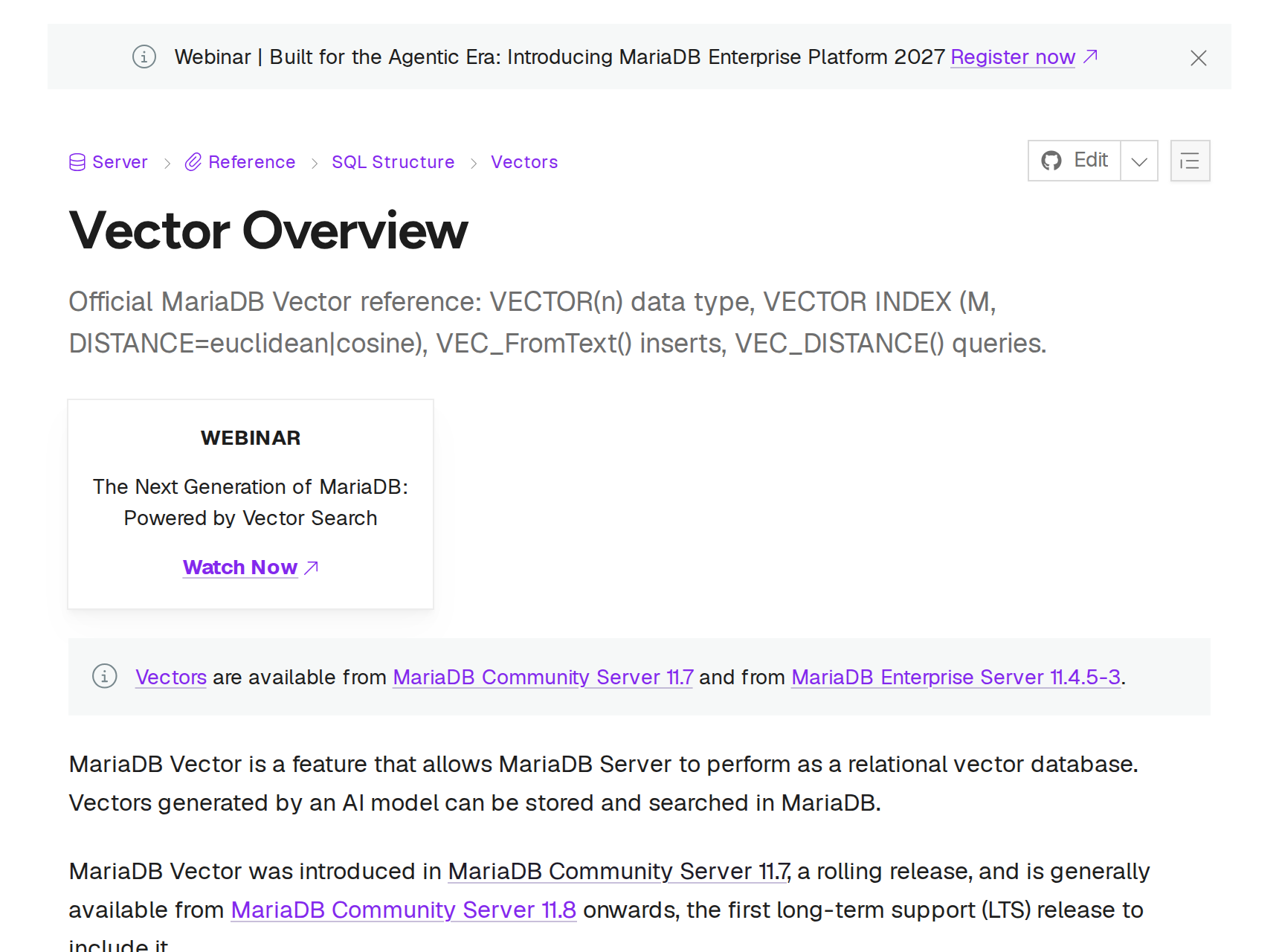
MariaDB split from MySQL in 2009 and today it is a different database, but those who have MySQL can usually switch to it without touching the application. Since version 11.7, and in 11.8, which is the LTS, it has the VECTOR type, the distance functions and the vector index, all in the free edition. I tested 11.8.8. The column is VECTOR(384) NOT NULL (the NOT NULL is mandatory for indexing), and the load used LOAD DATA plus VEC_FromText, which converts the text into a vector: 10 seconds.
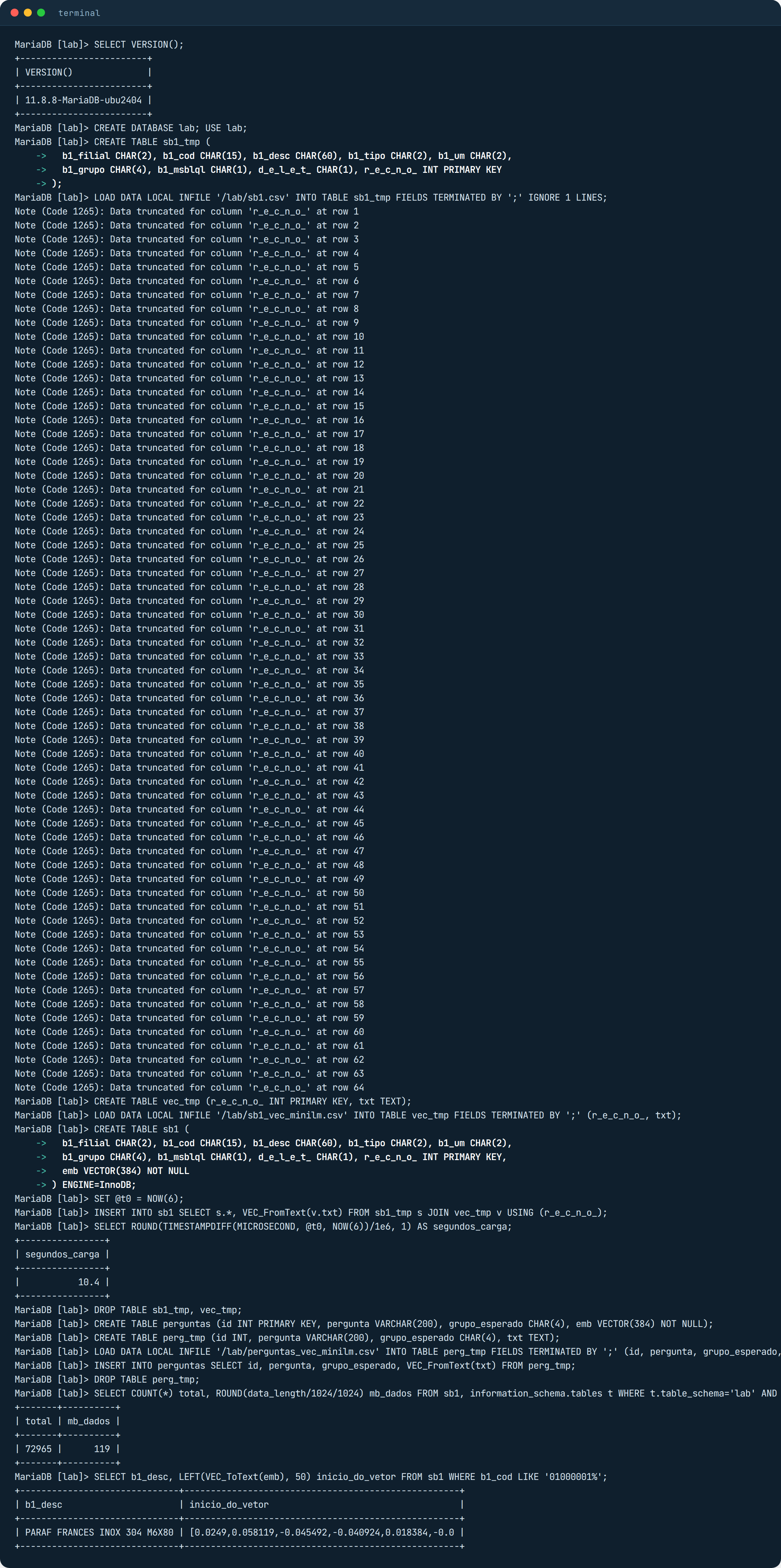
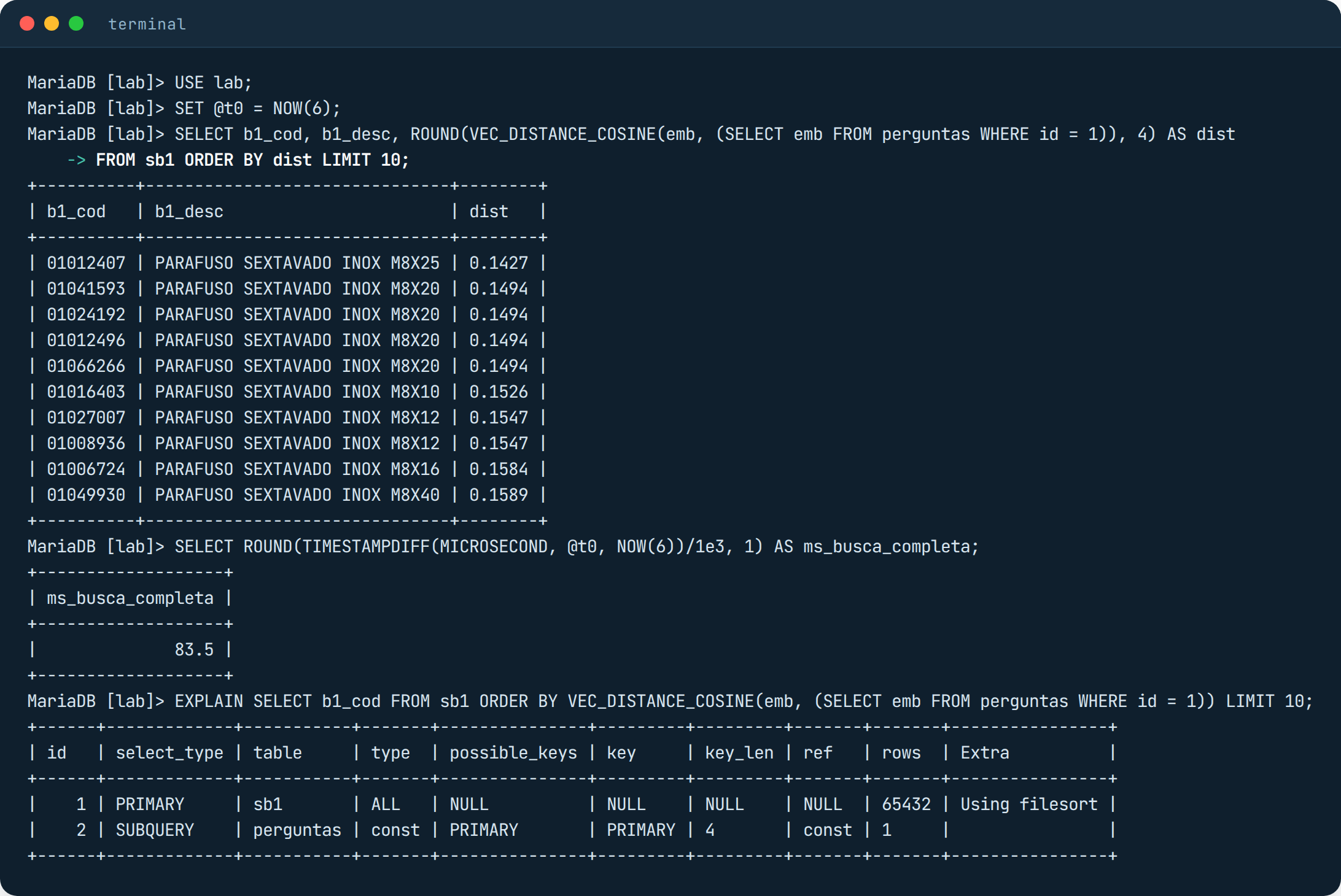
The full search works right away with VEC_DISTANCE_COSINE, and EXPLAIN shows type ALL with Using filesort, which means “I read the whole table and sorted it”. It took 83 ms in the client and 87 ms per question in the measurement, close to PostgreSQL.
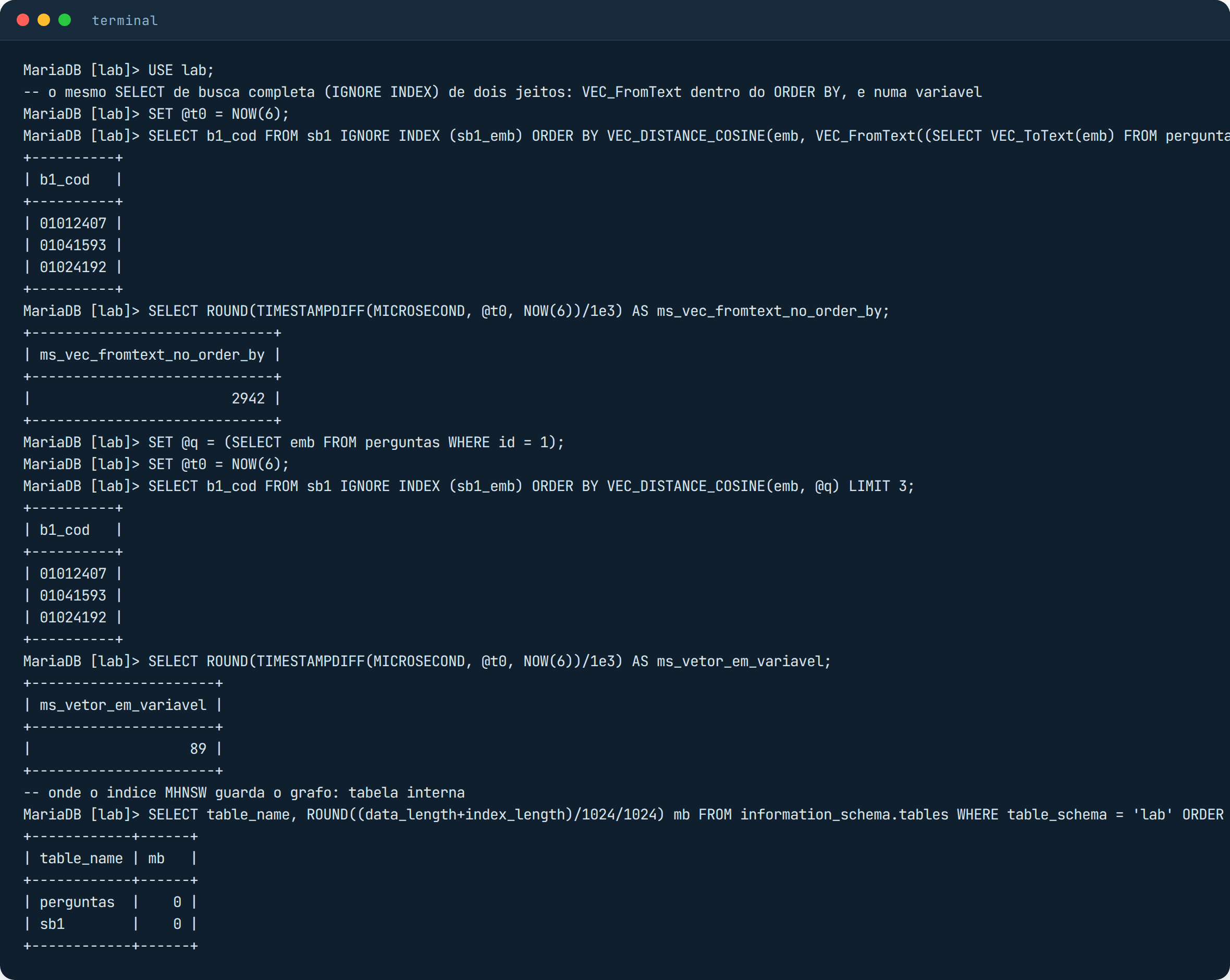
Before the index, a catch that cost me dearly in my measurement script. If the text-to-vector conversion, VEC_FromText, sits inside the ORDER BY, MariaDB redoes that conversion for each of the 72,965 rows, and the same query goes from 89 ms to 2.9 seconds. The way out is to convert once, into a variable, and use the variable in the query. That is how the application should send the question’s vector.
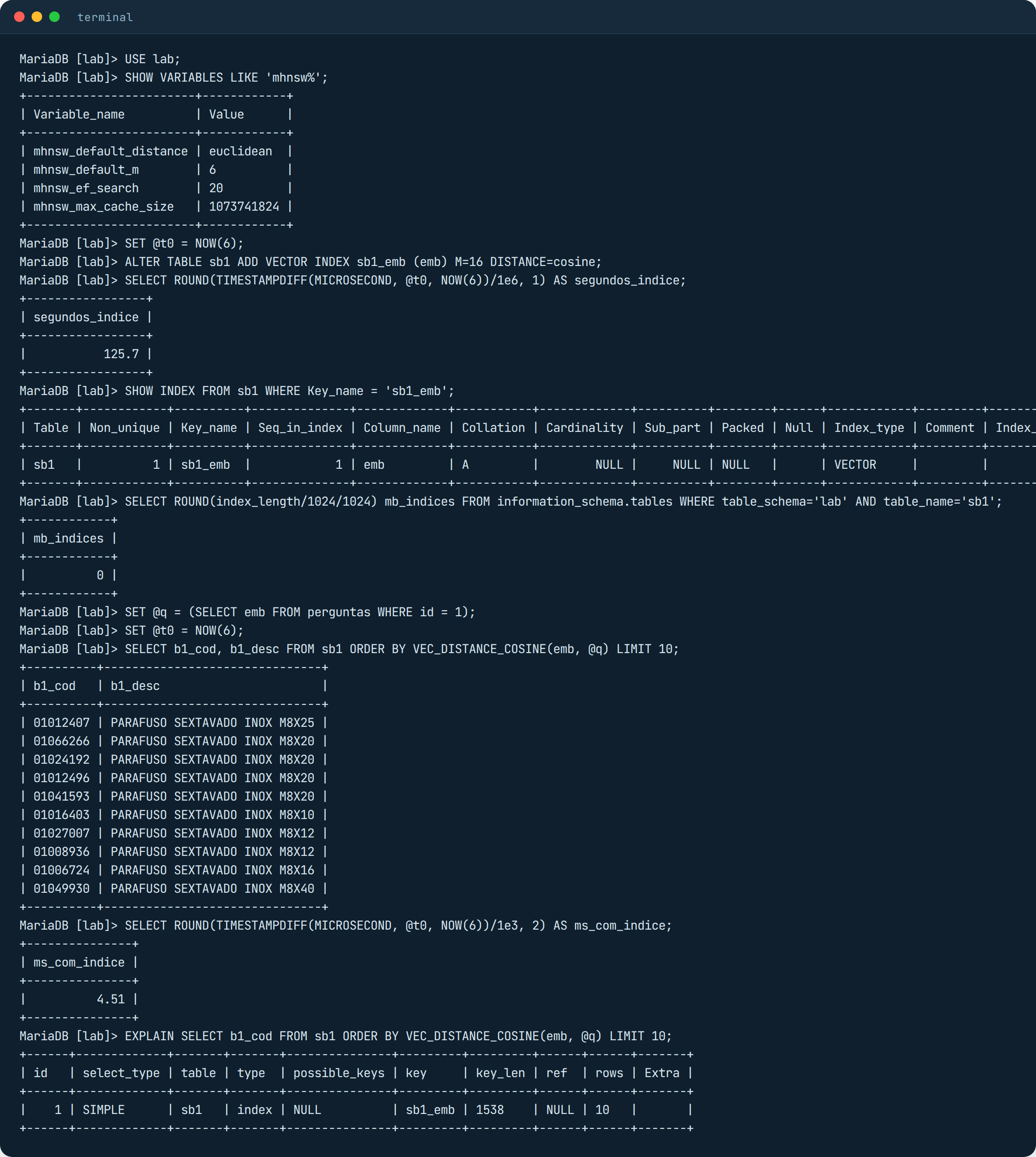
The index comes in with ALTER TABLE … ADD VECTOR INDEX, and you can choose M (how many neighbors each point on the map keeps) and the distance. I used M=16 and cosine, same as the others. It took 2 minutes and 6 seconds to build, more than pgvector (10 seconds) and close to Oracle (1 minute and 47). After that EXPLAIN shows the sb1_emb index being used and the query dropped from 83 ms to 4.5 ms in the client and 0.76 ms per question in the measurement, with 99% recall at the default (mhnsw_ef_search = 20). It was the best accuracy with factory settings among the databases in the lab.
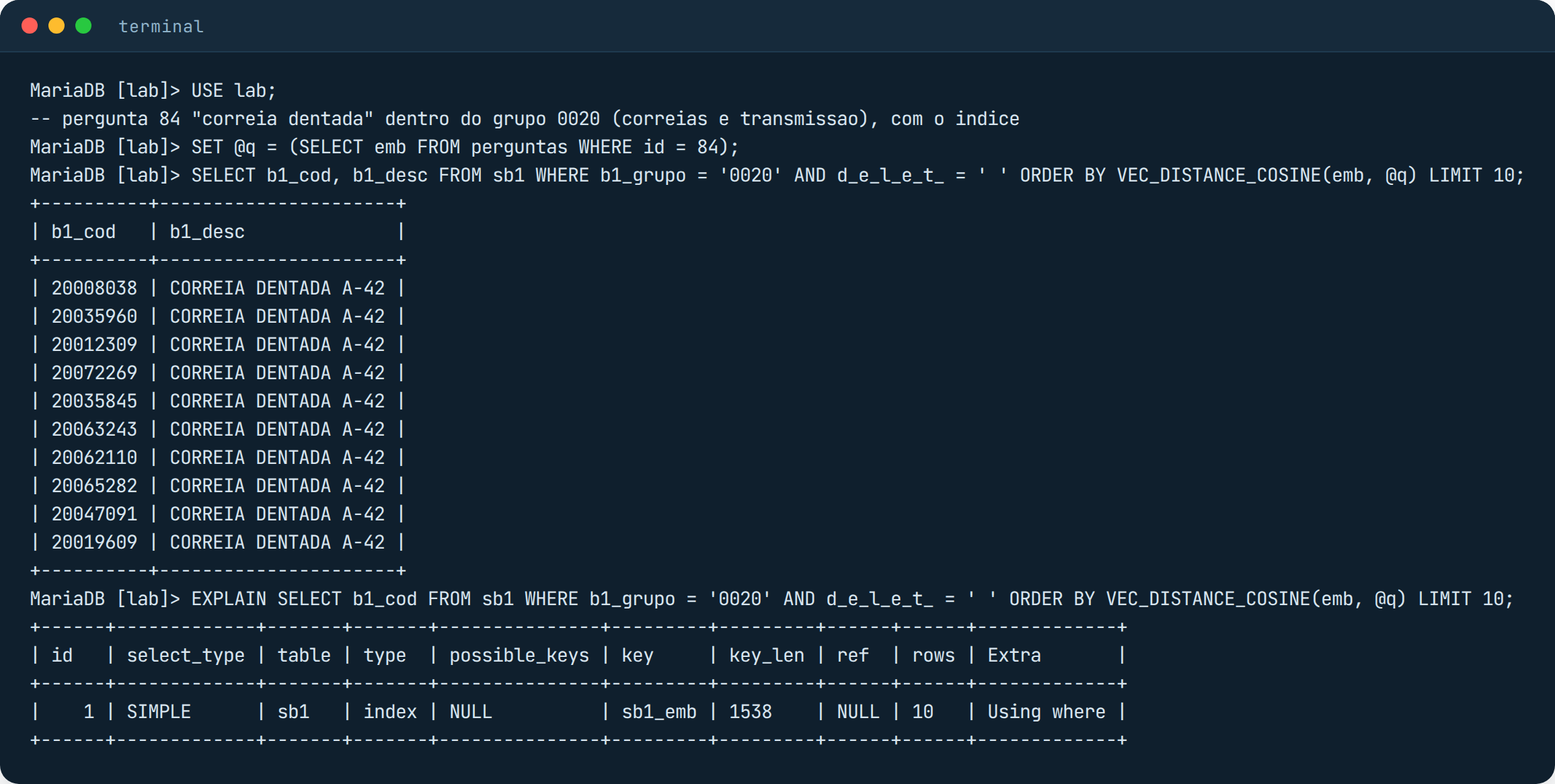
And the filter, the same “correia dentada” in group 0020? On screen, it came back right: 10 timing belts, with EXPLAIN showing the index plus Using where. But that question got lucky. Across the 100 questions with the filter, MariaDB returned on average 3.3 rows out of 10, with a minimum of zero and 25.8% recall, and the time ranged from 26 ms at the median up to 1.8 seconds in the worst cases. It behaves like pgvector without iterative scan: it walks the map, picks candidates and applies the WHERE afterward; when the candidates do not pass, it tries a little longer and gives up. Raising mhnsw_ef_search to 200 did not help (1.9 rows on average). For ERP queries with filters, today, this is its weak spot.
SQL Server 2025 and the VECTOR type: no lab here
I did not run the lab on SQL Server 2025 because of licensing, so nothing that follows was measured by me. It is what Microsoft’s documentation said on November 9, 2026, and it is worth checking against your version before counting on anything.
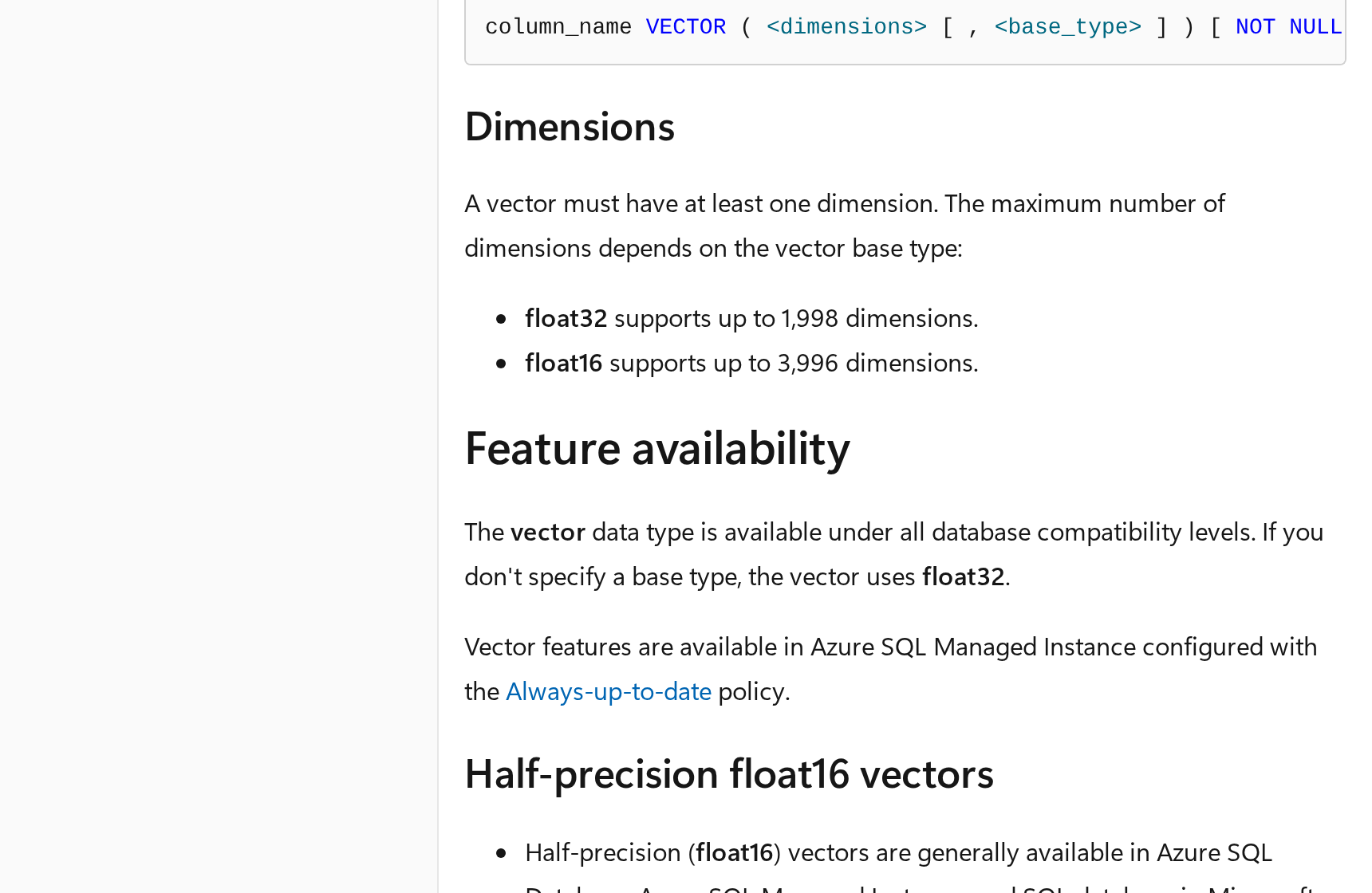
The VECTOR type is production ready (GA, which means “available to everyone”): it stores up to 1,998 numbers per vector in the regular format (float32) and up to 3,996 in the compact format (float16), with float16 still in preview on SQL Server 2025 installed on your own machine. Preview means “in testing, may change, Microsoft does not recommend it for production”. The full search, with VECTOR_DISTANCE and ORDER BY, works without turning anything on, just like the one I ran on the other databases with no index. The index (CREATE VECTOR INDEX, of the DiskANN type) and the indexed search function (VECTOR_SEARCH), however, are preview on SQL Server 2025: to use them, you have to turn them on with ALTER DATABASE SCOPED CONFIGURATION SET PREVIEW_FEATURES = ON. On Azure SQL Database, which is the cloud version, both are already GA.
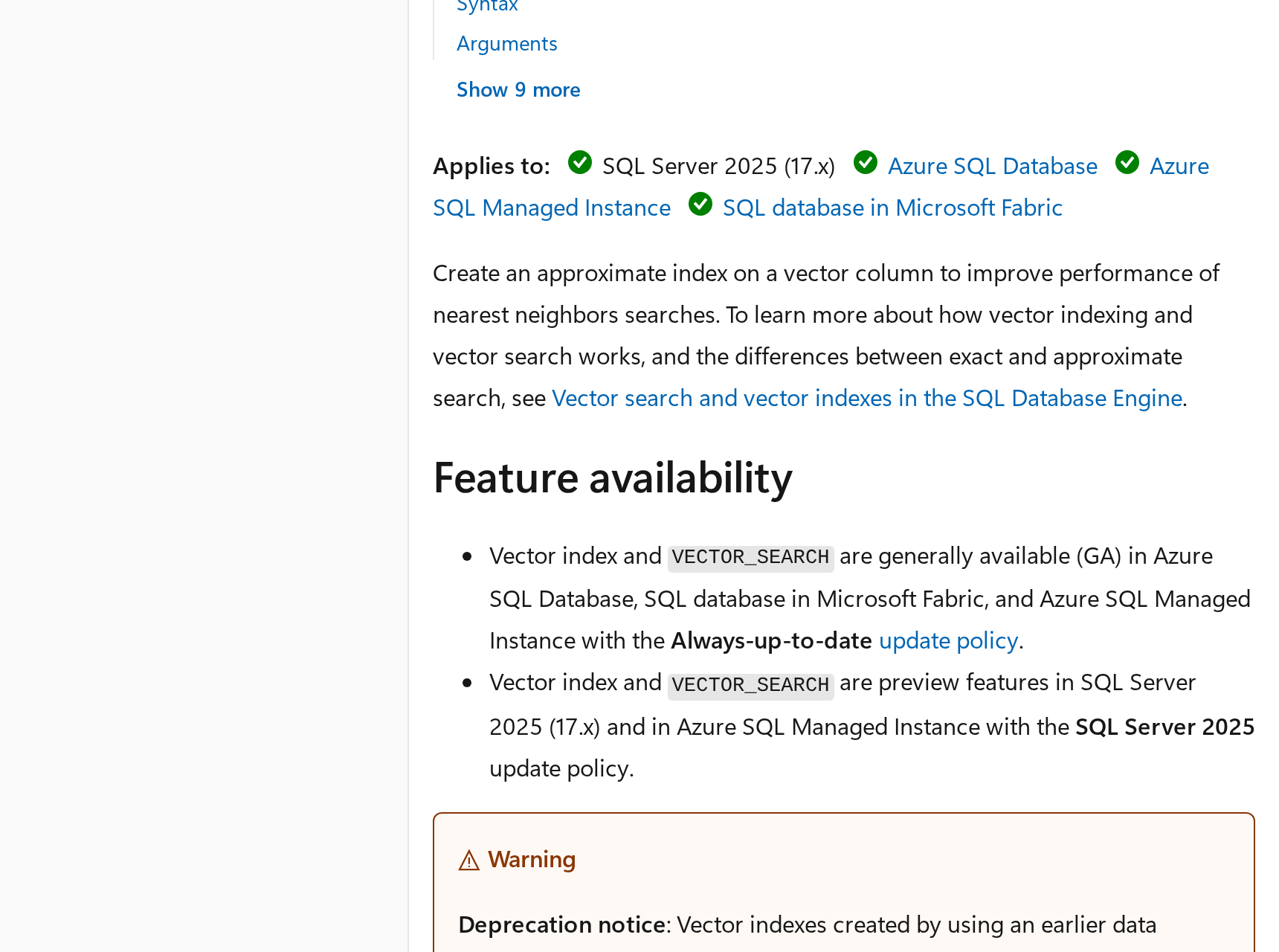
There is one more detail the documentation leaves in the middle of the text. There is a new version of the index, which accepts INSERT, UPDATE and DELETE on the table and applies the WHERE filter during the search; that version is in the cloud. The previous version leaves the table read-only after the index is created, and the documentation warns that the filter may return fewer rows than expected, the same behavior I saw in pgvector. Before counting on a vector index in an installed SQL Server, check which index version you have in sys.vector_indexes.
Comparing the five: which vector database does it best
All the numbers shown above came from the measurement script, exactly as it printed them. These are lab numbers, good for comparing the databases against each other on the same machine, not for promising anything to anyone.
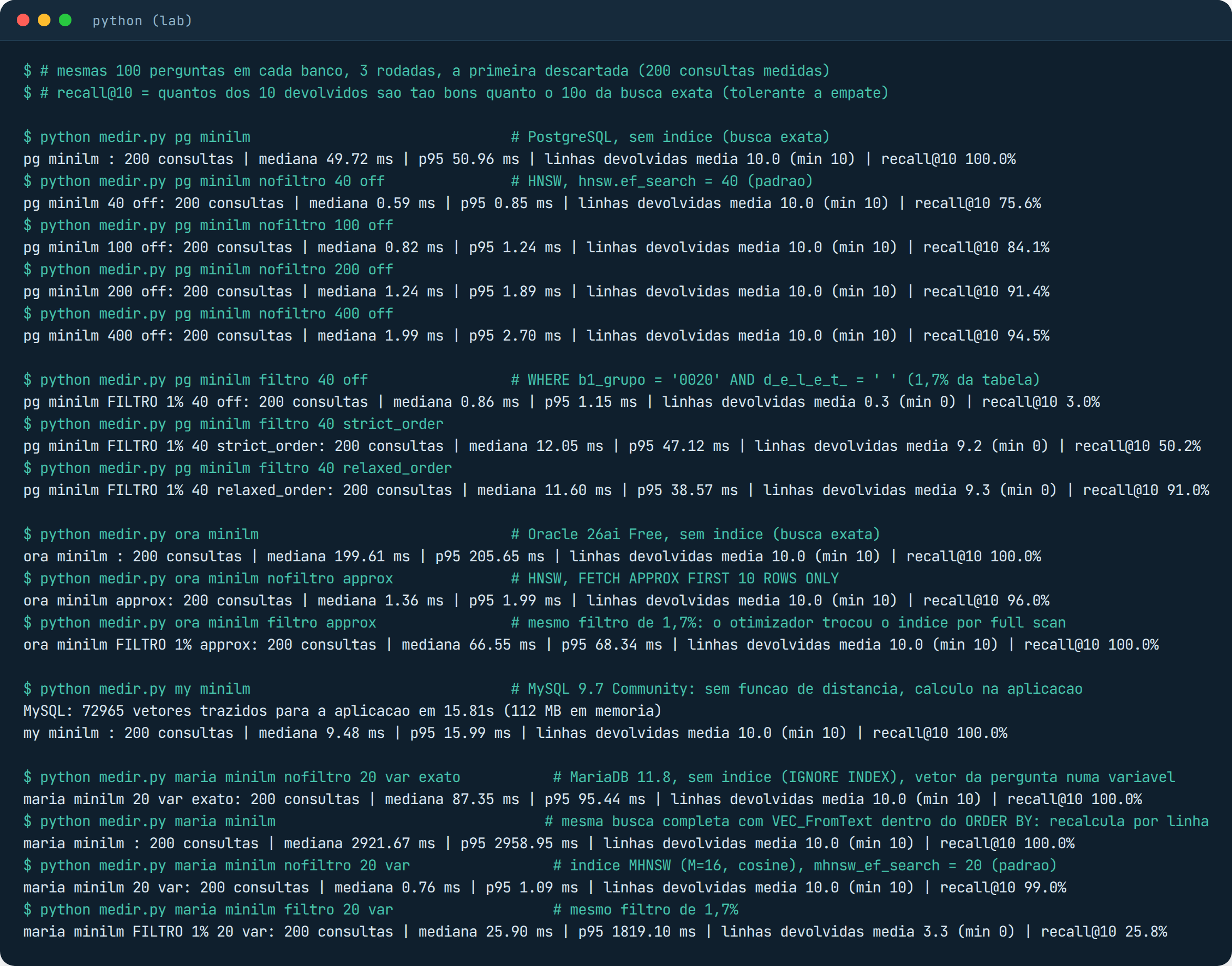
Reading the numbers. On the full search, with no index, PostgreSQL was four times faster than Oracle (49 ms against 200 ms), and both get everything right, because they look at the whole table. With an index, both answer in 1 or 2 ms; pgvector builds the index in 10 seconds and gets 75% right at the default, Oracle takes almost 2 minutes to build and gets 96% right. With a filter in the WHERE, which is real life in an ERP, pgvector returns empty until you turn on the iterative scan, and Oracle returns the right rows but gives up on the index and reads the whole group. MariaDB 11.8 was a surprise on accuracy: 99% with factory settings, in 0.8 ms, with the index built in 2 minutes; but with a filter in the WHERE it returns on average 3 rows out of 10 and does not have the setting pgvector has. MySQL Community stores the vector, but neither compares nor indexes it; the calculation has to be done outside, and for 70 thousand products that still fits. SQL Server 2025 has the type ready and the index in preview in the installed version; the full search works today.
To wrap up, a ranking of the five. The criterion is what each database delivers today for vector search, in the version you install on your own server, with the numbers from this lab and without looking at price. If price comes into the picture, PostgreSQL moves to first, and MariaDB stays right behind it.
| Rank | Database | Indexed search | Index build | Filter in the WHERE | Status today |
|---|---|---|---|---|---|
| 1st | Oracle 26aiAI Vector Search | 1.36 ms, 96% recallfull search: 200 ms | 1 min 47 s131 MB of reserved RAM (vector pool) | returns the right rowsbut drops the index and reads the whole group, 66 ms | production readymodel inside the database and hybrid index; vector_memory_size has to be configured |
| 2nd | PostgreSQL 18pgvector 0.8.7 | 0.59 ms, 75.6% recall94.5% with ef_search 400; full search: 49 ms | 10 s36 MB on disk | returns empty by defaultturn on the iterative scan and it reaches 91% | production readyfree; vector generated outside, in the application; tune ef_search and iterative_scan |
| 3rd | MariaDB 11.8MHNSW, free edition | 0.76 ms, 99% recallfull search: 87 ms | 2 min 06 sindex inside InnoDB | returns 3 rows out of 1026% recall, p95 of 1.8 s; no setting equivalent to the iterative scan | production readyfree; vector generated outside; watch out for VEC_FromText inside the ORDER BY |
| 4th | SQL Server 2025no lab, documentation only | index in previewVECTOR_SEARCH requires PREVIEW_FEATURES | previewthe older index version leaves the table read-only | may return fewer rowsiterative filter only in the cloud version | VECTOR type ready, index not yetfull search with VECTOR_DISTANCE works; vector generated outside |
| 5th | MySQL 9.7Community | not availableDISTANCE() only in HeatWave and MySQL AI | not availablethere is no vector index in Community | in the application only73 thousand vectors in 15.8 s, then 9.5 ms per question | only stores the vectorthe way out is MariaDB, right above |
For a catalog of tens or hundreds of thousands of items, the database you already have does search by meaning. PostgreSQL with pgvector is the cheapest and the most mature, as long as the iterative scan is turned on before the first WHERE. Oracle 26ai is the most complete, with the model inside the database and the hybrid index, but it charges in reserved memory and in index build time. MariaDB is the natural way out for those on MySQL who want a vector index without changing families, as long as the filtered query is tested first. A separate vector database, for a problem this size, is one more system to look after for no good reason.
When to call a specialist
Putting vector search in the production database touches memory (Oracle’s vector pool, PostgreSQL’s shared memory and maintenance_work_mem), index build time and the way filtered queries behave, which is the case for almost every ERP screen. If you want to know how your environment handles this before turning it on, Furushima’s database managed support does that assessment. You can request a health check or reach us through the contact page.
Cover image: humanoid robots in a boxing match, reproduction of a screenshot published by O Globo on May 26, 2025.
References
- pgvector: README (Iterative Index Scans, Filtering) and CHANGELOG (0.8.7 on October 1, 2026)
- Oracle AI Vector Search User’s Guide: Size the Vector Pool
- Oracle: SQL Quick Start Using a Vector Embedding Model Uploaded into the Database
- Oracle: Understand Hybrid Vector Indexes
- Microsoft Learn: CREATE VECTOR INDEX (Transact-SQL)
- Microsoft Learn: Vector data type
- Microsoft Learn: VECTOR_SEARCH (Transact-SQL)
- MySQL 9.7 Reference Manual: Vector Functions
- sentence-transformers/all-MiniLM-L12-v2 and intfloat/multilingual-e5-small
- Oracle: pre-built ONNX model for embedding generation