


SQL Server 2016 left extended support on July 14, 2026. 2017 leaves in October 2027, and TOTVS already flags it as EOL on its list of certified databases. Anyone running Protheus on either of those two versions will have to touch the database one way or another.
And that is when the question shows up in the meeting: since we have to touch it anyway, why not move to PostgreSQL and stop paying for licenses?
I get this question often. The honest answer is that it depends on things almost nobody checks before asking. Here I will lay out what TOTVS actually certifies, in their words and not mine, what it costs to stay, what changes for the DBA and for the developer, with tests run on a lab PostgreSQL, and how the migration really happens with the official tool. No rooting for either database. I have seen Protheus fly on both and crawl on both.
What TOTVS certifies today
Everything in this section I took from the DBAccess certified databases page and the Protheus certified databases page on TDN, consulted on October 15, 2026.
So no, you do not lose the average cost procedures by moving to Postgres. That is a myth that still goes around, and TOTVS writes the opposite in plain letters on the Protheus page: “Stored Procedures are supported for the PostgreSQL database starting with Protheus version 12”.
There is a green box on the DBAccess page worth reading twice. Keep it in mind for the cost section.

And there is the version policy, which a lot of people ignore. Certification covers the tested major version and the following minors. A new major requires a new certification. PostgreSQL 17 is not on the list, so there is no “upgrade to 17 because it came out”. You go from 16 to 18, when your DBAccess allows it.
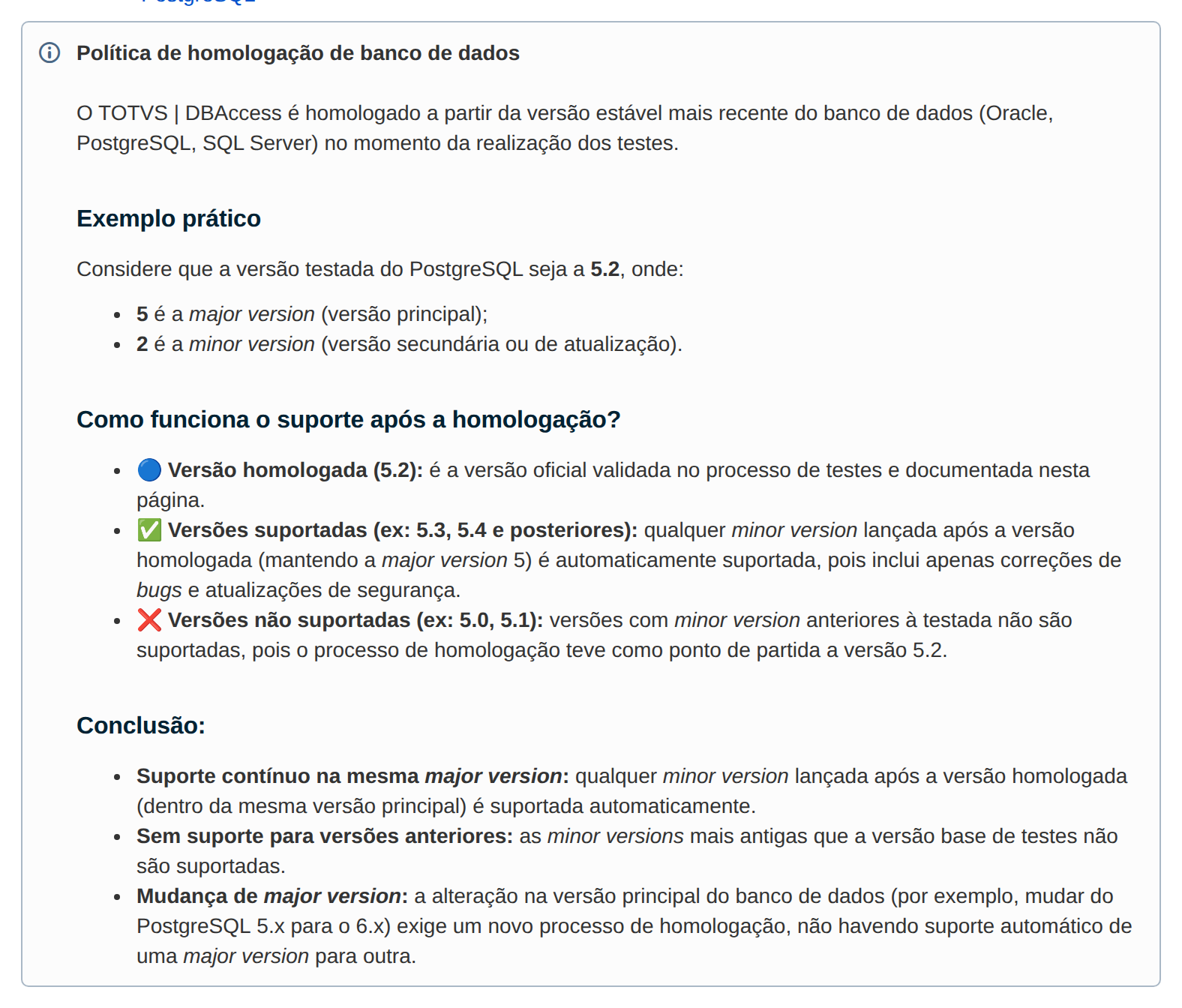
For PostgreSQL, TOTVS requires three things when creating the database and one in DBAccess. In their words:
Encoding: WIN1252. Collation: C. Character type: *.CP1252 and/or *.1252.
DBAccess.ini: In the DBAccess configuration file, set the key ODBC30=1. The use of ODBC 1.0 functions from the Postgres ODBC is kept only for compatibility, and using them can cause instability and DBAccess crashes.
postgresql12-contrib package: this package is essential for identifier fields.
TOTVS, TDN: Certified Databases (Microsiga Protheus Line)
I tested it on a clean PostgreSQL 16, because there is a catch right on the first line: the database cannot be created from the default template, which is UTF8. Without template0, this is the error:
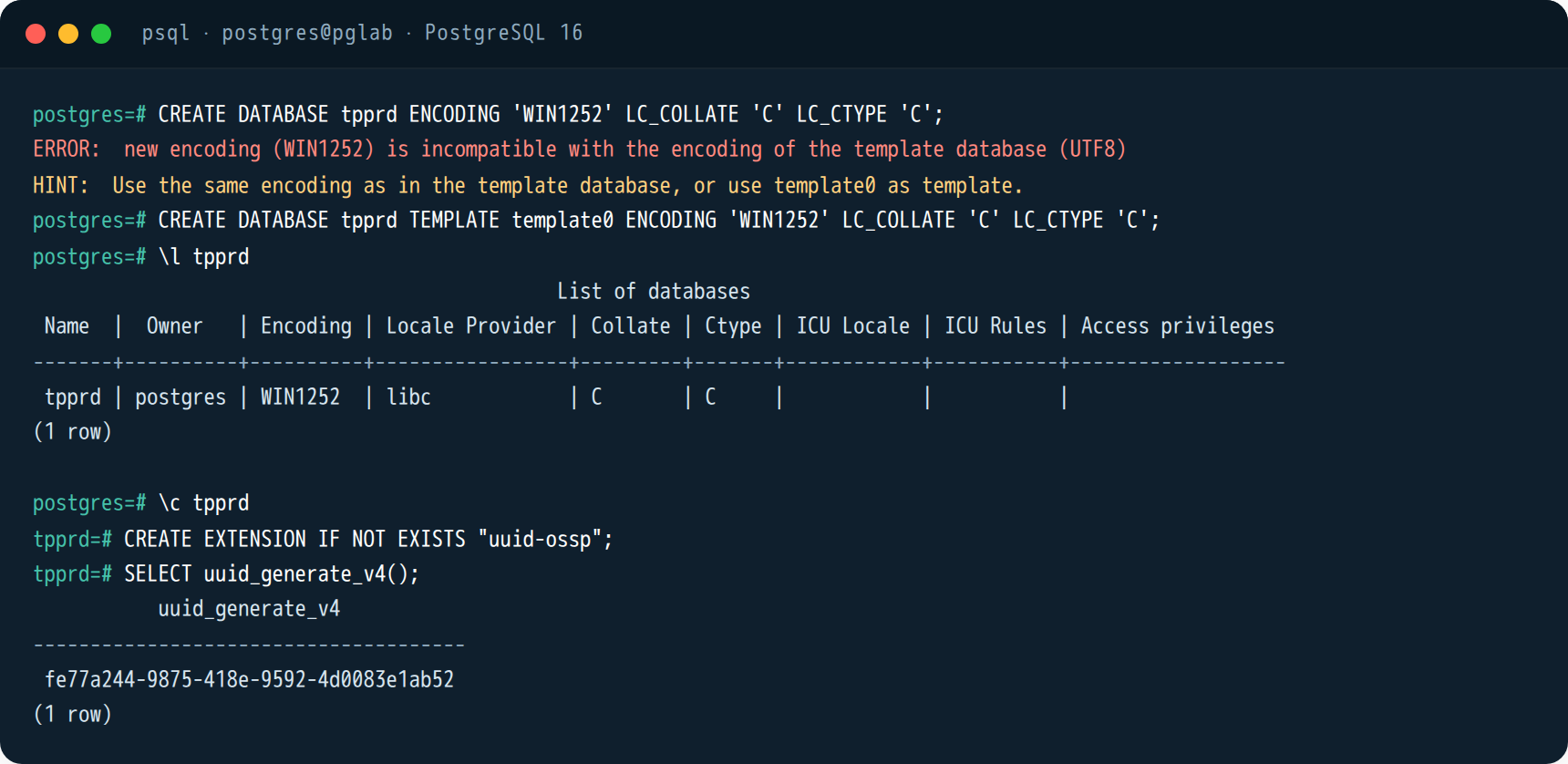
-- o banco do Protheus precisa nascer assim (não dá pra mudar depois)
CREATE DATABASE tpprd
  WITH TEMPLATE = template0
       ENCODING = 'WIN1252'
       LC_COLLATE = 'C'
       LC_CTYPE   = 'C';

CREATE EXTENSION IF NOT EXISTS "uuid-ossp";
; dbaccess.ini
[General]
ODBC30=1
[POSTGRES]
environments=tpprd
[POSTGRES/tpprd]
user=tpprd
password=...
TableSpace=tpprd_data
IndexSpace=tpprd_dataThe ODBC30=1 goes in the General section, not the database section. And if DBAccess runs on Windows, skip version 16 of the Postgres ODBC driver. The DBAccess page says it has a known bug and points you to 17.00.0003 or later.
One more, on the migration tips page. If your team only knows Windows, this is the first hidden cost of the conversation:

What it costs to stay on SQL Server
Let’s do the math with Microsoft list prices for SQL Server 2025, per-core licensing, which is what you use with Protheus. 2-core pack, Standard: US$ 3,945. 2-core pack, Enterprise: US$ 15,123. Minimum of 4 cores per server. An 8-core database server, which is a common size for a mid-sized Protheus:
Look at the second box. If you follow the TOTVS recommendation and go Enterprise, an 8-core server is sixty thousand dollars at list price. If your QA environment runs the same engine, double it. On subscription, that is twenty-one thousand a year for production alone, forever.
Plenty of people run Standard and live fine. But then there is no full Always On, no TDE before 2019, and there is a memory cap per instance. Each of those “no”s becomes an architecture decision you make to save on licensing, and that is a cost too, it just does not show up on the invoice.
PostgreSQL costs zero in licensing. It does not cost zero. The cost moves somewhere else: a migration project with three rounds, people who know how to operate Postgres on Linux, a backup tool, a high availability architecture, and, if you want someone to call in the middle of the night, a support contract.
What changes for the DBA
This is the part I most want you to read, because it is where the migration goes wrong six months after it went right.
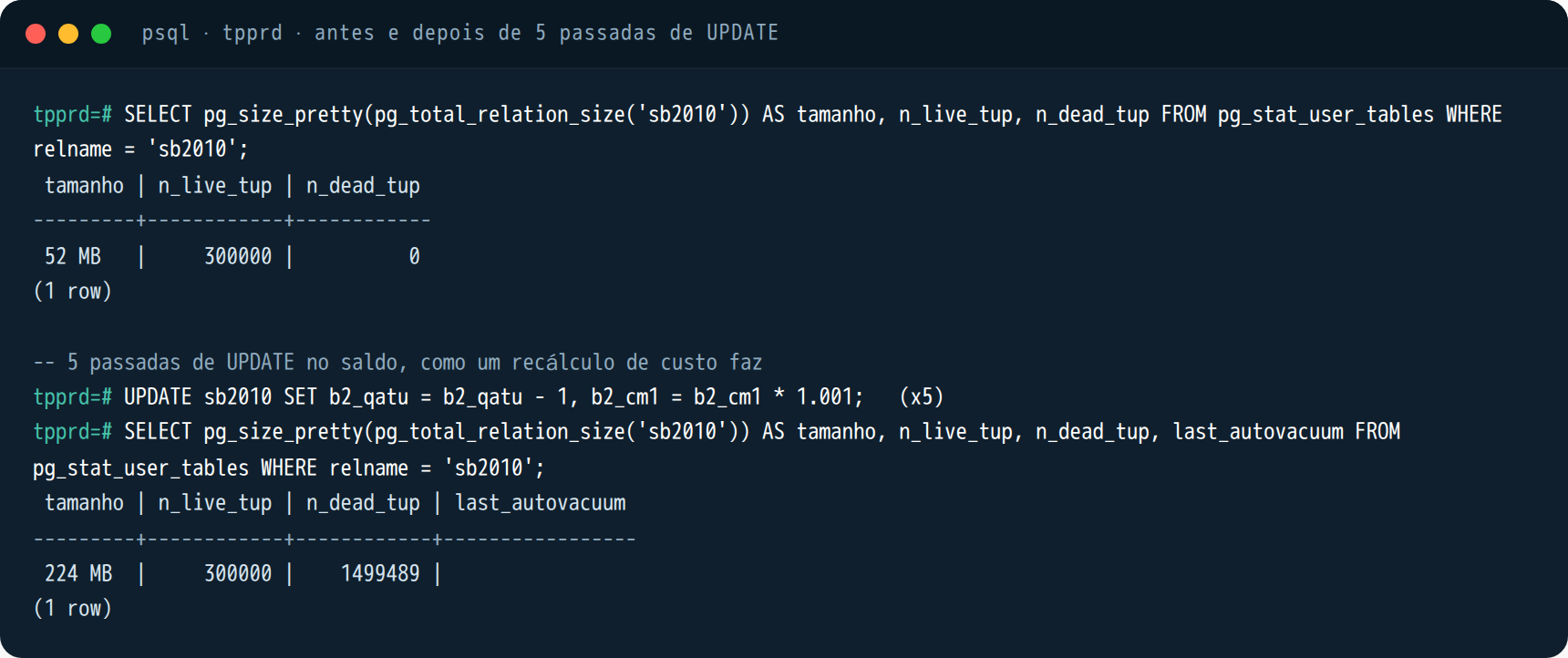
SQL Server updates the row in place. PostgreSQL does not. Every UPDATE in Postgres writes a new version of the row and leaves the old one behind, marked dead, until VACUUM comes by and frees the space. That is how its MVCC works, and it is why readers do not block writers.
Now think about Protheus. A delete in Protheus is an UPDATE on D_E_L_E_T_. SB2 gets hammered with updates all night long during the cost recalculation. The accounting balance tables take inserts, updates and deletes at every closing. All of that becomes dead rows in Postgres.
This is not theory. I created an sb2010 shaped like the Protheus one (CHAR fields, D_E_L_E_T_, R_E_C_N_O_, composite index), 300 thousand rows, and ran five passes of UPDATE on the balance, which is what a recalculation does. Look at the size before and after:
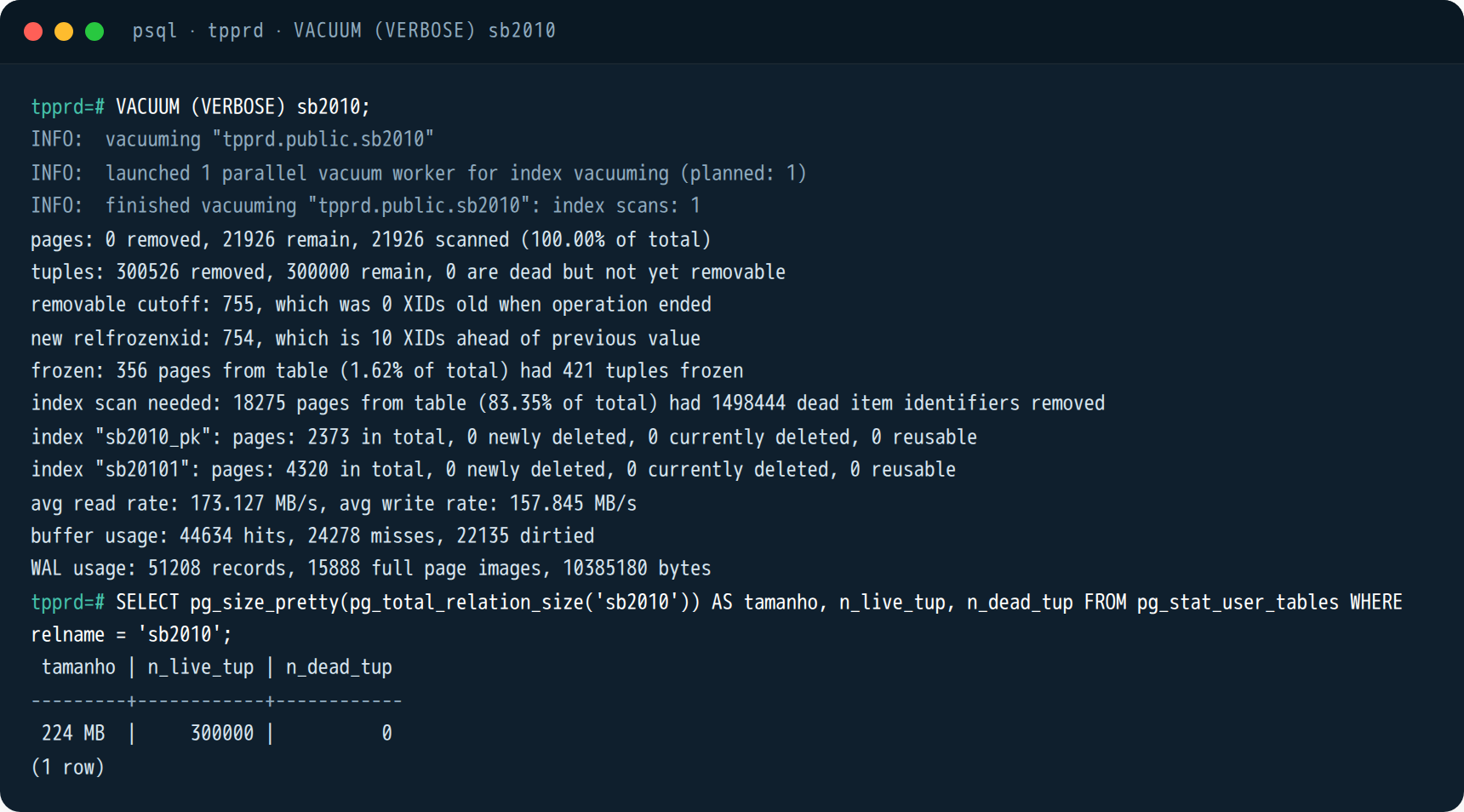
Then run VACUUM. It collects the dead rows, frees the space for reuse inside the table, and the table stays at 224 MB. A regular VACUUM does not return space to the operating system. This matters for anyone coming from SQL Server and expecting a shrink:
Autovacuum exists to take care of this, and with factory defaults it is lazy on large tables. The trigger is 20% of the table in dead rows. On an SD3 with 100 million rows, it waits for 20 million dead rows before starting. On an SB2 that gets updated in a loop, that is far too late. First thing I look at on a Protheus running on Postgres:
-- quem está inchando e quando o autovacuum passou pela última vez
SELECT relname,
       n_live_tup,
       n_dead_tup,
       ROUND(100.0 * n_dead_tup / NULLIF(n_live_tup + n_dead_tup, 0), 1) AS pct_mortas,
       last_autovacuum,
       last_autoanalyze
  FROM pg_stat_user_tables
 WHERE relname IN ('sb2010', 'sb9010', 'sd3010', 'sd1010', 'cq1010', 'se2010', 'se1010')
 ORDER BY n_dead_tup DESC;
And the tuning is per table, not global. The tables Protheus hammers get their own trigger. The fillfactor leaves spare room on the page so the new version lands on the same page as the old one, which is what Postgres calls a HOT update and spares the index:
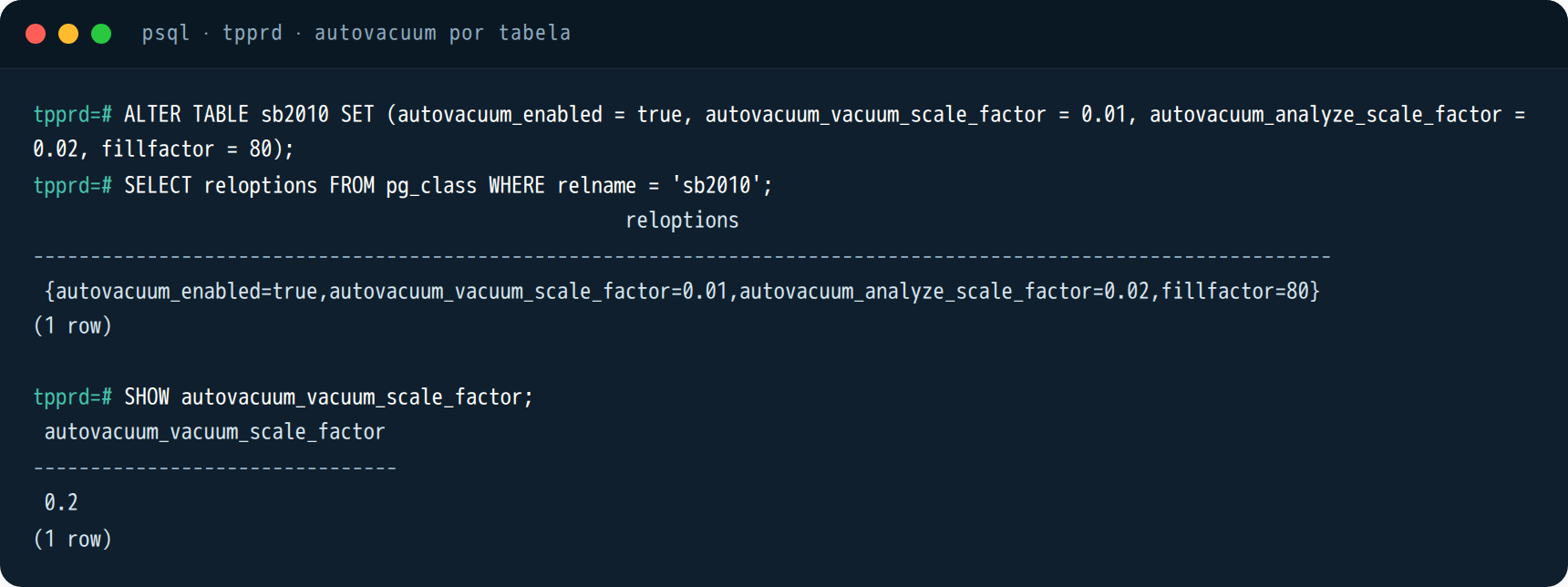
ALTER TABLE sb2010 SET (
  autovacuum_vacuum_scale_factor  = 0.01,
  autovacuum_analyze_scale_factor = 0.02,
  fillfactor = 80
);
ALTER TABLE sd3010 SET (autovacuum_vacuum_scale_factor = 0.02);
ALTER TABLE cq1010 SET (autovacuum_vacuum_scale_factor = 0.01);
A note on TOTVS’s own maintenance page, which shows a vacuumdb -z -f -v on databases called tpprd. The -f is VACUUM FULL. That one does return space, because it rewrites the whole table, but it holds an exclusive lock the entire time. It is fine for a weekend window after a large purge. It is not for routine use, and not with users logged in.
Second thing: connections. In Postgres every connection is an operating system process, with its own memory. DBAccess opens one connection per Protheus thread. The dbaccess.ini example TOTVS publishes on the migration page has ThreadMax=10000. Ten thousand Postgres processes do not exist. So max_connections and work_mem have to be sized together, because work_mem is per sort operation, per connection, and the math blows up fast.
-- quantas conexões o DBAccess está segurando agora, e em que estado
SELECT state, COUNT(*) AS conexoes,
       ROUND(MAX(EXTRACT(EPOCH FROM (now() - state_change))) / 60) AS parada_ha_min
  FROM pg_stat_activity
 WHERE backend_type = 'client backend'
 GROUP BY state
 ORDER BY conexoes DESC;
And do not count on a transaction-mode pooler (PgBouncer and the like) to solve this. DBAccess relies on session state, uses temporary tables, and transaction-mode pooling breaks exactly that. Session mode does work, but then it saves no processes at all. The solution is to size ThreadMax for the real number of concurrent users and give the server memory.
Third: size. Many Protheus databases on SQL Server use data compression, TOTVS even has a page about it, and their migration example started from 600 GB compressed. PostgreSQL has no row compression. A CHAR field padded with spaces, which is everything in Protheus, will take up its declared size. Expect the database to grow at the destination. By how much, only the test round will tell. I have no formula and I distrust anyone who has one.
Fourth: backup and high availability. There is no one-line “backup database to disk”. There is physical backup with WAL archiving, and the tool is pgBackRest or Barman (TOTVS mentions Barman in its documentation). Always On becomes streaming replication, and failover is orchestrated by Patroni, repmgr or your cloud operator. All of this is mature. All of this is different. If your disaster runbook is a .bak in a folder, it will have to be rewritten from scratch.
Fifth, and this one touches the LGPD, Brazil’s data protection law: there is no TDE in community PostgreSQL. TOTVS even warns about it on the certification page:
With the start of the General Data Protection Law (LGPD), if the database needs to be encrypted, we recommend contacting the vendor of the chosen database to check whether the version to be purchased includes native data encryption.
TOTVS, TDN: DBAccess, Database page
In Postgres the path is to encrypt the disk (LUKS, or the cloud storage) or a commercial distribution that ships TDE. On SQL Server I have already shown how to enable TDE, and it is an afternoon of work. If encryption at rest is an audit requirement at your company, settle it in the design, before migrating.
What changes for the developer
TOTVS standard code already ships with queries adjusted for the three databases. The migration page itself says so, and in the same paragraph tells you to recompile the procedures afterwards:
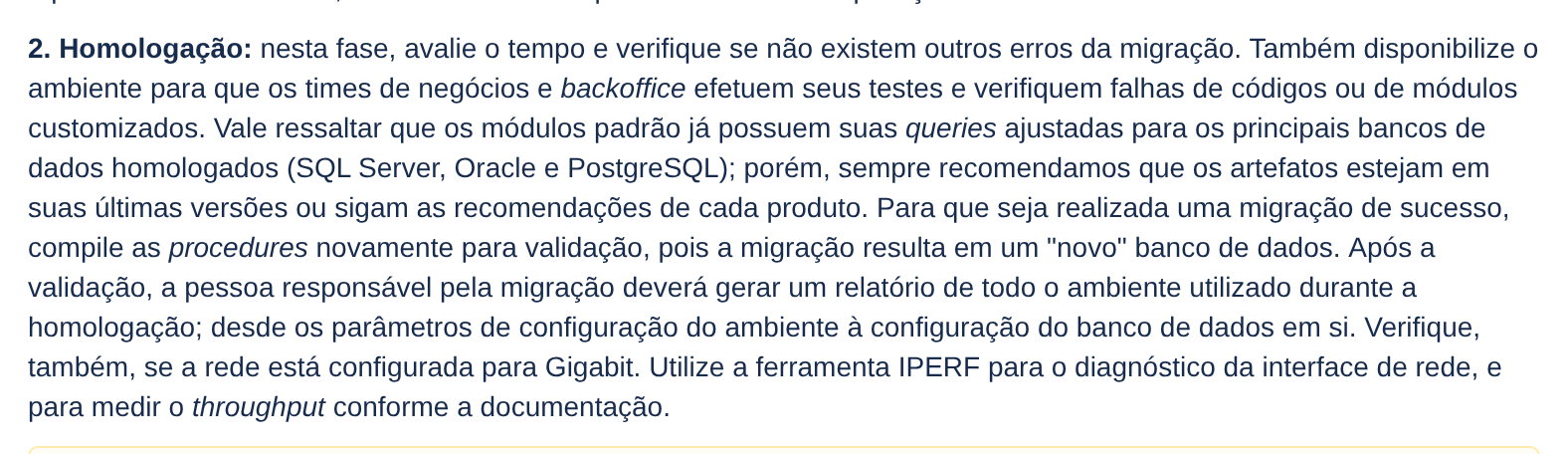
The problem is never the standard code. It is the customization. Ten years of entry points and custom routines written by people who only ever knew SQL Server leave T-SQL scattered across the source. WITH (NOLOCK) is the most common, so much so that TOTVS calls it out by name:

But there is more: GETDATE(), ISNULL(), CONVERT(), TOP 10, DATEADD(), concatenation with +, column names in square brackets, temporary tables with #. Before any application test, I run a dumb scan of the source. Dumb and effective:
# no diretório dos fontes customizados (.prw, .prx, .tlpp)
grep -ril --include='*.prw' --include='*.prx' --include='*.tlpp' \
  -e 'nolock' -e 'getdate' -e 'isnull(' -e 'convert(' -e 'dateadd(' \
  -e ' top ' -e 'datediff(' -e 'charindex(' -e 'with (' . | sort > suspeitos.txt

wc -l suspeitos.txt
That number is the size of your project on the development side. It may be ten files, it may be four hundred. It is what decides whether the migration takes two months or a year, not the size of the database.
Two catches that do not show up in the grep and that bite. I tested both in the lab.
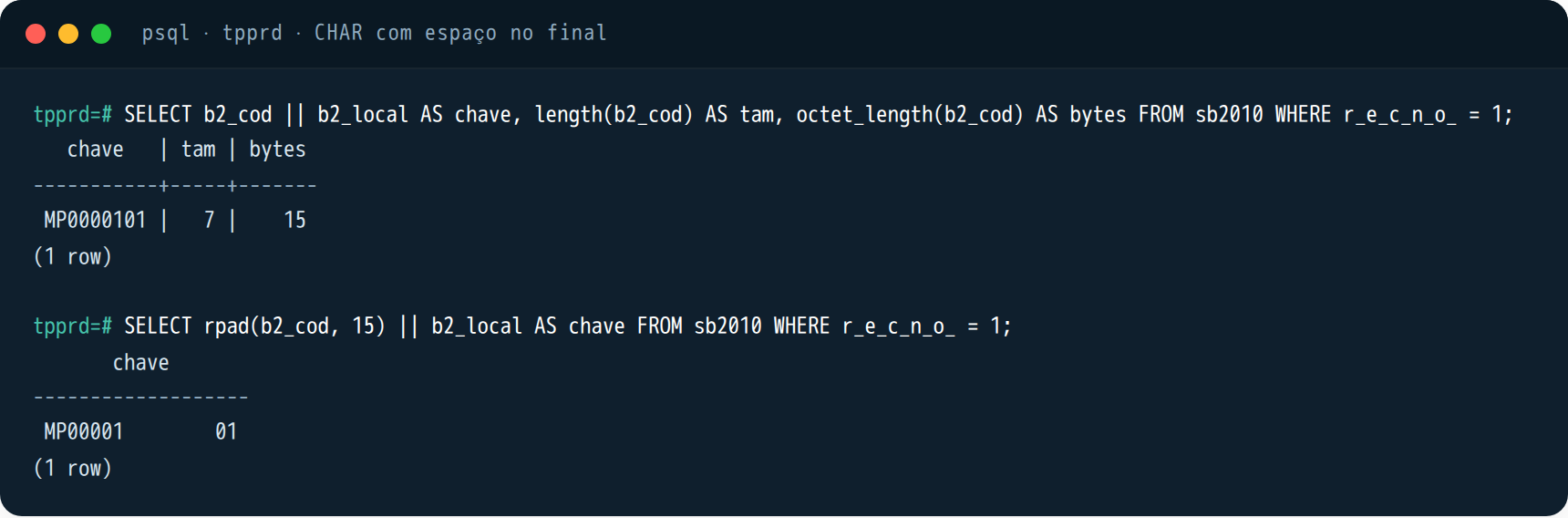
Trailing spaces. Protheus pads every character field with spaces up to its declared length. On SQL Server, concatenating two CHARs with + carries the spaces along. In Postgres, || converts the CHAR to text first, and the conversion drops the trailing spaces. The query does not fail. It returns something else:
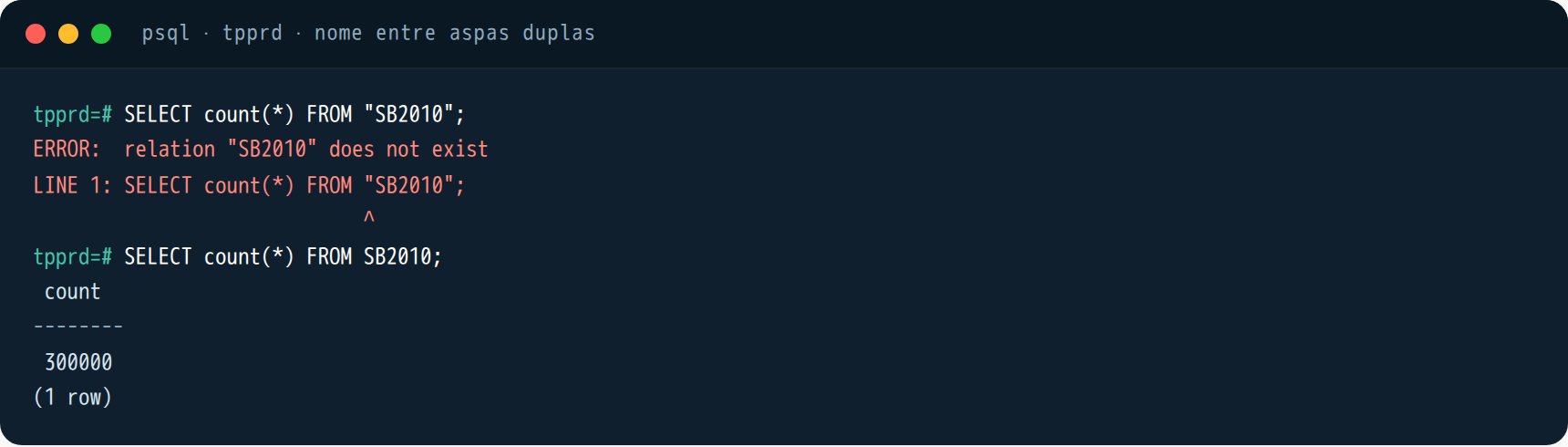
Names in double quotes. In Postgres, an unquoted identifier is folded to lowercase. Everything Protheus sends unquoted works, because the database folds to lowercase on both sides. Now a query someone wrote with "SB2010" in quotes works on SQL Server and breaks on Postgres:
On sorting and case, good news: Latin1_General_BIN on SQL Server and collation C on Postgres are both binary orderings. ORDER BY comes out the same, LIKE is case-sensitive the same way, the index behaves the same. That is exactly why TOTVS requires collation C. Whoever tries to be clever and creates the database with pt_BR.UTF-8 to “sort nicely” finds Protheus behaving differently on lookup screens, and by then it cannot be changed without recreating the database.
How the migration really happens
The tool is from TOTVS, it is called DBTools, and it lives inside the DBAccess installation folder. It does not talk to any database directly: it reads the source through one DBAccess and writes to the destination through another DBAccess. It is a copy, table by table. It is not replication, it is not CDC, there is no “sync the delta later”. The diagram is TOTVS’s own:
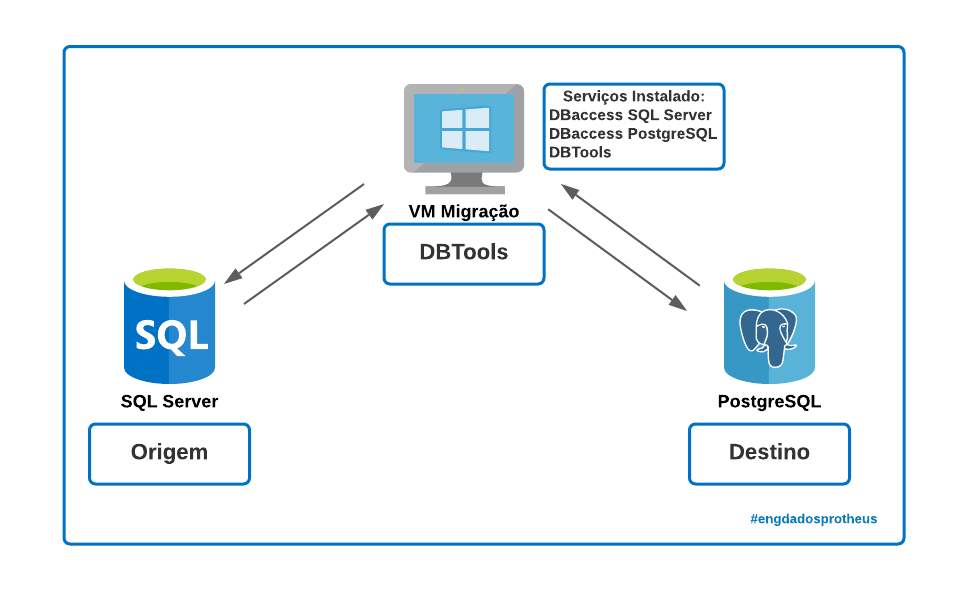
Three rules of the migrator that change your planning, in their words:

The source DBMS must not be accessed or updated while the data is being read for the copy.
TOTVS, TDN: DBTools, Environment Migrator (requirements)

This is the parameters screen. It is text mode, you navigate by typing the option number:
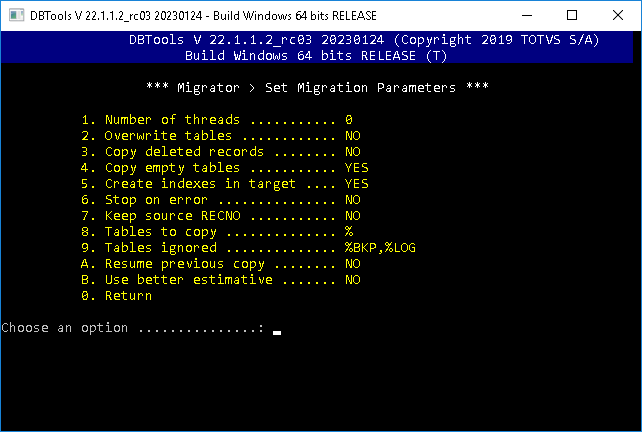
In production I run it in batch mode, with a file. This is my starting point, adapted from the example TOTVS published:
; dbtools.ini
[general]
threads=0          ; deixa ele escalar sozinho; depois da rodada 1 você fixa
overwrite=0
resume=0
copydeleted=1      ; leva os registros com D_E_L_E_T_ = '*' (expurga ANTES, não durante)
copyempty=1
createindex=1
errorstop=0        ; não para na primeira tabela com erro; o log diz quais falharam
keeprecno=1        ; mantém o R_E_C_N_O_ de origem nas tabelas sem numeração automática
copymask=%
ignoremask=%BKP,%LOG

[sourcedb]
dbserver=10.0.0.10
dbport=7898
dbdatabase=MSSQL
dbalias=TPPRDSQL
dbuser=
dbpsw=

[targetdb]
dbserver=10.0.0.10
dbport=7899
dbdatabase=POSTGRES
dbalias=TPPRD
dbuser=
dbpsw=
C:\totvs\dbaccess\dbtools>dbtools.exe /batch /log migracao-rodada1.logTwo parameters deserve a minute. copydeleted=1 carries the garbage along. If the database has 30% dead records, you will copy 30% garbage and build indexes on top of it. The right path is to purge at the source, the right way, with the module and the dictionary, weeks before round 1. Migration is not the time to clean up a database. And keeprecno=1: by default it comes off and TOTVS says it is not necessary. I turn it on, because there are integrations out there that stored R_E_C_N_O_ as if it were a key, even with TOTVS saying, on the UUID fields page, that “the R_E_C_N_O_ value must not be used as a foreign key”.
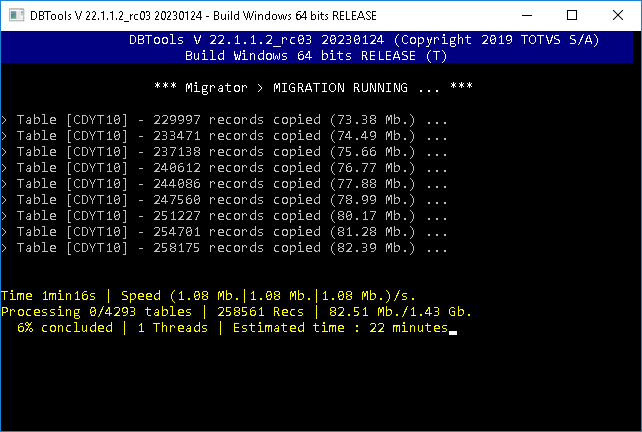
Running, this is the screen. Note the “Threads”: with threads=0 it starts one process, measures for 90 seconds, starts another, and only stops adding when the next one does not increase throughput, which is usually when the network or the destination disk saturates:
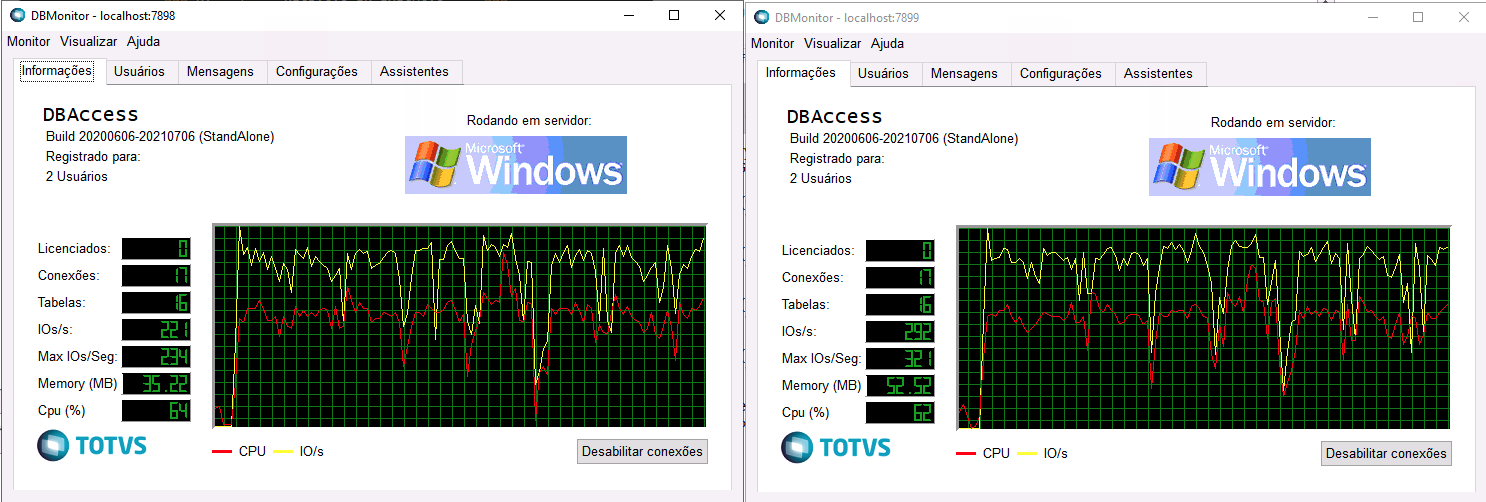
On the Postgres side, the initial load is the only time I touch durability parameters. Put everything back before opening to users:
# postgresql.conf, SÓ durante a carga do DBTools
maintenance_work_mem = 2GB          # criação de índice depois de cada tabela
max_wal_size = 16GB                 # menos checkpoint no meio do insert em massa
checkpoint_timeout = 30min
synchronous_commit = off            # commit não espera o fsync do WAL
autovacuum = off                    # ele só atrapalha enquanto a tabela está nascendo
wal_level = minimal                 # exige max_wal_senders = 0; sem réplica durante a carga
max_wal_senders = 0

# depois da carga: volta tudo, reinicia, e roda
# VACUUM (ANALYZE, VERBOSE);   -- estatística do banco inteiro antes do primeiro teste
How long does it take? TOTVS published their lab: “the expected time was around 5h38min to migrate around 600GB”, with 8-core machines, a 4 Gbit network and disks between 800 and 2,000 IOPS. Your numbers will be different. Round 1 exists to find out what they are. And TOTVS tells you to measure the network with iperf beforehand, because the copy bottleneck is usually the network or destination IOPS, not CPU.
That time is your production window, because the source has to stay down from start to finish. If the window does not fit in a weekend, the options are to slim down the database first (purge, backup tables nobody uses, five years of integration logs) or accept a longer outage. What does not exist is “copy during the week and sync the rest at cutover”. Not with this tool.
And how many times? TOTVS answers:

The phase 2 warning is the one I most often see ignored. Someone applies a fix patch in the middle of acceptance testing, a table structure changes, and the production round migrates a different database from the one that was tested:

When I would not migrate
If the only reason is the end of support for 2016 or 2017. Running from a deadline is the worst reason to switch DBMS. In that case the short path is to upgrade to SQL Server 2022 or 2025, which is a version upgrade, and decide on PostgreSQL calmly, next year, with a test round done without pressure.
If the infrastructure team is 100% Windows and there is nobody to operate Linux. TOTVS does not recommend Postgres on Windows for production, and neither do I. You would be trading licensing for dependency.
If half the world reads the database directly. Power BI pointed at SB2, a linked server from another system, an SSIS package, an integration that runs SELECT on SA1 in the middle of the night. Each of those is a parallel project nobody budgeted. Take the inventory before promising a date.
If suspeitos.txt came back with hundreds of files and there is no developer to review them. The database migrates in a weekend. The customization does not.
Now, if you have four environments on the same engine, the license renewal is on the table, the team already operates Linux for other things, and the grep came back small, then the math closes fast. And it closes again every year.
When to call a specialist
If your SQL Server renewal is coming up, or your 2016 is already out of support, the right step is not to pick a database. It is to take the inventory: DBAccess version, a scan of the customizations, who reads the database from outside, the real size of the database without the garbage, and a round 1 copy to measure the window. With that in hand the decision becomes math, not a bet. That is what Furushima does in its database consulting and Protheus managed support practices: an assessment of the environment, the three migration rounds with the official TOTVS tool, and the DBA on the other end when autovacuum decides to show up.
Cover photo: Bernard Dupont, CC BY-SA 2.0, via Wikimedia Commons (cropped). Screenshots marked as TDN are from TOTVS public documentation, reproduced for citation, with links in the list below. psql screenshots are from a lab PostgreSQL 16.
References
- TOTVS TDN: Certified databases for TOTVS DBAccess (versions, certification policy, ODBC30, ODBC driver, LGPD)
- TOTVS TDN: Certified Databases for Protheus (encoding, collation, contrib)
- TOTVS TDN: PostgreSQL on the Microsiga Protheus Line (stored procedures supported)
- TOTVS TDN: DBTools, Environment Migrator (parameters, batch mode, resume, screens)
- TOTVS TDN: DBTools, migration tips (three rounds, NOLOCK, Linux, sizing, 600 GB timing, architecture)
- TOTVS TDN: Protheus with PostgreSQL on Linux (installation, cluster, DBAccess, backup)
- TOTVS TDN: UUID fields in DBAccess (and why R_E_C_N_O_ is not a foreign key)
- TOTVS TDN: Stored Procedures, new package manager
- Microsoft: end of support for SQL Server 2016 and 2017
- Microsoft: SQL Server 2025 Pricing Datasheet (list prices per 2-core pack)
- PostgreSQL: Routine Vacuuming (autovacuum, scale factor, bloat)
- PostgreSQL: Populating a Database (parameters for bulk loading)