

While migrating a Pluggable Database (PDB) from an on-premise source environment to Oracle Cloud DBCS, we identified a failure during the execution of the native DBCS backup. The error shown was the following:
ORA-28361: master key not yet set
This error occurs mainly when the source PDB does not have TDE (Transparent Data Encryption) enabled. When migrated to the DBCS environment, the PDB remains in the OPEN_NO_MASTER_KEY status, which prevents operations such as backup from completing correctly, along with other features that depend on the master key.
In this article, we will briefly cover the fundamentals of TDE encryption in Oracle, explain why this problem happens, and walk through the hands-on, step-by-step procedure to fix the ORA-28361 error and restore full operation of the new PDB in the Oracle Cloud environment.
For a better understanding of this topic, we recommend reading the following official technical notes available on My Oracle Support. They complement this article with detailed guidance on the OPEN_NO_MASTER_KEY error and the correct procedures to activate the encryption (master) key in PDBs on Oracle Cloud:
- [OCI-C]: Newly Created PDB Inside The Container Database Shows Wallet Error “OPEN_NO_MASTER_KEY” (Doc ID 2443398.1)
- Creating and Activating a Master Encryption Key for a PDB (in OCI and OCI-Classic) (Doc ID 2469398.1)
- WALLET_STATUS is OPEN_NO_MASTER_KEY in new pdb (Doc ID 3028669.1)
These official documents provide practical instructions and are highly recommended, especially for DBCS environments on OCI that involve creating new PDBs without an active encryption key.
To use Oracle Transparent Data Encryption (TDE) in a pluggable database (PDB), you must create and activate a master encryption key for the PDB.
What is Transparent Data Encryption (TDE)?
Transparent Data Encryption (TDE) is an Oracle Database feature that encrypts sensitive data stored in tables and tablespaces in order to protect that information from unauthorized access.
Once encrypted, the data is transparently decrypted at access time for authorized users or applications. This means that for anyone with permission, reading the data works as usual, with no manual steps needed to decrypt it.
TDE is especially effective at protecting data stored on physical media, also known as data at rest, in situations such as loss, theft, or improper access to the storage media (for example, datafiles at the operating system level).
Although Oracle Database uses robust authentication, authorization, and auditing mechanisms to protect data internally, those mechanisms do not apply directly to the physical data files in the operating system. That is where TDE acts as an additional security layer, encrypting the data directly in those files.
To prevent unauthorized decryption, TDE stores the encryption keys in a security module external to the database, called a keystore.
As part of a TDE implementation, you can configure Oracle Key Vault, a solution that enables centralized management of keystores (also called virtual wallets in the Oracle Key Vault context) across the organization’s entire infrastructure.
For example, you can upload a software keystore to Oracle Key Vault, migrate the database to use it as the default keystore, and then share its contents with other Oracle Real Application Clusters (Oracle RAC) nodes, both primary and standby, streamlining day-to-day administrative operations in environments with encrypted data.
________
________
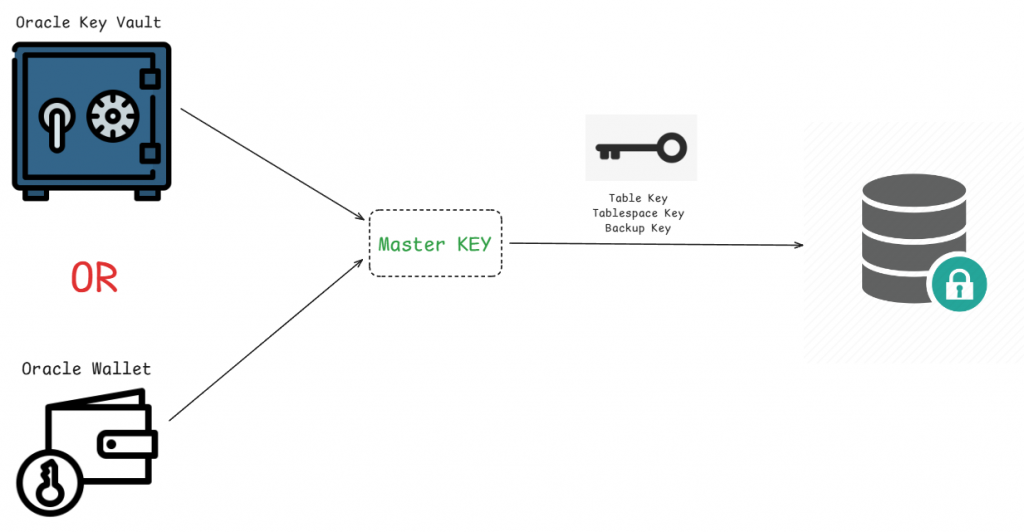
The master key can be stored in two ways: locally (inside the database server) through the Oracle Wallet, or in a centralized, secure fashion (outside the database server) using Oracle Key Vault. Both mechanisms exist to store and protect the database master key.
The master key is the main key in the TDE (Transparent Data Encryption) architecture. It is used to encrypt the data encryption keys, which are directly responsible for encrypting the sensitive data stored in the database, such as tables, tablespaces, backups, and other persistent objects.
This multi-level key security approach ensures that even if the physical database files are improperly accessed, the data remains protected as long as the master key is not accessible.
________
Next, we will walk through the step-by-step procedure to create and activate the master key in the new PDB, as well as recreate the wallet in AUTOLOGIN mode.
Listing jobs with “Failure” status in DBCS using the dbcli command
[root@database ~]# dbcli list-jobs | grep -i Failure
a047a9ac-5fab-4495-8c0a-3d897404c5ee     Create Longterm Backup with TAG-DBTLongterm17443774703478Op for Db:BRAVEO in OSS:b4u6hISKttDARmxAARwI Friday, April 11, 2025, 10:38:39 BRT Failure
________
After identifying the job with “Failure” status, you need to check the corresponding logs using the dbcli command. To do that, use the describe-job parameter along with the job ID, which can be obtained from the previous listing. This command provides full details about the job execution, including error messages and the steps performed.
[root@database ~]# dbcli describe-job -i  a047a9ac-5fab-4495-8c0a-3d897404c5ee  -j
{
  "jobId" : "a047a9ac-5fab-4495-8c0a-3d897404c5ee",
  "status" : "Failure",
  "message" : "DCS-10430:Request failed with ORA-* Errors:ORA-28361: master key not yet set \nError Stack :[RMAN-00601: fatal error in recovery manager,\n RMAN-03004: fatal error during execution of command,\n ORA-01480: trailing null missing from STR bind value,\n ORA-199",
  "errorCode" : "DCS-10430",
  "reports" : [ {
    "taskId" : "TaskSequential_29809",
    "taskName" : "task:TaskSequential_29809",
    "taskResult" : "",
    "startTime" : "April 11, 2025 10:38:40 AM BRT",
    "endTime" : "April 11, 2025 10:39:14 AM BRT",
    "status" : "Failure",
    "taskDescription" : null,
    "parentTaskId" : "TaskZLockWrapper_29808",
    "jobId" : "a047a9ac-5fab-4495-8c0a-3d897404c5ee",
    "tags" : [ ],
    "reportLevel" : "Error",
    "updatedTime" : "April 11, 2025 10:39:14 AM BRT",
    "message" : null
  }, {
    "taskId" : "TaskServiceRequest_29810",
    "taskName" : "Validate Database backup Configuration",
    "taskResult" : "",
    "startTime" : "April 11, 2025 10:38:40 AM BRT",
    "endTime" : "April 11, 2025 10:39:04 AM BRT",
    "status" : "Success",
    "taskDescription" : null,
    "parentTaskId" : "TaskSequential_29809",
    "jobId" : "a047a9ac-5fab-4495-8c0a-3d897404c5ee",
    "tags" : [ ],
    "reportLevel" : "CInfo",
    "updatedTime" : "April 11, 2025 10:39:04 AM BRT",
    "message" : null
  }, {
    "taskId" : "TaskParallel_29826",
    "taskName" : "Install object store swift module",
    "taskResult" : "",
    "startTime" : "April 11, 2025 10:38:42 AM BRT",
    "endTime" : "April 11, 2025 10:38:52 AM BRT",
    "status" : "Success",
    "taskDescription" : null,
    "parentTaskId" : "TaskSequential_29825",
    "jobId" : "a047a9ac-5fab-4495-8c0a-3d897404c5ee",
    "tags" : [ ],
    "reportLevel" : "CInfo",
    "updatedTime" : "April 11, 2025 10:38:52 AM BRT",
    "message" : null
  }, {
    "taskId" : "TaskServiceRequest_29811",
    "taskName" : "Backup Database",
    "taskResult" : "",
    "startTime" : "April 11, 2025 10:39:04 AM BRT",
    "endTime" : "April 11, 2025 10:39:14 AM BRT",
    "status" : "Failure",
    "taskDescription" : null,
    "parentTaskId" : "TaskSequential_29809",
    "jobId" : "a047a9ac-5fab-4495-8c0a-3d897404c5ee",
    "tags" : [ ],
    "reportLevel" : "Error",
    "updatedTime" : "April 11, 2025 10:39:14 AM BRT",
    "message" : null
  }, {
    "taskId" : "TaskSequential_29812",
    "taskName" : "task:TaskSequential_29812",
    "taskResult" : "DCS-10430:Request failed with ORA-* Errors:ORA-28361: master key not yet set \nError Stack :[RMAN-00601: fatal error in recovery manager,\n RMAN-03004: fatal error during execution of command,\n ORA-01480: trailing null missing from STR bind value,\n ORA-199",
    "startTime" : "April 11, 2025 10:39:04 AM BRT",
    "endTime" : "April 11, 2025 10:39:14 AM BRT",
    "status" : "Failure",
    "taskDescription" : null,
    "parentTaskId" : "TaskServiceRequest_29811",
    "jobId" : "a047a9ac-5fab-4495-8c0a-3d897404c5ee",
    "tags" : [ ],
    "reportLevel" : "Error",
    "updatedTime" : "April 11, 2025 10:39:14 AM BRT",
    "message" : null
  }, {
    "taskId" : "TaskZJsonRpcExt_29846",
    "taskName" : "Database backup",
    "taskResult" : "DCS-10430:Request failed with ORA-* Errors:ORA-28361: master key not yet set \nError Stack :[RMAN-00601: fatal error in recovery manager,\n RMAN-03004: fatal error during execution of command,\n ORA-01480: trailing null missing from STR bind value,\n ORA-199",
    "startTime" : "April 11, 2025 10:39:04 AM BRT",
    "endTime" : "April 11, 2025 10:39:14 AM BRT",
    "status" : "Failure",
    "taskDescription" : null,
    "parentTaskId" : "TaskSequential_29812",
    "jobId" : "a047a9ac-5fab-4495-8c0a-3d897404c5ee",
    "tags" : [ ],
    "reportLevel" : "Error",
    "updatedTime" : "April 11, 2025 10:39:14 AM BRT",
    "message" : null
  } ],
  "createTimestamp" : "April 11, 2025 10:38:39 AM BRT",
  "resourceList" : [ ],
  "description" : "Create Longterm Backup with TAG-DBTLongterm17443774703478Op for Db:BRAVEO in OSS:b4u6hISKttDARmxAARwI",
  "updatedTime" : "April 11, 2025 10:39:14 AM BRT",
  "percentageProgress" : "33%",
  "cause" : "Request has failed with ORA-* errors during the operation(s).",
  "action" : "Refer to RMAN logs for more information."
}
________
It is important to note that both steps shown above must be executed as the root user.
Now, as the oracle user, let’s query the v$encryption_wallet dynamic view to check the master key status and better understand the current state of the keystore.
$ sqlplus / as sysdba

SQL*Plus: Release 19.0.0.0.0 - Production on Sun Apr 13 16:39:35 2025
Version 19.24.0.0.0

Copyright (c) 1982, 2024, Oracle.  All rights reserved.


Connected to:
Oracle Database 19c Enterprise Edition Release 19.0.0.0.0 - Production
Version 19.24.0.0.0

SQL> col WRL_PARAMETER for a60
SQL> SELECT wrl_parameter, status, wallet_type FROM v$encryption_wallet;

WRL_PARAMETER                                               |STATUS                        |WALLET_TYPE
------------------------------------------------------------|------------------------------|--------------------
/opt/oracle/dcs/commonstore/wallets/ORCL_LAB/tde/           |OPEN                          |AUTOLOGIN
                                                            |OPEN_NO_MASTER_KEY            |AUTOLOGIN


SQL> show pdbs ;

    CON_ID|CON_NAME                      |OPEN MODE |RESTRICTED
----------|------------------------------|----------|----------
         2|PDB$SEED                      |READ ONLY |NO
         3|PDB                           |READ WRITE|NO
________
Let’s highlight a few important points based on the result of the v$encryption_wallet query:
The query returned two rows. The first row represents the CDB (Container Database), while the remaining rows represent the PDBs (Pluggable Databases).
In this specific case, only one PDB has been created, so a single additional row was returned, with the status OPEN_NO_MASTER_KEY. This indicates that the master key has not yet been created or activated for that PDB.
When you run the SHOW PDBS command, you can see both the PDB that needs the key activated and PDB$SEED. The latter, however, is not part of this process, since it is a default template used only as a base for creating new PDBs and is not used directly for data storage or administrative operations.
What does the OPEN_NO_MASTER_KEY status mean in Oracle Database?
In Oracle Database, the OPEN_NO_MASTER_KEY status indicates that the keystore is open, but no master encryption key has been created or activated for the current database.
This status is common in multitenant environments where a Pluggable Database (PDB) was recently created or cloned but does not yet have its own master encryption key. Even if the keystore is accessible, the absence of a master key blocks operations that depend on encryption, such as backups, data exports, and access to encrypted data.
Why does each PDB require its own master key?
In a multitenant environment, each PDB is isolated and may have distinct security requirements. For that reason, Oracle Database allows each PDB to have its own master encryption key, even when they all share a single keystore. This provides more granular security management and makes operations such as key rotation and PDB export/import easier.
In this example, we are using the Oracle Wallet to store the master key, which means the key is stored locally on the database server itself. To find the wallet path, you can check the sqlnet.ora file or query the wallet_root database instance parameter.
$ cat $ORACLE_HOME/network/admin/sqlnet.ora | grep -i WALLET
ENCRYPTION_WALLET_LOCATION=(SOURCE=(METHOD=FILE)(METHOD_DATA=(DIRECTORY=/opt/oracle/dcs/commonstore/wallets/BRAVEO_DB2/tde)))


$ sqlplus / as sysdba

SQL*Plus: Release 19.0.0.0.0 - Production on Sun Apr 13 16:39:35 2025
Version 19.24.0.0.0

Copyright (c) 1982, 2024, Oracle.  All rights reserved.


Connected to:
Oracle Database 19c Enterprise Edition Release 19.0.0.0.0 - Production
Version 19.24.0.0.0

SQL> show parameter wallet_root

NAME                                 TYPE        VALUE
------------------------------------ ----------- --------------------------------------------------
wallet_root                          string      /opt/oracle/dcs/commonstore/wallets/ORCL_LAB
With the database up and running, let’s rename the cwallet.sso file to cwallet.sso.old. This disables the wallet’s automatic access mode (AUTOLOGIN), requiring the keystore to be opened manually with a password.
$ ls -la /opt/oracle/dcs/commonstore/wallets/ORCL_LAB/tde/cwallet.sso
-rw------- 1 oracle oinstall 9958 Apr 11 15:13 /opt/oracle/dcs/commonstore/wallets/ORCL_LAB/tde/cwallet.sso

$ mv /opt/oracle/dcs/commonstore/wallets/ORCL_LAB/tde/cwallet.sso /opt/oracle/dcs/commonstore/wallets/ORCL_LAB/tde/cwallet.sso.old

$ ls -la /opt/oracle/dcs/commonstore/wallets/ORCL_LAB/tde/cwallet.sso*
-rw------- 1 oracle oinstall 9958 Apr 11 15:13 /opt/oracle/dcs/commonstore/wallets/ORCL_LAB/tde/cwallet.sso.old
After disabling the wallet’s AUTOLOGIN, we will access the PDB in question to create its own master key. In this step, you will need to provide the keystore password. For standardization and easier management, we will use the same password already defined for the CDB master key.
SQL> alter session set container=PDB;

Session altered.

SQL> ADMINISTER KEY MANAGEMENT SET KEYSTORE open IDENTIFIED BY "Wallet_Password_Here";

keystore altered.

SQL> administer key management set key identified by  "Wallet_Password_Here" with backup;

keystore altered.

SQL> col WRL_PARAMETER for a60
SQL> SELECT wrl_parameter, status, wallet_type FROM v$encryption_wallet;

WRL_PARAMETER                                               |STATUS                        |WALLET_TYPE
------------------------------------------------------------|------------------------------|--------------------
                                                            |OPEN                          |PASSWORD
After creating the PDB master key, the next step is to recreate the wallet’s AUTOLOGIN. To do that, you will need to provide the keystore password. To keep things standardized and simplify administration, we will use the same password previously defined for the CDB master key.
The last step is to perform a shutdown immediate followed by a startup of the database instance. After that, we recommend querying the v$encryption_wallet view again to confirm that the wallet and master key status has been updated correctly.
SQL> alter session set container=CDB$ROOT;

Session altered.

SQL>  administer key management create AUTO_LOGIN keystore from keystore '/opt/oracle/dcs/commonstore/wallets/ORCL_LAB/tde' identified by  "Wallet_Password_Here" ;

keystore altered.

SQL> shutdown immediate;
Database closed.
Database dismounted.
ORACLE instance shut down.
SQL>
SQL> startup;
ORACLE instance started.

Total System Global Area 1.4361E+10 bytes
Fixed Size                  9151448 bytes
Variable Size            6710886400 bytes
Database Buffers         7616856064 bytes
Redo Buffers               24399872 bytes
Database mounted.
Database opened.
SQL>
SQL> col WRL_PARAMETER for a60
SQL> SELECT wrl_parameter, status, wallet_type FROM v$encryption_wallet;

WRL_PARAMETER                                                STATUS                         WALLET_TYPE
------------------------------------------------------------ ------------------------------ --------------------
/opt/oracle/dcs/commonstore/wallets/ORCL_LAB/tde             OPEN                           AUTOLOGIN
                                                             OPEN                           AUTOLOGIN
Understanding the Oracle Wallet files
To make things clearer, let’s explain the role of each file in the directory where the Oracle Wallet is stored. In general, the two main files are:
🔐 ewallet.p12
- This is the file that represents the keystore, that is, the secure repository that stores:
- Cryptographic keys (such as the master key),
- Passwords,
- Digital certificates and other sensitive data.
🔓 cwallet.sso
- This is the file responsible for the wallet’s Single Sign-On (SSO).
- It allows the database to open the keystore automatically during startup, with no need to enter the password manually.
These two files work together to provide both security and convenience in managing cryptographic keys within Oracle Database.
$ ls -la | egrep -i '(cwallet\.sso|ewallet\.p12)$'
-rw------- 1 oracle oinstall 9958 Apr 11 15:13 cwallet.sso
-rw------- 1 oracle oinstall 9913 Apr 11 15:12 ewallet.p12
With all the previous steps completed, we can now rerun the backup process to validate the implemented solution.