

Hey hey folks, how about some SQL Server today? 👀
Like every good DBA, we often run into the need to export and import data between databases (be it Oracle, SQL Server, MySQL, and so on).
Done by hand, these tasks are error-prone and eat up valuable time. With that in mind, I built two PowerShell scripts that automate the process using the BCP (Bulk Copy Program) utility.
⚠️ CONTAINS AI-IMPROVED TEXT – AND THAT’S FINE (IF YOU KNOW HOW TO USE IT 🤭)⚠️
Quick and simple stuff here:
The export script
# Autor: Acaciolr-DBA - DBA BRABO
# Timestamp: 2025-09-25 15:49:06
# Descrição: Script PowerShell para realizar export com bcp.
#

# --- OPÇÕES DE NOMENCLATURA DISPONÍVEIS ---

<#
EXEMPLOS DE NOMES GERADOS COM ESTE SCRIPT:

Formato atual (com data):
BFSQLPROD05_EGuardian_dbo_Usuarios_20250925.txt

Para usar outros formatos, substitua a linha do $FileName por uma das opções abaixo:

# Sem data (básico):
$FileName = "$($ServerName)_$($DatabaseName)_$($SchemaName)_$($TableName).txt"

# Com timestamp completo (data e hora):
$Timestamp = Get-Date -Format "yyyyMMdd_HHmmss"
$FileName = "$($ServerName)_$($DatabaseName)_$($SchemaName)_$($TableName)_$Timestamp.txt"

# Formato curto (sem servidor):
$FileName = "$($DatabaseName)_$($SchemaName)_$($TableName)_$DateStamp.txt"

# Apenas tabela com data:
$FileName = "$($TableName)_$DateStamp.txt"
#>

# --- 1. CONFIGURAÇÕES INICIAIS ---

# Defina as variáveis de conexão e do export
$ServerName = "SQLDBABRABO"                     # Nome da instância do SQL Server
$DatabaseName = "dbabraboDB"                     # << ATUALIZE ESTE VALOR >> Nome do banco de dados
$SchemaName = "dbo"                             # Nome do schema (geralmente "dbo")
$TableName = "TB_OCORRENCIAS_CLIENTE_OLD"                       # << ATUALIZE ESTE VALOR >> Nome da tabela a ser exportada
$OutputPath = "C:\Temp\Export"                  # Caminho para a pasta onde o arquivo será salvo
$Delimiter = "|"                                # Delimitador de campo (vírgula, ponto e vírgula, etc.)

# --- 2. GERAÇÃO AUTOMÁTICA DO NOME DO ARQUIVO ---

# Gera timestamp para incluir no nome do arquivo
$DateStamp = Get-Date -Format "yyyyMMdd"

# Gera o nome do arquivo automaticamente: servidor_database_schema_tabela_data.txt
$FileName = "$($ServerName)_$($DatabaseName)_$($SchemaName)_$($TableName)_$DateStamp.txt"

Write-Host "Nome do arquivo gerado automaticamente: $FileName" -ForegroundColor Cyan
Write-Host "Padrão: [SERVIDOR]_[DATABASE]_[SCHEMA]_[TABELA]_[DATA].txt" -ForegroundColor Gray

# --- 3. VERIFICAÇÃO E PREPARAÇÃO ---

# Cria o caminho de saída se ele não existir
if (-not (Test-Path $OutputPath)) {
    Write-Host "Caminho de saída '$OutputPath' não existe. Criando..." -ForegroundColor Yellow
    New-Item -ItemType Directory -Path $OutputPath | Out-Null
}

$ExportFilePath = Join-Path -Path $OutputPath -ChildPath $FileName

# Exclui o arquivo anterior se ele existir
if (Test-Path $ExportFilePath) {
    Write-Host "Arquivo existente '$ExportFilePath' será substituído." -ForegroundColor Yellow
    Remove-Item -Path $ExportFilePath -Force | Out-Null
}

# --- 4. EXECUÇÃO DO BCP ---

# A sintaxe do comando bcp:
# bcp <database_name>.<schema_name>.<table_name> out <data_file> -S <server_name> -T -t <delimiter> -c

# Parâmetros do BCP:
# out: indica que os dados serão exportados da tabela para um arquivo.
# -S: especifica o nome da instância do SQL Server.
# -T: usa a autenticação confiável (Windows Authentication). Para autenticação SQL, use -U e -P.
# -t: especifica o delimitador de campo.
# -c: usa modo de caractere. Se preferir modo nativo, use -n.

Write-Host "Iniciando export da tabela '$TableName'..." -ForegroundColor Green
Write-Host "Arquivo de destino: $ExportFilePath" -ForegroundColor Cyan

$bcpCommand = "bcp [$DatabaseName].[$SchemaName].[$TableName] out `"$ExportFilePath`" -S $ServerName -T -t`"$Delimiter`" -c"

# Executa o comando bcp
Invoke-Expression $bcpCommand

# --- 5. VERIFICAÇÃO DO RESULTADO ---

# Verifica se o arquivo foi criado e tem conteúdo
if (Test-Path $ExportFilePath) {
    $fileSize = (Get-Item $ExportFilePath).Length

    if ($fileSize -gt 0) {
        Write-Host "Export concluído com sucesso!" -ForegroundColor Green
        Write-Host "Arquivo salvo em: $ExportFilePath" -ForegroundColor Cyan

        # Condicional - MB se for grande, KB se for pequeno
        if ($fileSize -gt 1MB) {
            Write-Host "Tamanho do arquivo: $([math]::Round($fileSize / 1MB, 2)) MB" -ForegroundColor Yellow
        } else {
            Write-Host "Tamanho do arquivo: $([math]::Round($fileSize / 1KB, 2)) KB" -ForegroundColor Yellow
        }

        # Informações adicionais sobre o arquivo gerado
        Write-Host "Data do export: $(Get-Date -Format 'yyyy-MM-dd HH:mm:ss')" -ForegroundColor Gray

    } else {
        Write-Host "O arquivo foi criado, mas está vazio. Verifique se a tabela tem dados ou se ocorreu algum erro na execução." -ForegroundColor Red
    }
} else {
    Write-Host "ERRO: O arquivo '$ExportFilePath' não foi criado. Verifique as permissões de acesso ou o comando bcp." -ForegroundColor Red
}
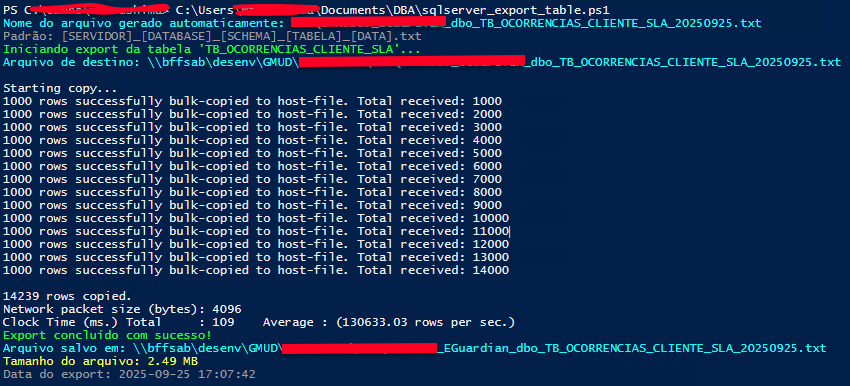
Key features
The export script was designed to be efficient, including:
- Automatic naming: Generates file names following the pattern
Servidor_Database_Schema_Tabela_Data.txt - Integrity check: Confirms the file was created and validates its size
- Delimiter flexibility: Supports any character as the separator (default: pipe
|) - Windows authentication: Uses integrated credentials for security
How it works
The script automatically:
- Creates the target directory if it does not exist
- Removes previous files with the same name
- Runs BCP with optimized parameters
- Provides a detailed report of the result
The import script
# Autor: Acaciolr-DBA - DBA BRABO
# Timestamp: 2025-09-25 15:49:06
# Descrição: Script PowerShell para realizar import com bcp.
#

# --- 1. CONFIGURAÇÕES INICIAIS ---

# Defina as variáveis de conexão e do import
$ServerName = "SQLDBABRABO"                     # Nome da instância do SQL Server
$DatabaseName = "dbabraboDB"                     # << ATUALIZE ESTE VALOR >> Nome do banco de dados
$SchemaName = "dbo"                                                             # Nome do schema (geralmente "dbo")
$TableName = "TB_OCORRENCIAS_CLIENTE_NEW"                                       # << ATUALIZE ESTE VALOR >> Nome da tabela de destino
$InputPath = "C:\Temp\Export"                                                   # Caminho para a pasta onde o arquivo está localizado
$FileName = "BFSQLPROD05_EGuardian_dbo_TB_OCORRENCIAS_CLIENTE_20250925.txt"     # Nome do arquivo de entrada (removido espaço no início)
$Delimiter = "|"                                                                # Delimitador de campo (vírgula, ponto e vírgula, etc.)
$ImportMode = "REPLACE"                                                          # APPEND (adicionar) ou REPLACE (substituir dados)

# Configurações adicionais
$FirstRow = 1                                                                   # Primeira linha a importar (2 se tem cabeçalho, 1 se não tem)
$BatchSize = 1000                                                               # Tamanho do lote para processamento
$ErrorFile = "C:\Temp\Import_Errors.txt"                                        # Arquivo para registrar erros

# --- 2. VERIFICAÇÃO E PREPARAÇÃO ---

$ImportFilePath = Join-Path -Path $InputPath -ChildPath $FileName

# Verifica se o arquivo de entrada existe
if (-not (Test-Path $ImportFilePath)) {
    Write-Host "ERRO: O arquivo de entrada '$ImportFilePath' não foi encontrado!" -ForegroundColor Red
    exit 1
}

# Verifica o tamanho do arquivo
$fileSize = (Get-Item $ImportFilePath).Length
Write-Host "Arquivo de entrada encontrado: $ImportFilePath" -ForegroundColor Green
Write-Host "Tamanho do arquivo: $([math]::Round($fileSize / 1MB, 2)) MB" -ForegroundColor Cyan

# Cria diretório para arquivo de erro se não existir
$ErrorDir = Split-Path $ErrorFile -Parent
if (-not (Test-Path $ErrorDir)) {
    New-Item -ItemType Directory -Path $ErrorDir -Force | Out-Null
}

# Remove arquivo de erro anterior
if (Test-Path $ErrorFile) {
    Remove-Item $ErrorFile -Force
}

# --- 3. PREPARAÇÃO DA TABELA (SE NECESSÁRIO) ---

if ($ImportMode -eq "REPLACE") {
    Write-Host "Modo REPLACE ativado. Truncando tabela de destino..." -ForegroundColor Yellow

    $truncateCommand = @"
sqlcmd -S $ServerName -d $DatabaseName -E -Q "TRUNCATE TABLE [$SchemaName].[$TableName]"
"@

    try {
        Invoke-Expression $truncateCommand
        Write-Host "Tabela truncada com sucesso." -ForegroundColor Green
    } catch {
        Write-Host "ERRO ao truncar tabela: $($_.Exception.Message)" -ForegroundColor Red
        exit 1
    }
}

# --- 4. VERIFICAÇÃO DA ESTRUTURA DA TABELA ---

Write-Host "Verificando estrutura da tabela de destino..." -ForegroundColor Cyan

$checkTableCommand = @"
sqlcmd -S $ServerName -d $DatabaseName -E -Q "SELECT COLUMN_NAME, DATA_TYPE, IS_NULLABLE FROM INFORMATION_SCHEMA.COLUMNS WHERE TABLE_SCHEMA = '$SchemaName' AND TABLE_NAME = '$TableName' ORDER BY ORDINAL_POSITION" -h-1
"@

try {
    $tableStructure = Invoke-Expression $checkTableCommand
    Write-Host "Estrutura da tabela verificada." -ForegroundColor Green
    # Opcional: exibir estrutura
    # Write-Host $tableStructure
} catch {
    Write-Host "AVISO: Não foi possível verificar a estrutura da tabela." -ForegroundColor Yellow
}

# --- BACKUP DA TABELA ORIGINAL COM DATA ---
Write-Host "`n--- CRIANDO BACKUP DA TABELA ORIGINAL ---" -ForegroundColor Yellow

# Extrai o nome original da tabela removendo "_BKP" do final (se existir)
if ($TableName -like "*_BKP") {
    $OriginalTableName = $TableName -replace "_BKP$", ""
} else {
    $OriginalTableName = $TableName
}

$BackupSuffix = "_BKP_$(Get-Date -Format 'yyyyMMdd_HHmmss')"  # Sufixo com data/hora
$BackupTableName = $OriginalTableName + $BackupSuffix

Write-Host "Tabela original: $OriginalTableName" -ForegroundColor Cyan
Write-Host "Tabela de backup: $BackupTableName" -ForegroundColor Cyan

# Comando SQL para criar a tabela de backup (apenas estrutura)
$backupCommand = @"
sqlcmd -S $ServerName -d $DatabaseName -E -Q "
SELECT *
INTO [$SchemaName].[$BackupTableName]
FROM [$SchemaName].[$OriginalTableName];
"
"@

try {
    Write-Host "Criando estrutura da tabela de backup..." -ForegroundColor Cyan
    Invoke-Expression $backupCommand
    Write-Host "Tabela de backup criada com sucesso: $BackupTableName" -ForegroundColor Green
} catch {
    Write-Host "ERRO ao criar backup da tabela: $($_.Exception.Message)" -ForegroundColor Red
    # Decide se quer continuar ou parar o script
    # exit 1  # Descomente se quiser parar o script em caso de erro
}

# --- VERIFICAÇÃO DO BACKUP ---
Write-Host "Verificando a tabela de backup criada..." -ForegroundColor Cyan

$verifyBackupCommand = @"
sqlcmd -S $ServerName -d $DatabaseName -E -Q "
SELECT
    TABLE_NAME,
    TABLE_TYPE,
    TABLE_SCHEMA
FROM INFORMATION_SCHEMA.TABLES
WHERE TABLE_NAME = '$BackupTableName'
AND TABLE_SCHEMA = '$SchemaName';
" -h-1
"@

try {
    $backupVerification = Invoke-Expression $verifyBackupCommand
    if ($backupVerification -match $BackupTableName) {
        Write-Host "✓ Backup verificado com sucesso: $BackupTableName" -ForegroundColor Green
    } else {
        Write-Host "✗ A tabela de backup não foi encontrada." -ForegroundColor Red
    }
} catch {
    Write-Host "Erro na verificação do backup: $($_.Exception.Message)" -ForegroundColor Yellow
}

# --- 5. EXECUÇÃO DO BCP IMPORT ---

# A sintaxe do comando bcp para import:
# bcp <database_name>.<schema_name>.<table_name> in <data_file> -S <server_name> -E -t <delimiter> -c -F <first_row> -b <batch_size> -e <error_file>

# Parâmetros do BCP para import:
# in: indica que os dados serão importados do arquivo para a tabela.
# -S: especifica o nome da instância do SQL Server.
# -E: usa a autenticação confiável (Windows Authentication). Para autenticação SQL, use -U <username> -P <password>.
# -t: especifica o delimitador de campo.
# -c: usa modo de caractere.
# -F: especifica a primeira linha a ser importada (útil para pular cabeçalhos).
# -b: especifica o tamanho do lote.
# -e: especifica o arquivo para registrar erros.

Write-Host "Iniciando import para a tabela '$TableName'..." -ForegroundColor Yellow
Write-Host "Primeira linha a importar: $FirstRow" -ForegroundColor Cyan
Write-Host "Tamanho do lote: $BatchSize" -ForegroundColor Cyan

$bcpCommand = "bcp [$DatabaseName].[$SchemaName].[$TableName] in `"$ImportFilePath`" -S $ServerName -T -t`"$Delimiter`" -c -F$FirstRow -b$BatchSize -e`"$ErrorFile`""

Write-Host "Comando BCP: $bcpCommand" -ForegroundColor Gray

# Executa o comando bcp e captura o resultado
try {
    $bcpResult = Invoke-Expression $bcpCommand 2>&1
    Write-Host $bcpResult -ForegroundColor White
} catch {
    Write-Host "ERRO durante a execução do BCP: $($_.Exception.Message)" -ForegroundColor Red
}

# --- 6. VERIFICAÇÃO DO RESULTADO ---

Write-Host "`n--- VERIFICAÇÃO DOS RESULTADOS ---" -ForegroundColor Yellow

# Verifica se houve erros
if (Test-Path $ErrorFile) {
    $errorContent = Get-Content $ErrorFile -ErrorAction SilentlyContinue
    if ($errorContent -and $errorContent.Length -gt 0) {
        Write-Host "ATENÇÃO: Erros foram encontrados durante o import!" -ForegroundColor Red
        Write-Host "Arquivo de erros: $ErrorFile" -ForegroundColor Red
        Write-Host "Primeiras linhas dos erros:" -ForegroundColor Red
        $errorContent | Select-Object -First 10 | ForEach-Object { Write-Host "  $_" -ForegroundColor Red }
    } else {
        Write-Host "Nenhum erro registrado." -ForegroundColor Green
        # Remove arquivo de erro vazio
        Remove-Item $ErrorFile -Force -ErrorAction SilentlyContinue
    }
}

# Conta registros na tabela após o import
Write-Host "Contando registros na tabela de destino..." -ForegroundColor Cyan

$countCommand = @"
sqlcmd -S $ServerName -d $DatabaseName -E -Q "SELECT COUNT(*) as Total_Registros FROM [$SchemaName].[$TableName]" -h-1
"@

try {
    $recordCount = Invoke-Expression $countCommand
    $recordCount = ($recordCount -replace '\s+', '').Trim()
    Write-Host "Total de registros na tabela: $recordCount" -ForegroundColor Green
} catch {
    Write-Host "Não foi possível contar os registros na tabela." -ForegroundColor Yellow
}

# Mostra algumas linhas de exemplo (opcional)
Write-Host "`nPrimeiros registros importados:" -ForegroundColor Cyan

$sampleCommand = @"
sqlcmd -S $ServerName -d $DatabaseName -E -Q "SELECT TOP 5 * FROM [$SchemaName].[$TableName]" -h-1
"@

try {
    $sampleData = Invoke-Expression $sampleCommand
    Write-Host $sampleData -ForegroundColor White
} catch {
    Write-Host "Não foi possível exibir dados de exemplo." -ForegroundColor Yellow
}

# --- 7. RELATÓRIO FINAL ---

Write-Host "`n=== RELATÓRIO FINAL DO IMPORT ===" -ForegroundColor Green
Write-Host "Servidor: $ServerName" -ForegroundColor Cyan
Write-Host "Banco: $DatabaseName" -ForegroundColor Cyan
Write-Host "Tabela: [$SchemaName].[$TableName]" -ForegroundColor Cyan
Write-Host "Arquivo importado: $ImportFilePath" -ForegroundColor Cyan
Write-Host "Tamanho do arquivo: $([math]::Round($fileSize / 1MB, 2)) MB" -ForegroundColor Cyan
Write-Host "Modo: $ImportMode" -ForegroundColor Cyan
Write-Host "Delimitador: '$Delimiter'" -ForegroundColor Cyan
Write-Host "Data/Hora: $(Get-Date -Format 'yyyy-MM-dd HH:mm:ss')" -ForegroundColor Cyan

if (Test-Path $ErrorFile) {
    Write-Host "Arquivo de erros: $ErrorFile" -ForegroundColor Red
} else {
    Write-Host "Import concluído sem erros registrados!" -ForegroundColor Green
}

Write-Host "=== FIM DO RELATÓRIO ===" -ForegroundColor Green

# --- 8. LIMPEZA (OPCIONAL) ---

# Descomente as linhas abaixo se quiser mover o arquivo processado para uma pasta de backup
# $BackupPath = "C:\Temp\Import\Processados"
# if (-not (Test-Path $BackupPath)) { New-Item -ItemType Directory -Path $BackupPath -Force | Out-Null }
# $BackupFile = Join-Path $BackupPath "$([System.IO.Path]::GetFileNameWithoutExtension($FileName))_$(Get-Date -Format 'yyyyMMdd_HHmmss').txt"
# Move-Item $ImportFilePath $BackupFile
# Write-Host "Arquivo movido para: $BackupFile" -ForegroundColor Yellow
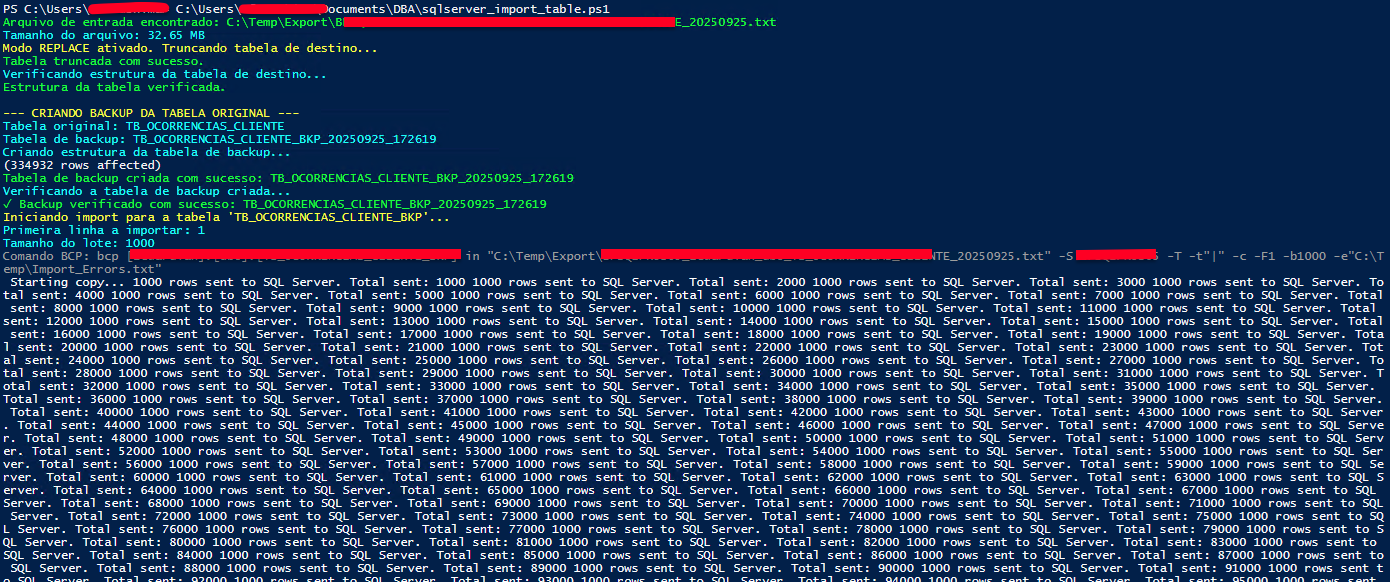
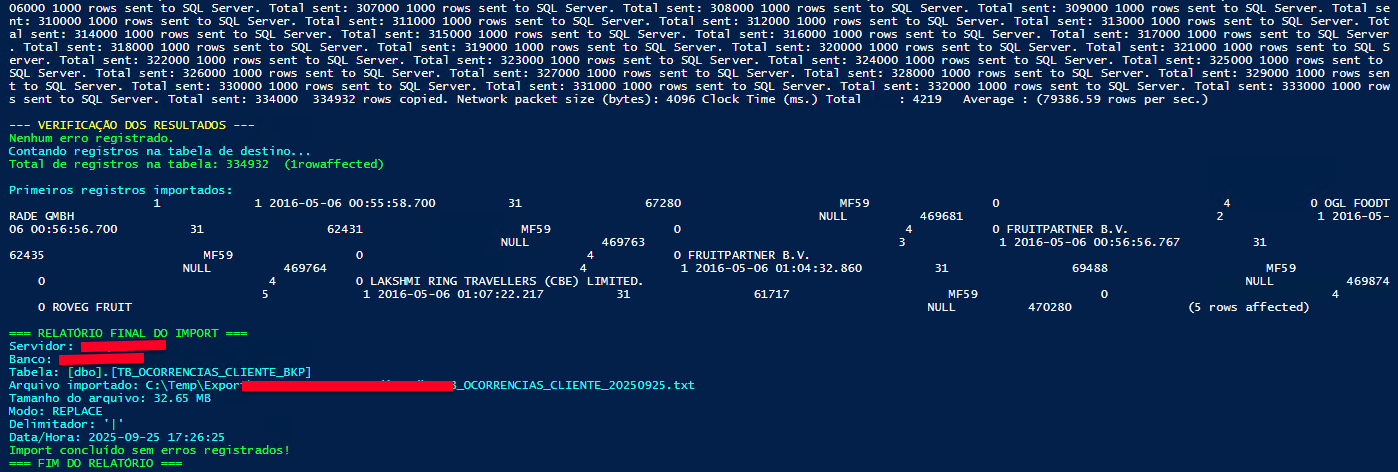
Import script highlights
The import version goes beyond a simple data load, incorporating safety mechanisms that are essential:
- Automatic backup system: Creates a copy of the original table before the import
- Two operating modes:
APPEND(appends data) orREPLACE(replaces the table) - Robust error handling: Logs and reports problems in detail
- Multi-level validation: Checks the structure, counts records, and shows samples
This is the heart of the process’s safety: before any operation, a dated backup of the original table is created, allowing instant recovery if anything goes wrong.
Well folks, there you go, a tip I found cool and important.